9 Claude Skills that write your monthly report for you.
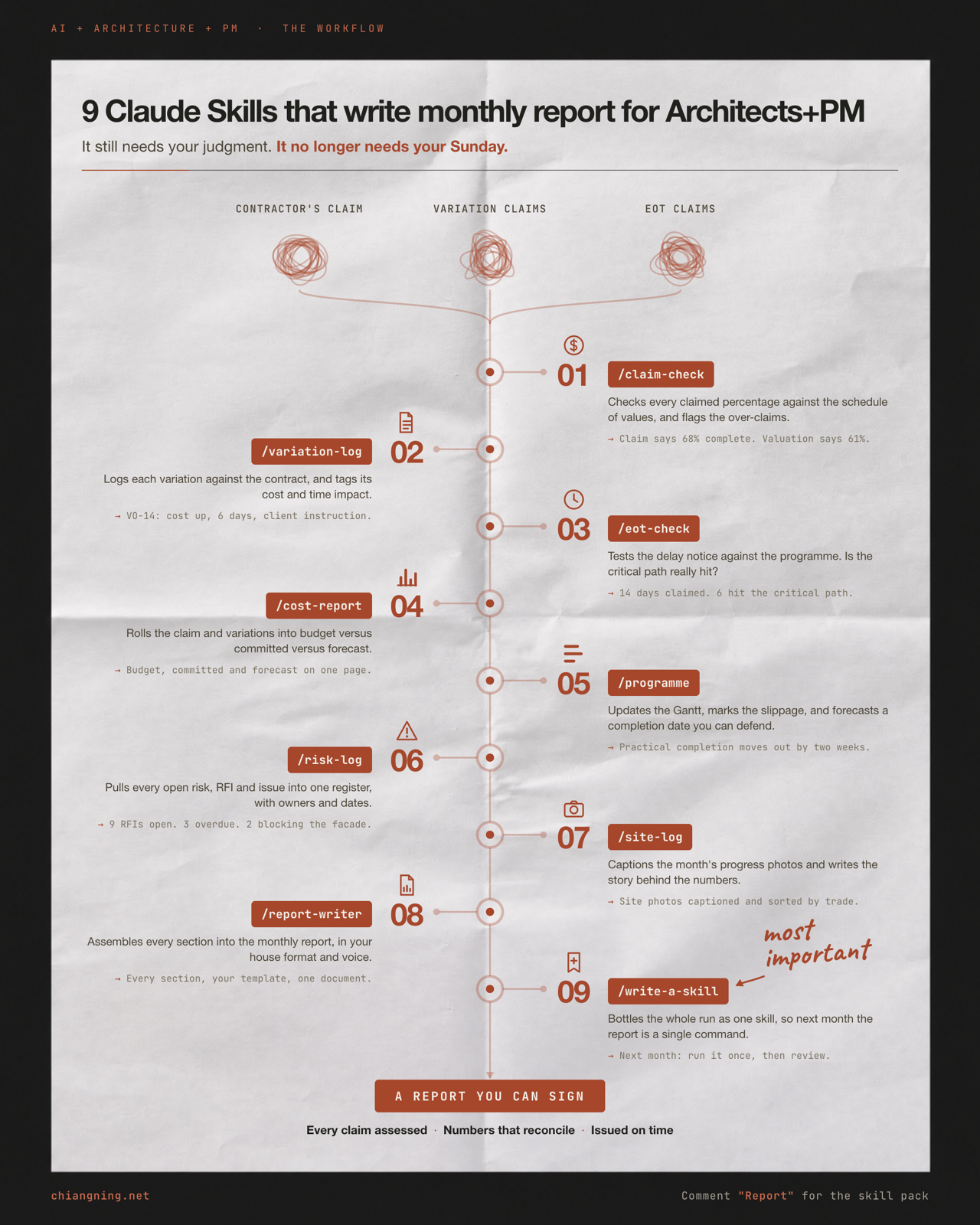
A progress claim, a pile of variations and an EOT claim go in. A report you can sign comes out. Nine small skills, each doing one job, then passing the work to the next. Every prompt is here, every skill links to a real open-source equivalent on GitHub, and the whole set is a free download.
The report was never the hard part.
The hard part is the last week of the month, when three things land at once. The contractor's progress claim, optimistic as always. A stack of variations, half of them instructed verbally. And an EOT claim with a programme attached that you have not had time to open.
You have days to assess all three, reconcile them, and turn them into a document a client will read and act on. It is not intellectually difficult work. It is just a lot of it, all at once, every month, forever.
So I stopped treating it as one big job and broke it into nine small ones. Each is a skill that does a single thing well, then hands its output to the next.
This is the whole chain, in plain English. For each step: what it does, the exact prompt to paste, the real open-source tool on GitHub if one exists, and the one mistake that quietly wastes it.
The Monthly Report Skill Pack
All 9 as ready-to-install Claude Skills (a SKILL.md each), plus a README with the running order. Every skill lists its open-source GitHub equivalent at the bottom. Australian English. No email wall.
1. Save this. Run it on next month's claim, not on a made-up one.
2. Send it to one PM who still assembles the monthly report by hand at 9pm.
Every step below links to a real, publicly maintained skill you can fork. Most come from the DDC Skills for AI Agents in Construction repo, which is worth cloning whole. The official Claude Skills format lives at github.com/anthropics/skills. If a real tool exists, use the real tool. My skills are for the judgement layer around it.
- Claim Check — what was really built this month
- Variation Log — nothing quietly absorbed
- EOT Check — is the critical path really hit
- Cost Report — budget, committed, forecast
- Programme — a date you can defend
- Risk Log — every open item, with an owner
- Site Log — the story behind the numbers
- Report Writer — your format, your voice
- Write a Skill — bottle it for next month
- The part AI can't do
Step 01 · /claim-checkClaim Check
Like the contract administrator who reads every line of the claim before you do, and marks the three that will not survive a question.
It compares the progress claim line by line against the schedule of values, and gives you an assessed valuation with a reason attached to every percentage you disagree with.
Use it for: the first day of the assessment window, before any figure is carried anywhere else.
Act as a contract administrator assessing a monthly progress claim.

Attached: this month's progress claim, the schedule of values, last
month's assessed valuation, and the site records for the period.
[ATTACH the actual files, not a description of them]

Do this:
1. Compare line by line. For each: value, previously assessed %,
   claimed %, your assessed %.
2. Where claimed and assessed differ, give the reason in one sentence,
   tied to a specific record, photo or docket.
3. Treat materials on site and off site separately, against the
   contract's conditions for payment.
4. Apply retention, previously certified and set-offs exactly as the
   contract sets them out.
5. Where you have no evidence either way, mark the line UNRESOLVED and
   ask for the record. Do not assess it.

Australian English. DD/MM/YYYY.
The one mistake: assessing on impression rather than record. If you cannot point to the evidence for a percentage, mark it unresolved. An assessment you cannot evidence will not survive an adjudication.
Step 02 · /variation-logVariation Log
Like the register you wish someone had kept from day one, instead of the email folder everyone searches at handover.
It turns instructions, quotes and email threads into one variation register, each line tagged with origin, cost impact, time impact and approval status.
Use it for: monthly, and any time you cannot state the current adjusted contract sum in one line.
Build a variation register from these instructions, quotes and emails.

Attached: the current register, this month's instructions and quotes,
and the contract clauses for valuing variations.
[ATTACH the files]

Do this:
1. One row per variation: reference, one-line description, originator
   (client instruction / consultant / site condition / contractor
   proposal), date instructed, value claimed, value assessed, time
   impact in days, status.
2. Status vocabulary is fixed: instructed, quoted, assessed, approved,
   rejected, in dispute. Do not invent new ones.
3. Note claimed time impacts but do not assess them here.
4. Total approved variations SEPARATELY from claimed-but-unapproved.
   Show both against the original contract sum.
5. Flag anything being built on site without a written instruction.
The one mistake: merging claimed and approved into one total. The client reads a single number and budgets against it. Keep approved and exposure on separate lines, always.
Step 03 · /eot-checkEOT Check
Like the programmer who opens the claim, looks at the notice date first, and tells you the argument is already over.
It tests the delay claim against the contract and the programme: was the notice compliant, what actually caused it, and how much of it lands on the critical path.
Use it for: the moment a delay notice arrives, not the week the report is due.
Assess this extension of time claim.

Attached: the EOT claim, the baseline programme, the current
programme, the contract's delay and notice clauses, and the site
records for the delay period.
[ATTACH the files]

Do this:
1. Check the NOTICE FIRST. Was it served in time, in the required
   form, to the right person? Answer that plainly before assessing
   anything else.
2. Identify the cause and classify it under the contract: relevant
   event with time and money / time only / contractor risk.
3. Compare baseline and current programme. Name the affected
   activities and test whether they sit on the critical path.
4. Report calendar days claimed AND critical days demonstrated. They
   are not the same number.
5. Address concurrency explicitly if a contractor-risk delay runs at
   the same time.
6. End with: what further evidence would change this assessment.
The one mistake: assessing the merits before checking the notice, and treating calendar days as critical days. Most EOT arguments are decided on notice and criticality, not on sympathy for the cause.
Step 04 · /cost-reportCost Report
Like the QS who can tell you in one page what moved this month, and why, without you asking twice.
It rolls the assessed claim and the variation register into a budget versus committed versus forecast position, with every movement since last month explained.
Use it for: after steps 01 and 02, and before any client conversation about money.
Produce this month's cost report.

Attached: the approved budget, the assessed valuation, the variation
register, all consultant and supply commitments, and last month's
cost report.
[ATTACH the files]

Do this:
1. By element: budget / committed / expended to date / forecast at
   completion / variance.
2. Show the movement since last month for every element that changed,
   with the reason in one sentence each.
3. Keep contingency as its own visible line: opening, drawn this
   month, remaining.
4. Separate the approved position from the exposure position.
5. Forecast final cost as a RANGE where inputs are uncertain.

Hard rule: use only figures present in the attached documents. If a
figure is missing, write "not provided". Do not estimate it. Do not
infer it. Do not round it into existence.
The one mistake: letting the model fill a gap with a plausible number. Every figure must trace to a source document. "Not provided" is a valid output. An invented total is a liability with your name on it.
Step 05 · /programmeProgramme
Like the planner who updates the Gantt from what was actually built, not from what everyone hoped was built.
It updates the programme from this month's assessed progress, marks the slippage against baseline and against last month, and forecasts a completion date you can defend.
Use it for: monthly, and any month the forecast date moves. The client should hear it from you first.
Update the construction programme for this month.

Attached: the baseline programme, last month's update, this month's
progress data, and any EOT awards.
[ATTACH the files]

Do this:
1. Update percentage complete from the ASSESSED valuation, not from
   the contractor's claimed percentages.
2. Recalculate the critical path and name the activities now driving
   completion.
3. Report slippage against BOTH the baseline and last month's update,
   so the trend is visible, not just the position.
4. State: contractual completion date, current forecast date, gap in
   working days.
5. Name the three activities most likely to move the date next month,
   each with the trigger to watch for.
6. Note float consumed and where it sits.
The one mistake: updating progress from the contractor's claimed percentages. If step 01 found the claim optimistic, a programme built on it forecasts a date nobody believes, including you.
Step 06 · /risk-logRisk Log
Like the associate who notices the same three items have been "in progress" for four months.
It pulls every open risk, RFI, issue and pending client decision into one register, ranks them, and puts a named owner and a date on every line.
Use it for: monthly, and before any client meeting where a decision is needed.
Consolidate every open item into one register.

Attached: the risk register, the RFI log, the issues log, this
period's meeting minutes, and the programme.
[ATTACH the files]

Do this:
1. One register: reference, description, category, owner, raised date,
   required-by date, status.
2. The owner must be a NAMED PERSON or organisation. Never "team",
   never "TBC". If no owner exists, say so explicitly.
3. Score likelihood and impact, give a combined rating, and state the
   scale you used.
4. Link every risk with a time impact to the affected programme
   activity.
5. Sort overdue items first, then items due inside the next month.
6. Separate items AWAITING A CLIENT DECISION into their own list, each
   with the consequence of a late decision in one line.
7. Close out anything resolved this month and say how.
The one mistake: owners recorded as a company or a team. An unowned risk is not managed, and the register becomes a page you copy forward every month without ever acting on it.
Step 07 · /site-logSite Log
Like the site engineer who can tell you which photograph settles the argument, and on which date it was taken.
It captions and orders the month's progress photos, indexes which ones evidence a disputed line, and writes the narrative that explains what the numbers actually mean on site.
Use it for: after the cost and programme sections exist, so the words can be written against real figures.
Caption this month's site record and write the progress narrative.

Attached: the month's photographs, the site diaries and inspection
notes, the assessed valuation, and the programme update.
[ATTACH the files]

Do this:
1. Caption each photograph: date, location or grid reference, trade,
   and what it evidences in one line.
2. Group by trade or zone to match the report structure, ordered
   chronologically inside each group.
3. Build an evidence index: which photographs support which disputed
   claim line or delay.
4. Write the progress narrative, 300-500 words, PAST TENSE, describing
   what was achieved and not what was intended. Tie each paragraph to
   a figure from the cost report or programme.
5. Log weather, access restrictions and anything that affected
   productivity, with dates.
6. Flag any period with no photographic record.
The one mistake: writing the narrative from the programme instead of from the photographs. If the words describe planned work and the pictures show something else, the client notices, and the whole report loses credibility.
Step 08 · /report-writerReport Writer
Like the associate who knows your template by heart and would never move the cost section to page six.
It assembles every section into the finished report, in a fixed order, in your house voice, with the executive summary written last.
Use it for: the final step, once everything above exists.
Assemble the monthly report from these sections.

Attached: the outputs of the previous skills, last month's issued
report, and the practice template.
[ATTACH the files]

Fixed section order, identical every month:
  1 Executive summary
  2 Progress this month
  3 Programme and completion date
  4 Cost position
  5 Variations and claims
  6 Risks, issues and decisions required
  7 Photographs
  8 Actions and next period

Do this:
1. Write the executive summary LAST, under 200 words, leading with
   whatever moved: the date, the forecast cost, or a decision the
   client must make.
2. Put any slippage in the FIRST paragraph of its section. Never bury
   bad news at the end.
3. Match the voice of last month's report. Same tense, same formality,
   same word for the same thing.
4. Use only figures already assessed above. Recalculate nothing.
5. DD/MM/YYYY, Australian English, under three pages plus appendices.
6. End with a dated actions table: action, owner, due date.
The one mistake: letting the section order drift month to month. Clients read the same report repeatedly and navigate by position. Move things around and they stop finding them, then they stop reading it.
Step 09 · /write-a-skillWrite a Skill
The most important one. Like the moment you realise you never have to explain this job again.
Everything above was a conversation. This step turns that conversation into a file. Next month, the whole run is one command, and the month after that it is a command a graduate can run.
Use it for: right at the end of the first full cycle, while the detail is still fresh.
Write what we just did as a reusable Claude Skill.

Do this:
1. Write a description that says clearly WHEN to use it. This is what
   the model matches on, so a vague description means the skill never
   triggers.
2. Set out the instructions as numbered steps, in the order a person
   would actually do them.
3. Specify the inputs it must ask for, and make it refuse to proceed
   without them.
4. Specify the exact output format, including section order.
5. Add the one mistake to avoid, from what actually went wrong today.
   Do not invent one.
6. Keep it to ONE job. If the description needs the word "and" twice,
   split it into two skills.

Output a complete SKILL.md with YAML frontmatter (name, description)
followed by markdown.
The one mistake: a vague description. "Helps with reports" will never trigger at the right moment. "Assess a contractor's monthly progress claim against the schedule of values" will.
Notice the mistake was almost the same every time. Trace every figure to a document. Put a name against every item. Never let a plausible number pass as a real one.
The part AI can't do
Nine skills clear the assembly. That is the slow, repetitive, every-month half, and it is the half that used to eat the last week.
They will not stand on site and tell you the blockwork is not the standard you specified. They will not read the room when the contractor says the delay was unavoidable. They will not know which battles are worth having with this client on this job.
And they will never decide what number you are willing to certify.
That call stays yours. So does the signature at the bottom of the report. The workflow just gets you to the judgement with a week left instead of a night.
Grab the free skill pack, or comment "Report" on the LinkedIn post and I'll send you the link.
Related: 9 Claude Skills that write your fee proposal · The construction PM skill pack · What is a Skill