29 Agent Skills for architects and project managers.
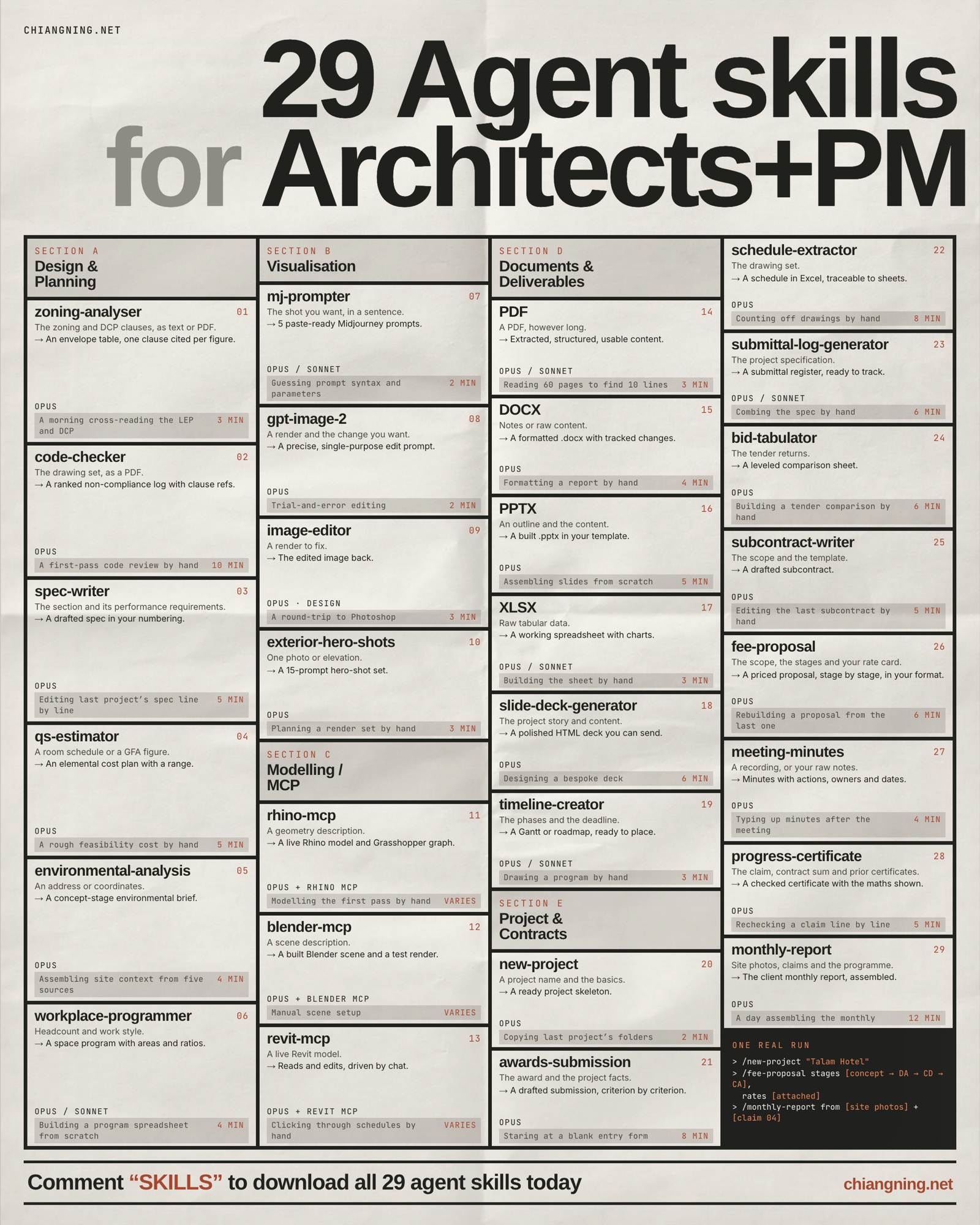
A Claude Skill is a small folder with a SKILL.md file inside it. It teaches Claude how to do one job the way you would do it, and Claude loads it automatically the moment your request matches. Write the spec once, and every project after that gets the same output without the same effort.
Below are 29 of them that map onto the real jobs that fill an architect's and a project manager's week: visualisation, modelling, planning and code, cost, fees and programme, documents, and construction admin. Nine are my own builds, written for live jobs in my own practice. Four are Anthropic's own document skills. The rest are open-source projects from the wider community. I curated the set. I did not write all of them, and I say who did.
This is the 25 I published in July, plus the four I kept needing after it went out, all of them at the contract-admin end of the week: fee-proposal, meeting-minutes, progress-certificate and monthly-report. Nobody writes about contract admin. It is not design. It is where the week actually goes.
Rather than re-host other people's work behind an email wall, every skill links to its real home below. You get the maintained, latest version, and the people who built it get the credit and the star. Expand any skill for how to install it and a concrete example.
Three ways a skill reaches Claude.
A folder with a SKILL.md. Drop it in ~/.claude/skills/ for Claude Code, or add it under Settings → Capabilities → Skills in Claude.ai. This covers most of the list.
Run /plugin marketplace add <owner/repo>, then /plugin install. Used by the community plugins here.
A plugin inside the app plus a server your Claude client connects to. Used by the Rhino and Revit tools. The repo README has the exact configuration.
Visualisation & rendering
The image half of the practice. These turn a rough idea, a photo, or an existing render into a controlled set of prompts and edits, so you spend your time directing rather than fighting the tool.
Writes and troubleshoots Midjourney prompts for renders, plans, sections, and competition boards.
It knows the parameters, the version differences, and the image-reference tricks, so you describe the drawing you want and it hands back a prompt that actually holds together, not a wall of keywords.
Install & example
A Skill is just a folder with a SKILL.md file inside it. To use it in Claude Code, drop the folder into ~/.claude/skills/ (personal) or .claude/skills/ in your project. In Claude.ai, add it under Settings → Capabilities → Skills.
Claude loads it automatically when your request matches what the skill is for.
Ask for "a warm timber pavilion, dusk, section perspective" and get a clean prompt with the right aspect ratio, style reference, and stylize value already set.
Turns a rough ask into a tight prompt for editing an existing render, photo, or sketch.
Editing is the main event here, not generation. Most architectural work starts from an image that already exists, and this skill is built to change that image without melting the geometry.
Install & example
This is a Model Context Protocol server, so it has two halves: a plugin that runs inside the app (Rhino or Revit), and a server your Claude client talks to.
Install the app-side plugin from the repo, then register the MCP server in your client's mcp config (Claude Desktop or Claude Code). The repo README has the exact steps and the supported app versions.
Paste an Enscape render and say "change the brick to zinc, keep everything else" and it writes the edit prompt for you.
Swaps materials, relights, changes the season, removes cars and crowds.
A catalogue of proven edits for Nano Banana 2 and GPT-Image-2, each captured as a recipe so the output is consistent every time rather than a fresh gamble.
Install & example
This is a Model Context Protocol server, so it has two halves: a plugin that runs inside the app (Rhino or Revit), and a server your Claude client talks to.
Install the app-side plugin from the repo, then register the MCP server in your client's mcp config (Claude Desktop or Claude Code). The repo README has the exact steps and the supported app versions.
Turn a grey overcast site photo into golden hour, or strip the parked cars out of a street elevation before a client meeting.
One exterior photo becomes 15 ready prompts, across 5 camera angles and 3 engines.
It reads the building into a locked description first, then generates a full coverage set from that anchor, so the fifteen shots read as the same building rather than fifteen cousins.
Install & example
A Skill is just a folder with a SKILL.md file inside it. To use it in Claude Code, drop the folder into ~/.claude/skills/ (personal) or .claude/skills/ in your project. In Claude.ai, add it under Settings → Capabilities → Skills.
Claude loads it automatically when your request matches what the skill is for.
Upload a single street photo of a house and get a hero shot, a corner approach, a worm's-eye, a detail, and a dusk view, all prompt-ready.
Modelling & geometry
These reach into your actual modelling software. Instead of clicking, you describe, and Claude drives Rhino, Blender, or Revit through a live connection.
Models geometry and builds Grasshopper definitions, by chat.
A Model Context Protocol server that connects Rhino and Grasshopper to Claude. It can read your document, place and wire components, and build geometry from a plain-English description.
Install & example
This is a Model Context Protocol server, so it has two halves: a plugin that runs inside the app (Rhino or Revit), and a server your Claude client talks to.
Install the app-side plugin from the repo, then register the MCP server in your client's mcp config (Claude Desktop or Claude Code). The repo README has the exact steps and the supported app versions.
Say "build me a louvre screen, 40mm blades at 15 degrees across this facade" and watch it wire the Grasshopper definition.
Drives an open Blender session from plain language: checks, fixes, animates, renders.
An operating doctrine for controlling Blender over MCP, written for a non-expert on a modest laptop. It works one task at a time and verifies with screenshots, so it is safe to point at a real file.
Install & example
This is a Model Context Protocol server, so it has two halves: a plugin that runs inside the app (Rhino or Revit), and a server your Claude client talks to.
Install the app-side plugin from the repo, then register the MCP server in your client's mcp config (Claude Desktop or Claude Code). The repo README has the exact steps and the supported app versions.
Ask it to "clean up this scene, tell me what's eating my memory, then animate the camera around the model."
Reads a Revit project, creates and edits elements, by chat.
The MCP server that connects Autodesk Revit to Claude. It can pull data from the model and drive it to create, modify, and delete elements, so routine model chores become a conversation.
Install & example
This is a Model Context Protocol server, so it has two halves: a plugin that runs inside the app (Rhino or Revit), and a server your Claude client talks to.
Install the app-side plugin from the repo, then register the MCP server in your client's mcp config (Claude Desktop or Claude Code). The repo README has the exact steps and the supported app versions.
Ask "how many Type A doors are in the model, and can you tag every one on this sheet."
Site & compliance
The reading-the-rules half of early design. These pull the planning, environmental, and code constraints into a structured answer, with a clause cited for every claim.
Reads a site's plot ratio, height, and setbacks, a clause cited for every figure.
Jurisdiction-agnostic logic with pluggable local profiles. It produces a structured planning summary and marks anything it cannot verify, rather than guessing a number.
Install & example
This ships as a Claude Code plugin. In Claude Code, run /plugin marketplace add <owner/repo> using the repo below, then /plugin install the piece you want.
The repo README lists the exact plugin and command names.
Give it a site address and the zoning code and get back max GFA, height limit, and setbacks, each next to the clause it came from.
Reads a site's climate, wind, flood and seismic risk, and soil.
Part of an architecture-specific plugin. It assembles the environmental context for a site into one brief you can drop into a feasibility study or a design rationale.
Install & example
This ships as a Claude Code plugin. In Claude Code, run /plugin marketplace add <owner/repo> using the repo below, then /plugin install the piece you want.
The repo README lists the exact plugin and command names.
Point it at a parcel and get sun angles, prevailing wind, flood zone, and rainfall in a single pass.
Runs a pre-submission non-compliance log against any jurisdiction's building code.
It reads marked-up plans and sections, compares them against a named code, and produces a severity-ranked list of probable issues with cited clauses. A pre-check, not a certificate.
Install & example
This ships as a Claude Code plugin. In Claude Code, run /plugin marketplace add <owner/repo> using the repo below, then /plugin install the piece you want.
The repo README lists the exact plugin and command names.
Run travel distances and egress on a floor plan and get a ranked list of where it likely fails, before the authority sees it.
Cost, fees & programme
The numbers, the fee and the timeline. These turn a schedule, a headcount or a scope into something a client can react to on day one, instead of week six.
Turns a room schedule into an indicative cost estimate, plus or minus 15 percent.
It maps areas to unit-rate bands, applies finish multipliers, and stacks contingency and escalation. An architect's working number to brief or sanity-check a QS, not a tendered BOQ.
Install & example
A Skill is just a folder with a SKILL.md file inside it. To use it in Claude Code, drop the folder into ~/.claude/skills/ (personal) or .claude/skills/ in your project. In Claude.ai, add it under Settings → Capabilities → Skills.
Claude loads it automatically when your request matches what the skill is for.
Feed it a Revit room-schedule CSV and get a one-page cost summary plus a detailed workbook in about twenty minutes.
Turns a headcount and work style into a space program.
Part of the architecture plugin. It builds a defensible space program from how a team actually works, so the brief starts from logic rather than a guessed schedule of areas.
Install & example
This ships as a Claude Code plugin. In Claude Code, run /plugin marketplace add <owner/repo> using the repo below, then /plugin install the piece you want.
The repo README lists the exact plugin and command names.
Give it "120 staff, hybrid, 3 days in" and get desks, meeting rooms, and support spaces sized and totalled.
Turns a scope and a rate card into a priced fee proposal, stage by stage.
It splits the fee across the stages, applies your rate card, and writes the inclusions and exclusions in your own words. The fee itself stays a commercial decision. The assembly is the part it takes off you.
Install & example
This one is mine, written for live jobs in my own practice. Download the Playbook skill pack, take the folder you want out of the zip, and drop it into ~/.claude/skills/ for Claude Code, or add it under Settings → Capabilities → Skills in Claude.ai.
No email wall, and the full prompt for each one is written out in the Playbook article.
Give it "concept through to contract administration, our rate card, four stages" and get a priced proposal with the percentage split per stage and the exclusions written out.
Builds HTML timelines, roadmaps, and Gantt charts, milestones and phases included.
From the visual-documentation plugin. It turns a task list into a clean, presentable programme you can put in front of a client without opening scheduling software.
Install & example
This ships as a Claude Code plugin. In Claude Code, run /plugin marketplace add <owner/repo> using the repo below, then /plugin install the piece you want.
The repo README lists the exact plugin and command names.
Paste your stages and durations and get a phased Gantt with milestones, ready for the deck.
Documents & delivery
The writing that used to eat the evening before it was due. Specs, submissions, decks, and the reading and formatting underneath all of it.
Drafts a MasterFormat spec section in your studio's house style.
The studio's specification template is its accumulated technical IP. This applies that IP consistently across every project, in the right division and section, in the right voice.
Install & example
This ships as a Claude Code plugin. In Claude Code, run /plugin marketplace add <owner/repo> using the repo below, then /plugin install the piece you want.
The repo README lists the exact plugin and command names.
Ask for "section 08-44-13, curtain wall, for this project" and get a populated draft in the house format.
Writes in the voice the jury for that specific award actually rewards.
It studies recent winners' structure and vocabulary for a named award, then drafts your submission to that genre, using verified data only.
Install & example
This ships as a Claude Code plugin. In Claude Code, run /plugin marketplace add <owner/repo> using the repo below, then /plugin install the piece you want.
The repo README lists the exact plugin and command names.
Ask it to "draft a RIBA submission for this project" and it matches the quiet, precise register RIBA juries reward.
Builds the whole folder tree, templates, and project memory file, in one pass.
The first hour of every project is the same ritual. This collapses it into two minutes: standard sub-folders, template documents, naming conventions, and a project memory file, identical every time.
Install & example
A Skill is just a folder with a SKILL.md file inside it. To use it in Claude Code, drop the folder into ~/.claude/skills/ (personal) or .claude/skills/ in your project. In Claude.ai, add it under Settings → Capabilities → Skills.
Claude loads it automatically when your request matches what the skill is for.
Paste a brief and get a working folder structure, a charter, a risk register, and a decision log, ready to share.
Extracts text, tables, and metadata, merges and annotates PDFs.
Anthropic's own PDF skill. The quiet workhorse under drawing sets and submissions, reading and reshaping the documents you already have.
Install & example
This is one of Anthropic's own document skills. On paid Claude.ai plans it is already on by default, so there is nothing to install. Just upload the file and ask.
To run it inside Claude Code, clone anthropics/skills and copy the skill folder into ~/.claude/skills/.
Pull the schedule of areas out of a consultant's PDF, or merge a submission set into one file.
Writes and edits Word documents, with tracked changes.
Anthropic's Word skill. Produces and edits real .docx files, formatting and all, so a report leaves Claude ready to send, not ready to reformat.
Install & example
This is one of Anthropic's own document skills. On paid Claude.ai plans it is already on by default, so there is nothing to install. Just upload the file and ask.
To run it inside Claude Code, clone anthropics/skills and copy the skill folder into ~/.claude/skills/.
Turn a set of meeting notes into a formatted report in the studio template, with tracked changes for review.
Builds and edits the slide deck.
Anthropic's PowerPoint skill. Creates and reworks decks with layouts, charts, and speaker notes intact.
Install & example
This is one of Anthropic's own document skills. On paid Claude.ai plans it is already on by default, so there is nothing to install. Just upload the file and ask.
To run it inside Claude Code, clone anthropics/skills and copy the skill folder into ~/.claude/skills/.
Turn a project summary into a client pitch deck, then restyle every slide to the studio palette.
Handles spreadsheet formulas, charts, and data transformations.
Anthropic's Excel skill. Reads, builds, and fixes real spreadsheets, so cost plans and schedules come back as working files.
Install & example
This is one of Anthropic's own document skills. On paid Claude.ai plans it is already on by default, so there is nothing to install. Just upload the file and ask.
To run it inside Claude Code, clone anthropics/skills and copy the skill folder into ~/.claude/skills/.
Clean a messy area schedule, add the totals column, and chart the cost split by floor.
Builds a client-facing HTML deck across 22 layout types.
From the architecture plugin. An editorial, on-brand deck built as HTML, a different register from a standard PowerPoint export.
Install & example
This ships as a Claude Code plugin. In Claude Code, run /plugin marketplace add <owner/repo> using the repo below, then /plugin install the piece you want.
The repo README lists the exact plugin and command names.
Turn a project narrative into a scrolling HTML presentation with cover, section, and image-led slides.
Construction admin
The delivery-phase paperwork nobody enjoys assembling, from the tender to the monthly report. These give Claude the working knowledge of a project engineer, straight from your drawings, specs and site photos.
Pulls door, finish, window, and panel schedules straight out to Excel.
Part of a construction-focused toolkit. It reads the schedules embedded in a drawing set and tabulates them, so you are not retyping a door schedule by hand.
Install & example
This ships as a Claude Code plugin. In Claude Code, run /plugin marketplace add <owner/repo> using the repo below, then /plugin install the piece you want.
The repo README lists the exact plugin and command names.
Point it at the drawing PDF and get the door schedule as a clean spreadsheet.
Parses specs and builds the submittal register.
It reads specification sections and generates the submittal log, one of the least loved and most necessary documents in delivery.
Install & example
This ships as a Claude Code plugin. In Claude Code, run /plugin marketplace add <owner/repo> using the repo below, then /plugin install the piece you want.
The repo README lists the exact plugin and command names.
Feed it the spec and get a submittal register with sections, items, and types laid out.
Consolidates subcontractor bids into one comparison sheet.
It takes multiple subcontractor bids and lines them up in a single comparison, so scope gaps and outliers are obvious at a glance.
Install & example
This ships as a Claude Code plugin. In Claude Code, run /plugin marketplace add <owner/repo> using the repo below, then /plugin install the piece you want.
The repo README lists the exact plugin and command names.
Drop in three trade bids and get a side-by-side sheet with the numbers aligned by scope.
Drafts scope-specific subcontracts from your templates.
It generates a subcontract for a given scope from your template documents, so the first draft is on the page instead of on the to-do list.
Install & example
This ships as a Claude Code plugin. In Claude Code, run /plugin marketplace add <owner/repo> using the repo below, then /plugin install the piece you want.
The repo README lists the exact plugin and command names.
Ask for "the concrete subcontract for this project" and get a scoped draft from your template.
Turns a recording or your raw notes into minutes with actions, owners and dates.
It separates the discussion from the decisions, then puts a name and a date on every action. Minutes are a contractual record, so it marks anything it could not make out rather than smoothing over it.
Install & example
This one is mine, written for live jobs in my own practice. Download the Playbook skill pack, take the folder you want out of the zip, and drop it into ~/.claude/skills/ for Claude Code, or add it under Settings → Capabilities → Skills in Claude.ai.
No email wall, and the full prompt for each one is written out in the Playbook article.
Drop in a site meeting recording and get attendees, decisions, actions with an owner and a due date, and the items carried forward.
Assesses a progress claim against the contract sum and shows the arithmetic.
It works the claim against the contract sum, retention and the previous certificates, and shows every step so you can audit it rather than trust it. It assesses a position. A named person still certifies.
Install & example
This one is mine, written for live jobs in my own practice. Download the Playbook skill pack, take the folder you want out of the zip, and drop it into ~/.claude/skills/ for Claude Code, or add it under Settings → Capabilities → Skills in Claude.ai.
No email wall, and the full prompt for each one is written out in the Playbook article.
Feed it claim 04, the contract sum and the last three certificates, and get a checked position with every unsupported line marked unresolved instead of assumed.
Assembles the client monthly report from site photos, claims and the programme.
It writes the narrative from the photographs rather than the plan, puts the slippage in the opening paragraph, and writes the executive summary last. Anything it cannot evidence reads as not provided.
Install & example
This one is mine, written for live jobs in my own practice. Download the Playbook skill pack, take the folder you want out of the zip, and drop it into ~/.claude/skills/ for Claude Code, or add it under Settings → Capabilities → Skills in Claude.ai.
No email wall, and the full prompt for each one is written out in the Playbook article.
Hand it the month's site photos, the current claim and the programme, and get the report in your section order, ready to check and sign.
Where these fall short.
None of these replace judgement. The zoning skill tells you to verify with the authority. The cost skill is not a QS's number. The code skill is a pre-check, not a certificate. The claim skill assesses a position for a named person to sign, and it never certifies. Every one of them says so, in writing, every time it runs, and that is the point.
They clear the ground so you can spend your time on the part that is actually yours: the site, the scale, the buildability, the read on what the client did not say. The tool changes. The thinking does not.
Do not install all 29 this afternoon. Pick the one document you write again and again in the same shape, install that skill, and use it on your next real job. Then add the next. The architects and PMs pulling ahead with this are not doing anything clever. They are just not writing the same document twice.
Credits: document skills are by Anthropic (anthropics/skills). Community projects: skills-for-architects by AlpacaLabs, claude-code-construction by dleerdefi, DDC_Skills_for_AI_Agents_in_Construction by DataDrivenConstruction, rhinomcp by jingcheng-chen, blender-mcp by ahujasid, the Revit MCP servers project, claude-skills-marketplace by mhattingpete, claude-skills by inbharatai and by jezweb, openai-gpt-image-mcp by SureScaleAI, mcp-image by shinpr, and Claude-Code-Scaffolding-Skill by hmohamed01. The architecture-render-prompt skill is my own, as are fee-proposal, meeting-minutes, progress-certificate, monthly-report and the rest of the Playbook set. Each is linked above under its own licence.