9 Claude Skills that write your fee proposal for you.
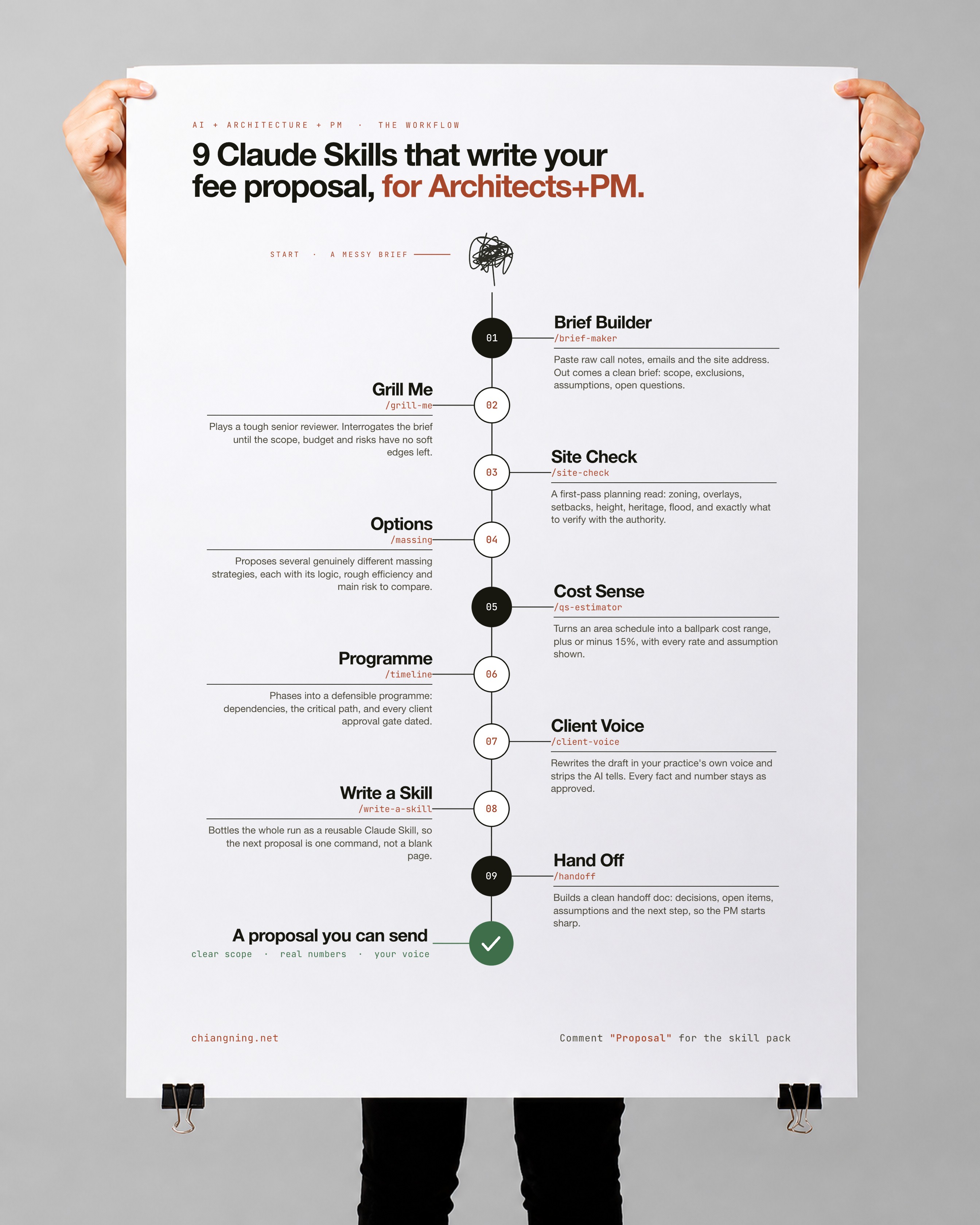
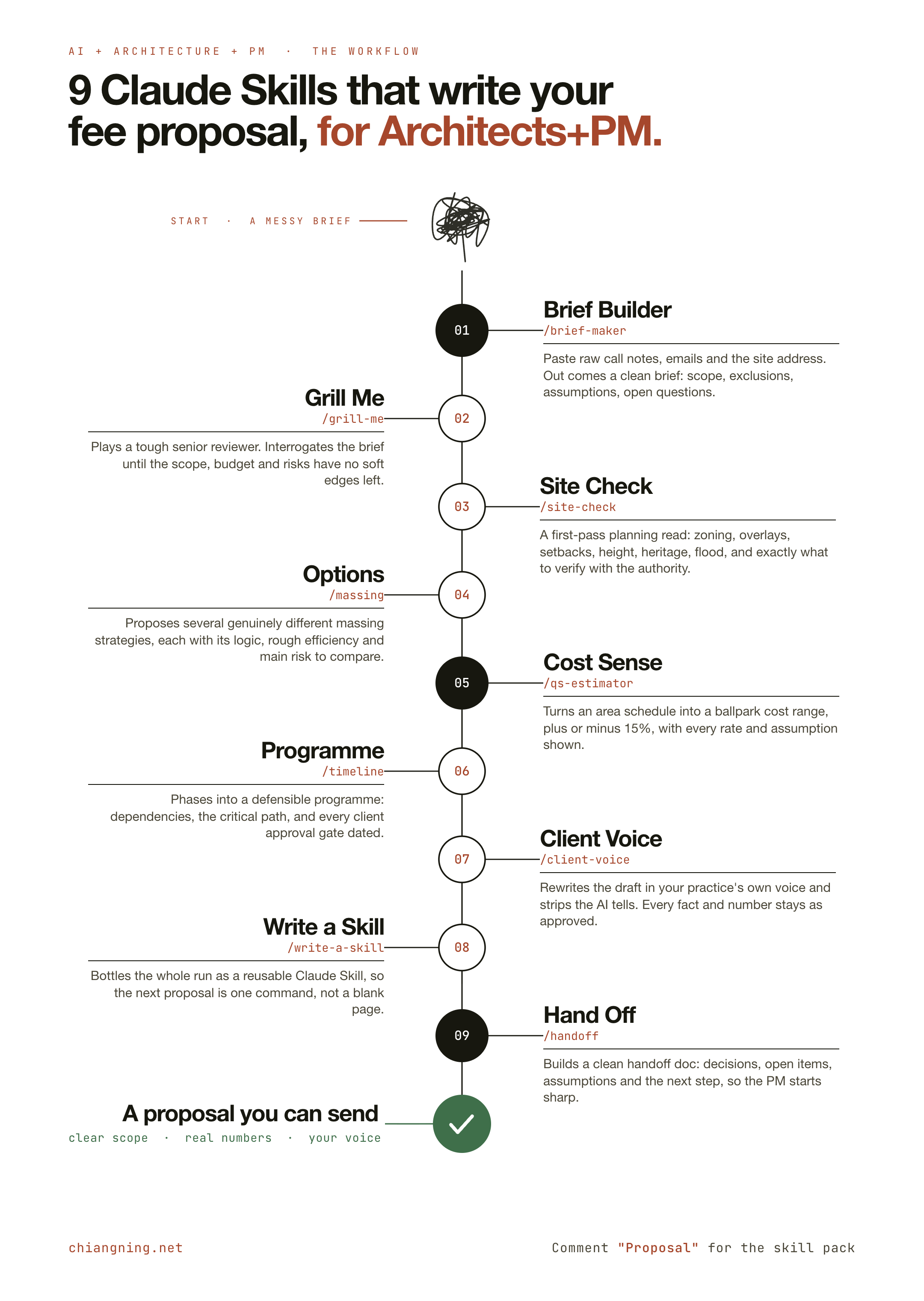
A messy brief goes in. A proposal you can send comes out. Nine small skills, each doing one job, then passing the work to the next. Every prompt is here, free, and the whole set is a download.
A fee proposal used to eat my whole Friday.
A client call. Half a page of notes. A site address. That was the input. The output was hours of staring at a blank page, then a document I was never quite sure was complete.
So I stopped treating it as one big job and broke it into nine small ones. Each is a skill that does a single thing well, then hands the result to the next. Messy brief in. Proposal out.
This is the whole chain, in plain English. For each step: what it does, the exact prompt to paste, and the one mistake that quietly wastes it. No hype. The parts you can use on your next enquiry.
The Fee Proposal Skill Pack
All 9 as ready-to-install Claude Skills (a SKILL.md each), plus a README with the running order. Australian English. No email wall.
1. Save this. Run it on your next brief this week.
2. Send it to one architect or PM who still builds every proposal from a blank template.
- Brief Builder — brain dump in, clean brief out
- Grill Me — questions until nothing is vague
- Site Check — zoning, setbacks, what you missed
- Options — the massing you haven't tried
- Cost Sense — a ballpark you can sanity-check
- Programme — phases into a defensible Gantt
- Client Voice — make it sound like you
- Write a Skill — bottle it for next time
- Hand Off — so the PM starts sharp
- The part AI can't do
Step 01 · /brief-makerBrief Builder
Like the grad who reads your scribbled notes back to you as a clean brief, before you've had coffee.
It takes the brain dump, a call, an email thread, a site address, and returns a disciplined brief: scope, exclusions, assumptions and the open questions still to resolve.
Use it for: the very start of a new commission, before any fee or design work, so scope and exclusions are on paper.
You are helping an architect or PM turn messy inputs into a clean
project brief.

Here is everything I have on a new commission:
[PASTE call notes, emails, the site address, the client wishlist]

Do this:
1. Write a clean brief under these headings: Project summary, Client and
   stakeholders, Site and context, Scope of works, Exclusions,
   Assumptions, Open questions, Suggested next step.
2. Separate what the client asked for from what you are assuming. Label
   every assumption as an assumption.
3. Do not invent facts. Put anything missing under Open questions.
Australian English. No filler.
The one mistake: letting assumptions pass as requirements. Every assumption must be labelled, so the client can correct it before it becomes a fee dispute.
Step 02 · /grill-meGrill Me
Like the associate who reads your brief and asks the three questions you were hoping nobody would.
It plays a demanding senior reviewer and interrogates the brief, one theme at a time, until there are no soft edges left to trip you at fee stage.
Use it for: straight after the brief, before you commit to a number.
Act as a demanding senior reviewer. Interrogate this brief until
nothing is vague.

Brief:
[PASTE the brief]

Do this:
1. Ask pointed questions, grouped by theme: site, programme, budget,
   planning, consultants, client decisions, risk.
2. Only ask what changes the design, the fee or the risk. No padding.
3. Under each theme, one line: why it matters.
4. End with the single highest unresolved risk right now.
The one mistake: accepting "we'll sort that later" as closed. Record it as a live risk, not a resolved item.
Step 03 · /site-checkSite Check
Like the town planner in the room, listing what to check before you fall in love with a scheme.
It structures the planning and constraint questions for a site into a first-pass read: zone, overlays, height, setbacks, coverage, heritage, flood. A pre-check to frame the conversation, not planning advice.
Use it for: early feasibility, and to price planning risk honestly in the fee.
Give me a first-pass planning and site-constraints read. This is a
pre-check to structure my conversation with the authority, not
planning advice.

Site: [ADDRESS or lot/plan]  Jurisdiction: [council / state]

Do this:
1. Structure the read: zone, overlays, height, setbacks, site
   coverage / plot ratio, parking, heritage, flood / bushfire, easements.
2. For each: a first-pass read AND exactly where I must verify it (which
   map or clause). Never state a control as fact.
3. List red flags that could stop the project, and the consultants to
   engage.
The one mistake: treating this as compliant-or-not. It structures the questions. The planning authority stays the source of truth.
Step 04 · /massingOptions
Like a studio crit that puts four schemes on the wall before anyone commits to one.
It reads the brief and constraints and proposes several genuinely different massing directions, each with its logic, efficiency and main risk, so you don't anchor on the first idea.
Use it for: concept stage, and to bring more than one option to a client workshop.
Propose several distinct massing strategies for this project, then
compare them.

Brief + constraints:
[PASTE brief and site-check output]  Target GFA/area: [if known]

Do this:
1. Give 3 to 5 genuinely different strategies (e.g. courtyard, bar,
   stacked, dispersed), not variations of one.
2. For each: the parti, how it answers the site, rough efficiency
   (net-to-gross), and its main risk.
3. End with a comparison table and what to test next.
Keep the design calls with me; widen the options, don't choose.
The one mistake: letting AI pick the scheme. Site, planning and buildability stay with you. This only makes the choice better informed.
Step 05 · /qs-estimatorCost Sense
Like a five-minute call with a QS friend who gives you a range, then tells you not to quote it.
It turns an area schedule into an order-of-cost range so you can sanity-check a scheme against the client's budget early. A feasibility check, not a QS's figure.
Use it for: keeping a concept inside budget, and framing the likely construction value in a proposal.
Give me an order-of-cost RANGE from this area schedule, for a
feasibility sanity-check. This is not a QS estimate and should say so.

Area schedule: [PASTE rooms/areas or GFA by use]  Location: [city]
My rates ($/m2): [PASTE your own rate ranges, or say "use placeholders"]

Do this:
1. Apply the rates per line. If I gave none, use clearly-labelled
   placeholders and tell me to replace them.
2. Add stated preliminaries and contingency. Show every assumption.
3. Give low / likely / high, at plus or minus 15%. List exclusions.
4. One line: what would move this number most.
For a proper data-driven estimator, see the open-source DDC estimate-builder. Still a tool, not a QS.
The one mistake: quoting the placeholder rates as real. Use your own rates, or verify locally, and never present this as a QS estimate.
Step 06 · /timelineProgramme
Like the PM who turns "a few months, roughly" into dates you can actually defend.
It takes phases and durations and builds a programme with dependencies, a critical path, and every client approval gate surfaced, because that is where projects really slip.
Use it for: a credible timeline in the proposal, and aligning consultants at kickoff.
Turn these phases into a defensible programme.

Phases + rough durations: [PASTE, or say "use typical stages"]
Fixed dates: [authority lodgement, client board dates, etc.]

Do this:
1. Build a phase table: phase | start | duration | depends on | milestone.
2. Identify the critical path. Flag assumed durations.
3. Surface every client decision / approval gate as its own dated item
   with a lead time (this is where projects slip).
4. List the key risks to the programme.
Turn the table into a styled Gantt with my Gantt chart AI workflow. For real scheduling data, there is the open-source pyp6xer-mcp for Primavera P6.
The one mistake: burying client decisions inside phases. Slippage comes from late approvals, so give every gate its own dated line.
Step 07 · /client-voiceClient Voice
Like the partner who reads your draft and says "good, now make it sound like us".
It rewrites a competent-but-generic draft so it reads in your practice's own voice, plain and professional, with the AI tells stripped out. The facts stay exactly as approved.
Use it for: the final language pass before anything goes to a client.
Rewrite this draft so it sounds like my practice wrote it. Change the
voice, not the facts.

My past writing (for tone): [PASTE 1-3 samples of your own writing]
Draft to rewrite: [PASTE the proposal / letter / report]

Do this:
1. Match my sentence length, formality, openings and closings, and
   vocabulary.
2. Remove AI tells: em dashes, "delve", "robust", "leverage", inflated
   adjectives, three-part lists.
3. Keep every fact, number and commitment exactly as written.
   Australian English.
4. End with a short note on what you changed in tone.
The one mistake: changing facts while changing the voice. This is a language pass only. Scope, numbers and commitments stay as approved.
Step 08 · /write-a-skillWrite a Skill
Like writing the office SOP once, so the next person doesn't have to ask you how.
It watches how you just did a task and packages it as a reusable Claude Skill, so next time is one command instead of a long prompt. This is how the eight steps above became a downloadable pack.
Use it for: any repeatable task you have now done once and know you will do again.
Help me turn a task I just did by hand into a reusable Claude Skill.

The task: [DESCRIBE what you just did, step by step]

Do this:
1. Ask me the 5 questions you need to capture exactly how I do it.
2. Then write a SKILL.md: YAML frontmatter (a kebab-case name and a
   description that says what it does AND when to use it), then What it
   does, When to use, Instructions, Output format, and the one mistake
   to avoid.
3. Short enough to reuse, specific enough to trust.
New to this? Start with What is a Skill, then browse the 25 Claude Skills for Architects and PMs and the construction PM pack. The official format and examples live at github.com/anthropics/skills.
The one mistake: a vague description. If it does not say clearly when to use the skill, the model won't trigger it at the right time.
Step 09 · /handoffHand Off
Like the handover note that means the PM never has to phone you on day one.
It compresses everything decided and everything still open into a short, structured handoff, so the next person, or your next chat, starts sharp instead of cold.
Use it for: passing a project from architect to PM, or ending a long session you'll resume later.
Write a handoff document for this work so the next person starts sharp.

Context: [PASTE the chat / project state, or point to the files]

Do this:
1. Summarise the project and stage.
2. Separate Decisions made from Open items. For non-obvious decisions,
   record who decided and why.
3. State the single most important next action first, unambiguously.
4. List assumptions and risks. Label every assumption so it can be
   challenged.
The one mistake: handing off decisions dressed as facts. Anything assumed must be labelled, so the receiver can challenge it rather than inherit it blindly.
Notice the mistake was almost the same every time. Label the assumptions. Describe the outcome, not the steps. Keep the judgment yours.
The part AI can't do
Nine skills clear the blank page. That is the fast, clean, repeatable half.
They will not read your site. They will not know your planning scheme. They will not size a beam, or tell you which projects are worth chasing.
And they will never decide which number you are willing to stand behind.
That call stays yours. So does the fee. The workflow just gets you to the judgment faster.
Grab the free skill pack, or comment "Proposal" on the LinkedIn post and I'll send you the link.