One window. Eight controls that do the job you already have.
Everyone tells architects and PMs to “use AI”. Almost nobody points at the screen and says: this button, this box, this setting, and here is what each one does on a live job.
There is no shortage of AI advice for our industry. There is a shortage of anyone showing you the actual window.
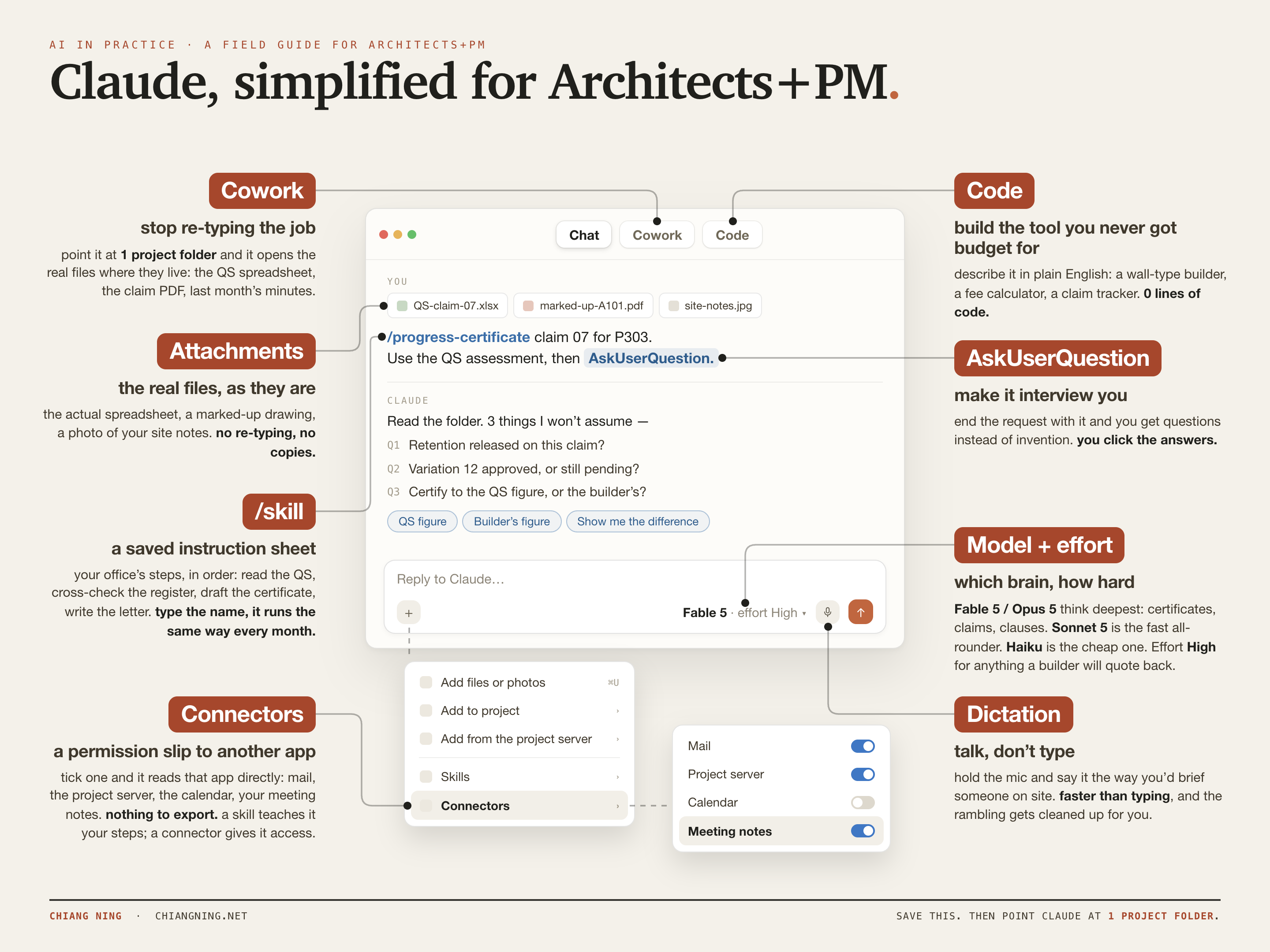
So I annotated it. One Claude window with a real request in it — a progress certificate for a live job — and a label on every control that changes the outcome. Eight of them. That is the whole surface area worth learning in the first month.
Each section below is the same three things: what the control actually is in plain English, a copy-paste prompt you can run on a job that is open in front of you right now, and the one mistake that quietly wastes it.
- Cowork — point it at the folder
- Attachments — the real files, as they are
- /skill — a saved instruction sheet
- AskUserQuestion — make it interview you
- Code — build the tool you never got budget for
- Connectors — a permission slip to another app
- Model + effort — which brain, how hard
- Dictation — talk, don't type
Control 01 · CoworkPoint it at the folder
Like handing a graduate the actual job file, instead of reading it to them down the phone.
Most people meet AI as a chat box: you paste something in, it answers, you paste the answer somewhere else. That is the slowest possible way to use it, and it is the reason so many people conclude it isn't much good.
Cowork works the other way round. You point it at one project folder and it opens what is in there — the QS assessment as a spreadsheet, the claim as a PDF, last month's minutes as a Word file — and works across all of them in one pass.
Open P303 › F06_Claims. Read claim 07, the QS assessment and the variation register, then show me every line where the builder's number and the QS number differ, with the variance and which document each figure came from.
The one mistake: screenshotting a spreadsheet. A number you paste is a number it cannot check. Give it the file and it can trace every figure back to the cell it came from.
Control 02 · AttachmentsThe real files, as they are
Site reality is scanned, scribbled and sideways. That is fine.
The attachment button is not just for tidy PDFs. A photograph of a marked-up A101. Your handwriting from a site walk. A 40-page builder's programme. A mid-project screenshot of a Revit schedule. It reads all of it.
This is the single highest-value habit for anyone in contract administration, because the mess is the job. The reason minutes take an evening is that someone has to translate a notebook into sentences.
Attached: a photo of my site notes from this morning and the marked-up A101. Turn the notes into minutes in our house format, and list every mark-up on the drawing as a separate action with an owner and a date. Flag anything you couldn't read rather than guessing it.
The one mistake: tidying the input first. The tidying was the work you were trying to hand over.
Control 03 · /skillA saved instruction sheet
Your office procedure, finally written down — and finally followed.
A skill is not clever technology. It is a plain-text instruction sheet with a name. You describe your steps once, in order, and from then on you type /progress-certificate and it runs the same way every month.
That is exactly what a practice manual was always meant to be, except this one gets used, because using it is less work than not using it.
Write me a skill called progress-certificate. The steps, in order: read the QS assessment, cross-check it against the variation register and the control doc, draft the certificate on our template, write the cover letter to the owner, compile the lot into one PDF. Before you start, ask me for anything you're missing.
The one mistake: re-explaining your method every month. Write it once, then only ever improve it. Every hour you spend on the skill is an hour you never spend on that task again.
Control 04 · AskUserQuestionMake it interview you
The good consultant asks first. Ask it to behave like one.
The failure mode of every AI tool is not stupidity, it is confidence. Given a gap, it fills the gap. On a certificate, a gap it invented becomes a number a builder quotes back at you.
So end the request with AskUserQuestion. Instead of an answer, you get questions — usually three — with the options laid out, and you click. Retention released this claim? Variation 12 approved or pending? Certify to the QS figure or the builder's?
… and before you draft anything, use AskUserQuestion to ask me the three things you would need answered before you would be willing to sign this.
The one mistake: reading a confident answer and never asking what it assumed to get there. If you only adopt one habit from this whole article, make it this one.
Control 05 · CodeBuild the tool you never got budget for
The small utility the practice would never commission — because it would cost more than it saves.
Every office has three or four jobs that are pure arithmetic dressed up as design work. Wall type thicknesses. Fee splits across stages. A claim tracker that lives in someone's head. None of them justify a software project.
They justify an evening. Describe the thing in plain English and you get a working single-page tool, with zero lines of code from you. I built a wall-type builder that way in one session.
Build me a single-page tool, one HTML file, no frameworks: I pick wall layers from a list of real Australian build-ups, it sums the overall and structural thickness, calculates the R-value, and exports a schedule with one column per type. If a batt doesn't fit the stud depth, refuse it instead of drawing it.
The one mistake: asking for a platform. Ask for one small tool that does one job, tonight. The scarce part was never the code — it is knowing that a 90mm batt does not go in a 64mm stud.
Control 06 · ConnectorsA permission slip to another app
Less a new app, more a key to the systems you already pay for.
This is the control people find most confusing, so here it is without the jargon. A connector is a permission slip. You tick one, and Claude can read that app directly — your mail, the project server, the calendar, your meeting notes. Nothing to export, nothing to upload, no copies drifting out of date in a downloads folder.
The distinction worth holding on to: a skill teaches it your steps; a connector gives it access. Different problems. Most people reach for a skill when what they actually needed was access.
And if you have heard the term MCP and wondered whether it is the same thing: near enough. MCP is the open standard — the wiring that lets a model talk to an outside system. A connector is the switch you tick in the interface, and most of them are MCP underneath. You do not need to know that to use one, which is rather the point.
Using my mail and the project server, prep me for Thursday's PCG on P303: last month's minutes, every action still open with its owner, this month's claim position, and any RFI raised more than 10 days ago that still has no answer.
The one mistake: connecting everything on day one. Start with two — mail and the project folder. Those two cover most of what a PM spends the week chasing.
Control 07 · Model + effortWhich brain, how hard
Cheap and fast is fine for prose. It is not fine for a number in a certificate.
Two dropdowns, and most people never touch either. They are the difference between the version of AI that impresses you and the version that embarrasses you.
Contracts, disputes, claims, clauses, a whole spec cross-checked in one pass. Fable sits at roughly twice Opus's rate, so save it for the genuinely hardest work rather than making it the default.
Minutes, letters, quick clause lookups, the first draft of almost anything. Fast, strong, and what most of your week should run on.
Sorting, tagging, short extractions, anything where the answer is obvious and the volume is high.
Then effort, which is simply how long it thinks before it answers. High for anything a builder or a client will quote back at you. Medium for drafts. Low for lookups.
The one mistake: judging all of AI by the fastest, cheapest setting. That was never the ceiling — it is the floor, chosen for you by default.
Control 08 · DictationTalk, don't type
You brief people out loud all day. Brief this the same way.
The most underrated button on the screen. Hold the mic and say it the way you would say it to a graduate standing at your desk: rambling, back-tracking, correcting yourself halfway through. It handles that better than it handles a tidy paragraph, because the rambling contains context a tidy paragraph edits out.
It is also just faster. Most people speak three to four times quicker than they type, and thinking out loud is closer to how the brief exists in your head in the first place.
That was me thinking out loud. Turn it into a numbered brief in my own words, keep every constraint I mentioned, and flag anything where I contradicted myself so I can decide which version I meant.
The one mistake: typing a paragraph you would rather have said. If you find yourself editing a prompt for tone, you have already lost the time you were saving.
Notice the same rule shows up on four of the eight. Give it the real file. Ask what it assumed. Save the method. Never let a plausible answer pass as a checked one.
The habit that makes all eight work
Stay in one thread, on one job, in one folder.
The instinct is to open a fresh chat for every question, the way you'd open a new search. It is the wrong instinct. A thread that already holds the QS assessment, the register and your last three corrections gives better answers than a clean one, every time, and it gets better the longer the month goes on.
Eight controls, one thread, one folder. That is the whole setup.
A note on the poster
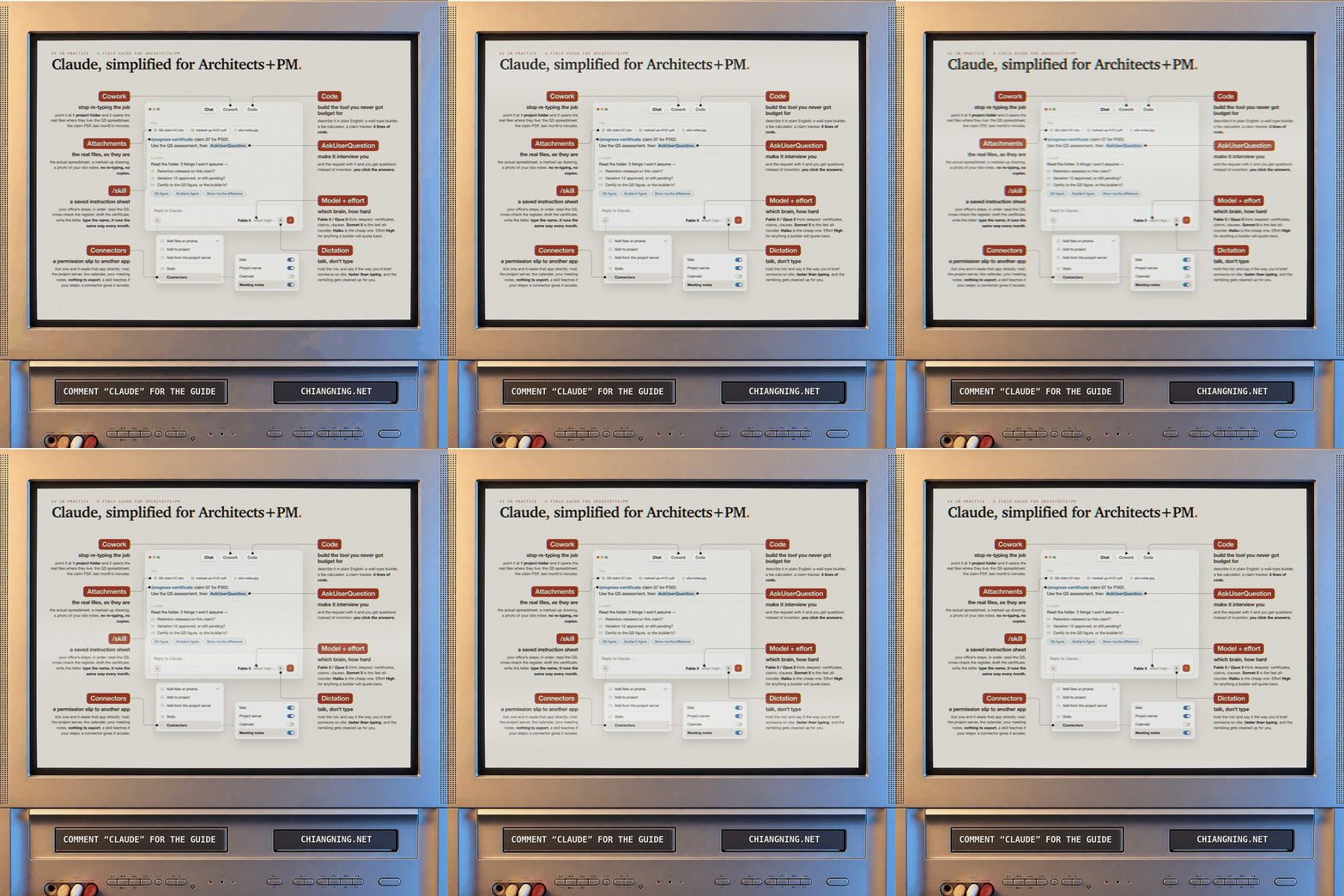
The image at the top is not a photograph of a screen. The poster is drawn in HTML — every label, every leader line, the mock window — then rendered, put through a composite-video treatment (chroma smeared sideways, red and blue split by a pixel, scanlines, phosphor triads) and composited into the tube of a CRT, with the CTA and the address printed into the deck slots.
There is a point buried in that. It was built the same way as everything else here: describe the thing, look at what comes back, say what is wrong with it, repeat. No design software was opened. The judgement about what belongs on the poster was mine; the drafting was not.
The poster, full size
The annotated window at print resolution, for the wall behind your desk or the studio noticeboard. No email wall, no sign-up.
Download the poster (PNG)What this doesn't do
Eight controls, and between them they clear the assembly — the re-typing, the reconciling, the chasing, the first pass at a document that used to eat an evening.
None of them stand on site and notice the blockwork isn't the standard you specified. None of them know which fights are worth having with this client, on this job, this week. None of them read a planning officer's tone in a meeting and understand the application just changed shape.
And none of them decide what you are willing to put your name to. A certificate is signed by a person. That does not change because the arithmetic got faster.
That judgement is the job. Everything on this poster exists so the eighty small decisions around it stop eating the time you need for the one that matters.
The originals, no email wall: The AI Framework for Architects + PM · 29 Agent Skills · Scope, Fee, Claim, Certificate · The Monthly Report Workflow · The Wall Type Builder.
Comment “Claude” on the LinkedIn post and I'll send you the guide — the poster plus the skill pack that matches whatever you're stuck on this week.