Free Download: Skill MD to recreate Opus 5.5 + Blender + Seedance combo.
1 skill file, your building model, and a 40-second film where the building grows, opens in section and comes to life.
I made a 40-second film of a bamboo music centre with Opus 5.5, Blender and Seedance 2.5.
The frame grows out of the ground, the pavilions open up in solid section, the camera never cuts, and the ending turns photoreal. Then I packed the whole method into 1 skill file, /video-design-development, so you can do the same with your own model. It's free. This is what's in it and where it came from.

01What the skill does
You give Claude Code a 3D model of a building and talk through the film you want. The skill turns that into a Blender scene and a review loop:
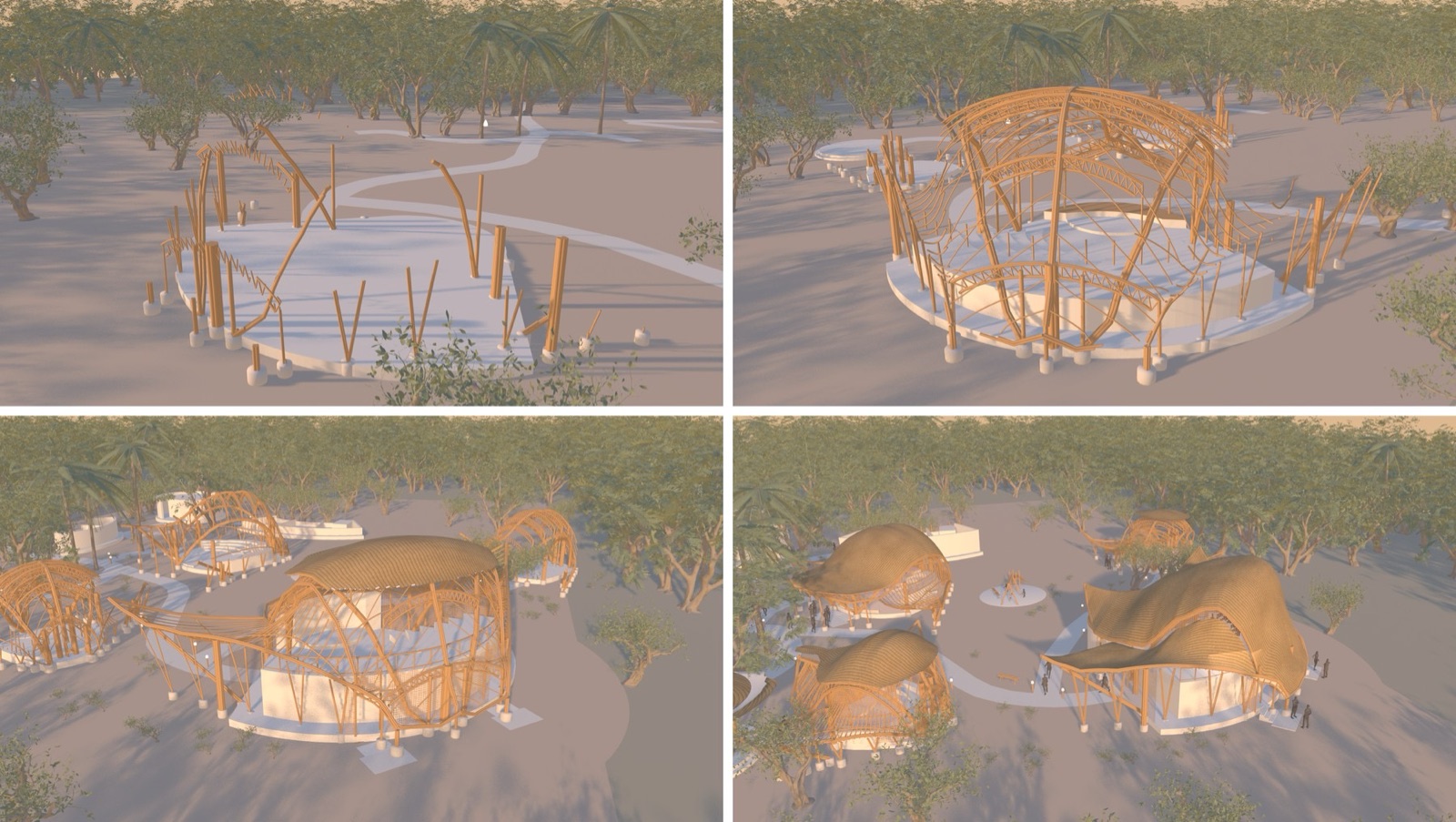
- The building grows. The frame goes up 1 member at a time, the roof drapes over it, and the neighbours follow.
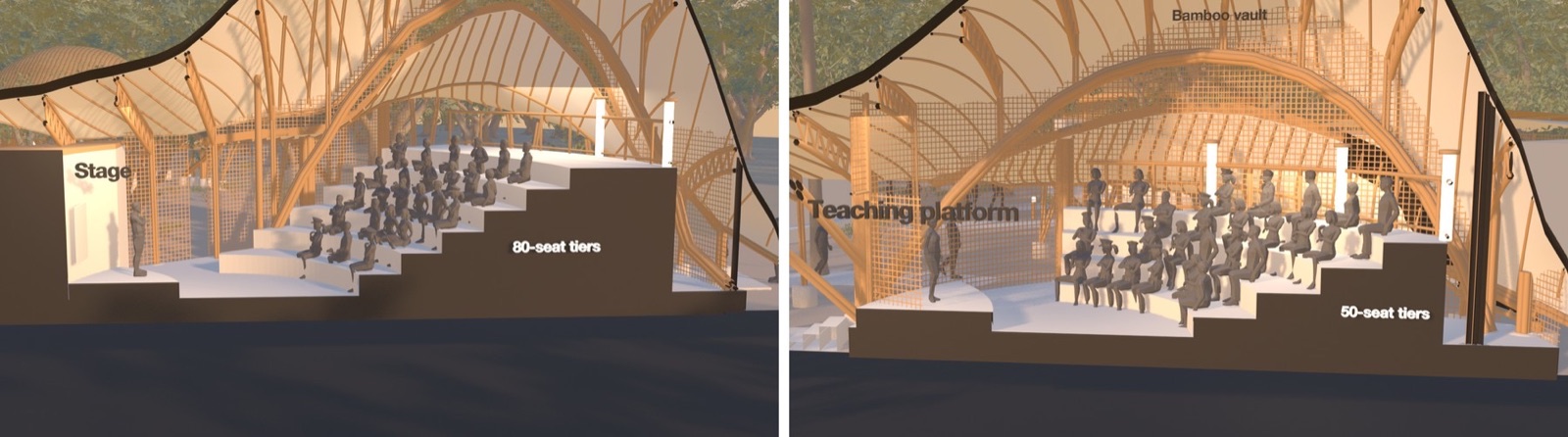
- The sections are solid. They're cut solid black, ground included, with the spaces named in 3D.
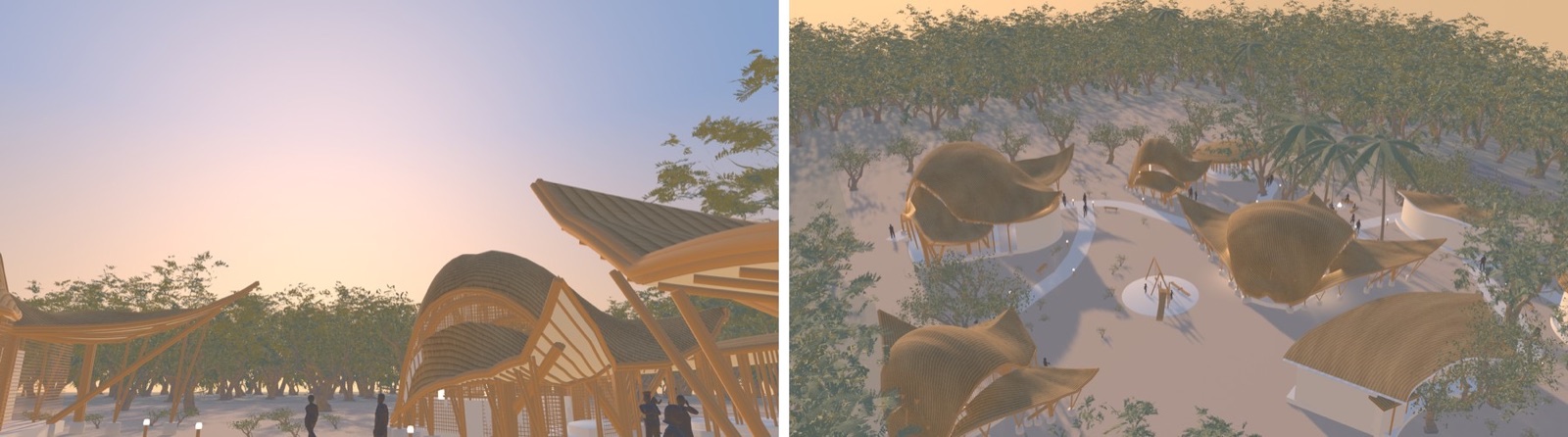
- The camera never cuts. It speed-ramps through eye-level scenes and widens into an establishing shot.
- It's lived in. There are seated audiences, people walking in, and a furnished landscape.
- The ending can be photoreal. It hands that part to an AI video tool and makes the join seamless, with music and sound.
It's 1 markdown file. Drop it into your Claude Code skills folder and type /video-design-development.
02Where it came from
I built it on a study of Ekarth Studio's Maestro Ilaiyaraaja Centre at IIT Madras. The model was made in an earlier session from the drawings and photos on Dezeen. (I've fixed typos in my prompts. Otherwise they're as I said them.)
Convert this to a Blender model.
Then I talked through the film I wanted:
Start with almost like the skeleton of one building that looks like it's growing out from the ground, one piece at a time. Then you've got this roof that's kind of draped over the structure, while the camera is orbiting around the building. While the first building is being built up to say 30, 40%, you can start to see the adjoining buildings grow out of the ground in an organic manner. After that, I want to cut a section through the main building, and you can see people using the space. Then it goes to the other section. Finally, the camera pulls out to an establishing shot of the entire village. 40 seconds, 16 by 9, golden light, interiors brightly lit at 3000K. Start with a solid model animation first, and once I approve, you can proceed with the final render.
03Every rule in it is something I said no to
The film took a lot of rounds. Each note I gave became a rule in the skill, so you don't have to give it.
Solid black sections. "The section appears hollow. You need to be a solid black whenever we cut a section, and cut the ground plane too. That's how architects represent a concept." It took 3 rounds. The usual fill trick only works on perfectly closed shapes, so the skill builds real black faces on the cut plane.
No cuts. "28th second should not be a cut, should be a continuous camera movement, speed ramp. Allow 3 scenes that showcase the building at human perspective level." So it's 1 camera from the first section to the end. Each eye-level scene shows a different building, and the last orbit eases out to a stop.
People who make sense. Everyone in a talk or a class sits facing the speaker, and walkers come in from the ends of the paths. Some of my figures walked backwards and sat turned away. The skill checks every figure before anything renders.
Light. "Interior appears overexposed." Interiors are warm at 3000 K but use dim fills that stay indoors.
The open ground. "The open space is a bit empty." Then "remove waterfall, out of place". The skill furnishes the paths with lamps, shrubs, benches and a feature, keeps all of it out of the camera's way, and asks before adding anything decorative.
Review cheap. This was in my brief from the start: a solid model first. Every round came back as a quick white model, about 20 minutes for a full cut, and nothing renders properly until the shots are agreed.
04The Seedance part
I cut the end of the film into its own clip and generated a photoreal version in Seedance 2.5. Then:
The transition between AI video and Blender is a bit abrupt. Smooth it out, to be seamless.
A hard cut showed the change in material. A plain dissolve ghosted, because the 2 cameras moved differently. What worked, and what the skill now does: shift the Blender colour to the AI clip's over the last second, then dissolve for under half a second where both cameras drift the same way. The music runs under both, and the AI clip's own sound comes in with it.

05How to use it
- Download the zip and copy the folder into
~/.claude/skills/. - Open your project in Claude Code with a model of your building: GLB, FBX or .blend, in metres.
- Type
/video-design-developmentand talk through the film you want. - Review the contact sheets and the solid preview, and give notes by the second.
- When the shots are settled, ask for the full render. If you want a photoreal ending, trim that part and generate it in your AI video tool, then ask it to join them.
If you use claude.ai rather than Claude Code, paste the file into a chat as instructions. It will write the Blender scripts for you to run.
Download /video-design-development (zip, 20 KB) video-design-development.zip · SKILL.md · INSTALL.md · free, no gate06Where the judgement sat
AI does the making. It doesn't decide which building leads, where the sections go, which scenes to show, what reads as hollow or out of place, or when a cut is good enough. In my film those were all my calls, and the skill is built to stop and ask you for them.
07What I would tell you before you copy it
The film is only as good as the model you give it. Mine was read off published drawings and photos, so parts of it are estimated. The people are low-poly stand-ins, and the AI ending invents planting, timber and light that aren't the real site's.
The skill is a starting method, not a button. Expect a few rounds of notes, the same as I needed.
Maestro Ilaiyaraaja Centre, IIT Madras, Chennai, 2026. Architect: Ekarth Studio. Source: Dezeen, 7 October 2026 (Lizzie Crook). Their photographs and drawings were used as reference only and are not reproduced here.
Built with Claude Code (Opus 5.5) and Blender. Trees: Poly Haven scans (CC0). AI video: Seedance 2.5 via OpenArt. Music: "Cinematic Documentary" (Pixabay). This is an independent study, not affiliated with or endorsed by Ekarth Studio.