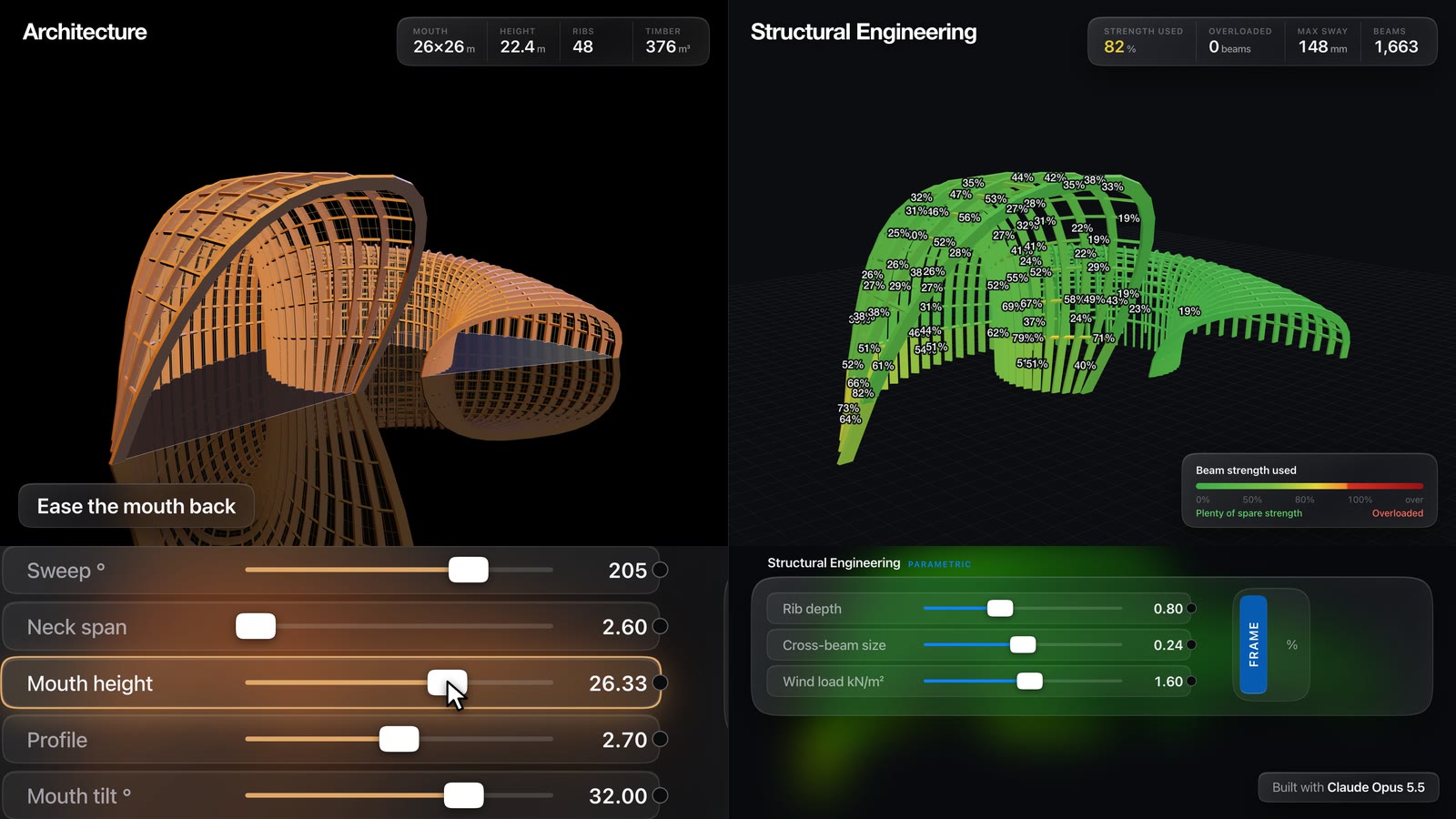
The architect shapes the horn. The engineer watches it turn red.
A browser tool with 2 layers on 1 model. Layer 1 is form: 14 sliders that bend a glulam rib shell into a horn. Layer 2 runs a frame analysis on every rib and purlin and checks each one against EN 1995-1-1 as you drag.
01Where it started
It started with a 40 second screen recording on LinkedIn.
A structural engineer had rebuilt the Grasshopper experience in their own web app (no Rhino), with a homemade FEM solver underneath. They credited Ahmed Zakzouk for the idea. Drag a slider and a wavy timber carport reshapes, and every member re-checks itself against Eurocode 5.
I rebuilt that video first, to see how far a single session could get. The result is the carport study linked above: 2,004 members, 4,074 degrees of freedom, solved in about 230 ms. Push the snow load from 0.68 to 1.40 kN/m² and the worst bottom chord goes from η 1.08 to 2.37.
Then I wanted an architect's version. The starting point was a photograph of a timber model: a ribbed glasshouse shaped like a horn, with arched ribs fanning around a narrow neck and opening into a tall tilted mouth. I wrote down the rule I could see in it and built a generator that makes that whole family of shapes.
022 layers, 1 model
Architects and engineers usually trade the same building across a gap of days. I wanted both on 1 screen, each with its own controls, sharing 1 set of geometry.
| Layer | Who drives it | What you see |
|---|---|---|
| 1 Architect | Form and skin | 14 form sliders, 3 skin sliders, timber ribs, glass, mullions and a reflecting pool. Quantities update live: floor area, glazed area, height, mouth opening, timber volume and an indicative cost. No analysis runs here, so dragging stays instant. |
| 2 Engineer | Sections and loads | The form arrives as 1 locked "Horn" input. Rib, purlin and mouth ring sizes, glazing, live and wind loads, glulam grade, service class and base fixity. Members go green, yellow or red by utilisation, with animated deflection and a full worked check on any member you click. |
If the architect stretches the mouth past what the ribs can carry, the engineer sees it the moment they switch layers.
03How to drive it
- Shape it in Layer 1. Start with Neck position, Mouth height and Mouth tilt; they change the character fastest. Flare decides how suddenly the horn opens, and Profile moves the arches from pointed (1.4) to almost square (4.0).
- Switch to Layer 2 (top left). The analysis runs straight away on the shape you left.
- Load it. Raise wind suction or live load and watch the colours move. Anything over η = 1.0 turns red, and the Results card counts it.
- Click a red member. The panel lists all 11 checks, sorted worst first, with the internal forces and every step of the governing calculation.
Drag the grid behind the sliders to pan, scroll to zoom, and drag any card by its title. The wire from the slider you're moving lights up.
04What's under the sliders
The geometry rule
Each rib is a superellipse arch standing in a vertical plane. The planes fan around 1 centre point and step along a spiral spine, so the ribs crowd together on the inside of the curve and open out on the outside. Span and height flare away from the neck in both directions (a tail bell and a mouth bell), and the last ribs lean forward so the mouth ring tilts open.
The analysis
Every rib segment and purlin is a 3D Euler-Bernoulli frame element with 12 degrees of freedom and rigid joints. Nodes are renumbered with Reverse Cuthill-McKee to keep the stiffness matrix narrow, then a banded Cholesky factorisation solves all 4 load combinations from 1 factorisation. It's plain JavaScript, with no library behind the maths.
| Combination | Factors | kmod duration |
|---|---|---|
| CO1 ULS | 1.35 G | Permanent |
| CO2 ULS | 1.35 G + 1.5 Q | Short-term |
| CO3 ULS | 1.0 G + 1.5 W (suction) | Instantaneous |
| CO4 SLS | G + Q, characteristic | Deflection only |
G is self-weight (member volume × ρmean) plus glazing on the surface area. Q acts on the plan area of up-facing panels, and wind suction acts normal to the skin.
The member checks
Each member is checked at both ends under every ULS combination; η is the worst result. The 11 checks follow EN 1995-1-1 section 6:
- Bending with tension, uniaxial and biaxial (Eq. 6.17, 6.18)
- Bending with compression (Eq. 6.19, 6.20)
- Flexural buckling about both axes (Eq. 6.23, 6.24, with kc from 6.25 to 6.28)
- Lateral torsional buckling, alone and with compression (Eq. 6.33, 6.35, kcrit from 6.34)
- Biaxial shear and torsion with shear (Eq. 6.13, 6.14)
Glulam strengths come from EN 14080 for GL24h, GL28h and GL32h, with γM = 1.25 and kmod set by load duration and service class.
05The numbers at the defaults
| Item | Value |
|---|---|
| Ribs and purlins | 34 ribs · 561 purlins · 1,173 members |
| Degrees of freedom | 3,468 |
| Solve time, all 4 combinations | about 35 ms on my laptop |
| Sections | 240 × 800 GL28h ribs, 160 × 160 purlins |
| Worst member | η 0.35, a purlin |
| Largest movement | 45 mm under CO3 wind suction |
| Floor area · glazed skin | 598 m² · 1,726 m² |
Wind governs deflection, which surprised me. A tall glazed mouth is mostly sail.
06What it won't tell you
This is a concept design tool. It tells you early whether a shape is in the right range, long before an engineer builds the proper model.
- Global arch buckling isn't checked. Buckling length is the analysis segment, so the whole rib buckling sideways as one arch needs its own check.
- Curved glulam factors are missing. No kr for curvature and no kh size factor.
- Connections aren't designed. Every joint is rigid, and that's a big assumption at a purlin.
- It's Eurocode 5, not AS 1720.1. Loads are user inputs, not derived from AS/NZS 1170, and the analysis is linear with no second-order effects.
Inspired by a structural engineer's browser FEM video on LinkedIn (they credited Ahmed Zakzouk) and by a photograph of a timber horn model whose designer I haven't been able to identify. Neither is reproduced here, and the geometry is my own generator. If you know who made the model, tell me and I'll credit them.
Built in a single session with Claude Code. If your practice has a form worth stress-testing this way, message me on LinkedIn.