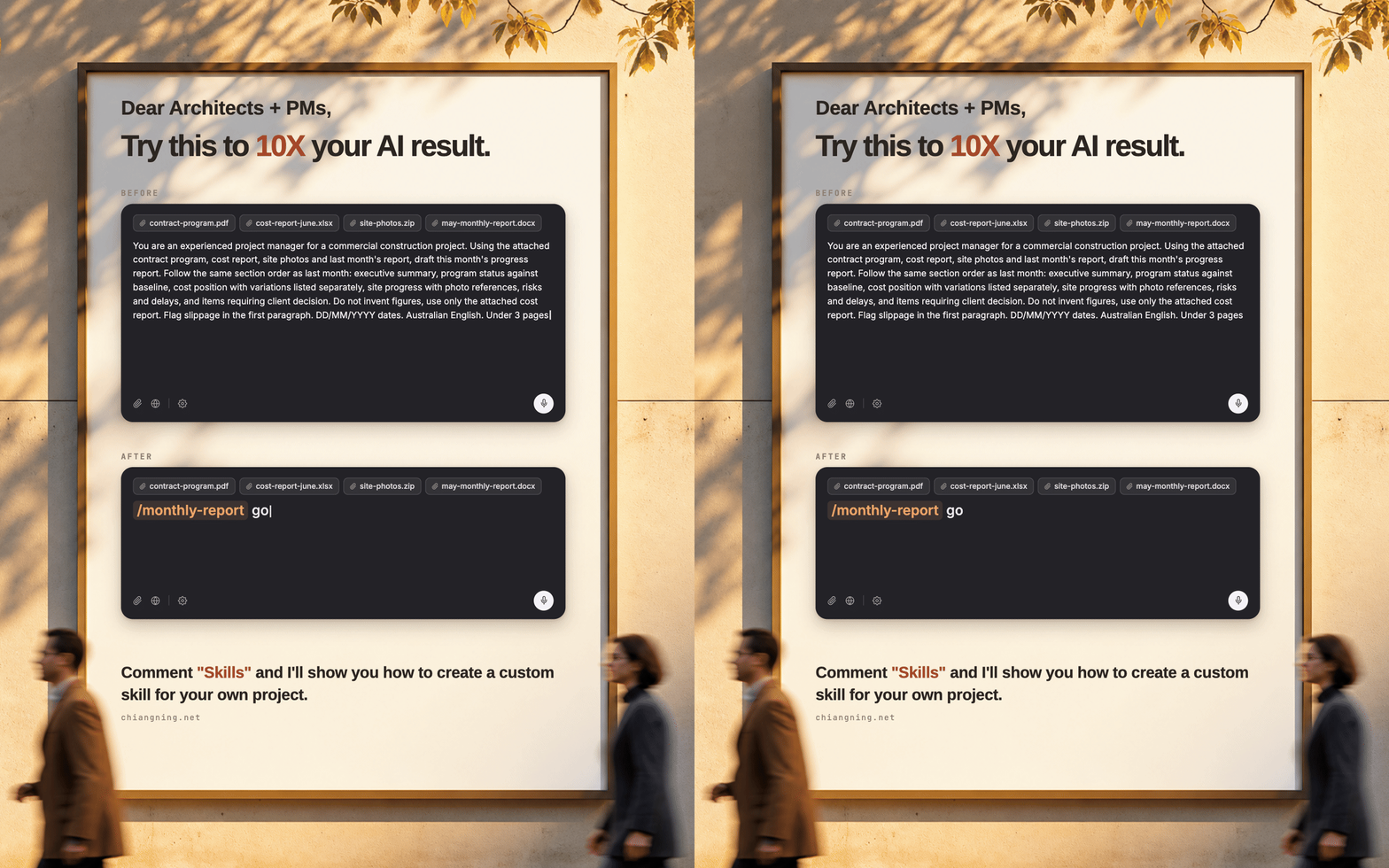
Draft the monthly progress report in two words.
First you teach the AI exactly what you want. Then you save that instruction once, and never type it again.
It is the last week of the month, so you already know what is coming.
The progress report. Same one as last month. Same one as the month before.
So you open a fresh AI chat and start typing the brief from memory. The role. The inputs. The sections. The rules. Two hundred words, more or less, and you forget a couple of them every time.
What comes back is generic. It invents a figure that was never in the cost report. It puts slippage on page two instead of the first line. You fix it by hand.
Next month, blank chat, same two hundred words, same fixing.
Here is how to break that loop. First we write the instruction properly, once. Then we turn it into something you run in two words.
Two things before we start
- Save this page. Open it the week your next report is due.
- Send it to one PM on your team still writing the same document from scratch every month. You know who.
Step 01Start with the real job, not a clever prompt
Most AI advice starts with the prompt. Wrong end.
Start with the job you actually have to do this week, in full, the way you would brief a capable graduate who has never seen your project.
A good instruction to an AI is exactly that brief, written down. Nothing more mysterious. If you can say clearly what the report is, what it is built from, how it should be laid out, and what it must never do, you have already written the prompt.
This month's progress report for a commercial construction project. You have the contract program, the June cost report, a folder of site photos, and last month's report. It needs to go to the client by Friday.
Step 02Teach it what to look at
The AI cannot use what it cannot see. So give it the real files, not a description of them.
Attach the actual documents:
- The contract program, so it knows the baseline dates.
- The cost report, so every number it writes has a source.
- The site photos, so it can reference real progress, not guess it.
- Last month's report. This is the important one.
Last month's report is your template. It carries your section order, your tone, your level of detail, your firm's language. Hand that over and you are no longer describing the format in words. You are showing it.
Check it: pasted text beats a vague summary, and a real file beats pasted text. If the number matters, the model should be reading it from the source, not from your memory of it.
Step 03Lock the format
Left to itself, the AI will pick its own structure, and it will be a different one next month.
So you hand it the section order and make it non-negotiable. Same order as last month, every month, so the client reads the same shape each time and can spot what changed.
1. Executive summary
2. Program status against baseline
3. Cost position (list variations separately)
4. Site progress, with photo references
5. Risks and delays
6. Items requiring a client decision
That last section is the one clients actually read. Make it its own heading so a decision is never buried inside a paragraph.
Step 04Set the rules that stop it lying
This is the part everyone skips, and it is the part that matters most.
An AI will fill a gap with a confident, wrong number unless you forbid it. So you write the constraints in plain, blunt language:
- Use only the figures in the attached cost report. Do not invent numbers. If something is missing, say so.
- Flag any slippage against the baseline in the first paragraph, not buried later.
- Dates as DD/MM/YYYY. Australian English. Keep it under three pages.
- Where a photo is referenced, name the file so anyone can check it.
Precise inputs, precise output. Every one of those lines exists because leaving it out produced a specific mistake.
Check it: "Do not invent numbers" is not decoration. It is the whole safety net. Keep it in every single time.
Step 05The whole instruction, in one block
Put the four parts together and you get the full brief. This is the "before": the thing you would otherwise retype every month. Copy it, fill the [brackets], attach your four files, and send.
You are an experienced project manager for a commercial
construction project. Using the attached contract program,
cost report, site photos and last month's report, draft
this month's progress report for [PROJECT NAME], for the
period [MONTH YYYY].

Follow the SAME section order as last month:
1. Executive summary
2. Program status against baseline
3. Cost position, with variations listed separately
4. Site progress, with photo references
5. Risks and delays
6. Items requiring a client decision

Rules:
- Use ONLY the figures in the attached cost report. Do not
  invent numbers. If a figure is missing, say so plainly.
- Flag any slippage against the baseline in the first
  paragraph.
- Reference site photos by file name.
- Dates as DD/MM/YYYY. Australian English. Under 3 pages.
- Match the tone and level of detail of last month's report.

Before you write, list any assumption you had to make.
What you get: a report in your structure, grounded in your numbers, with slippage where the client will see it, and a list of assumptions you can check in thirty seconds.
Step 06Now stop typing it: save it as a Skill
Here is the shift almost nobody has made yet.
You just wrote that instruction. It is good. It works. So why type it again next month?
A Skill is a saved instruction the AI reuses on command. You store the brief once, give it a name, and from then on you call it by that name. The prompt is the throwaway. The Skill is the asset.
In Claude, a Skill is a small folder with a plain-text file inside it, describing the task in exactly the language you just wrote. Something like this:
---
name: monthly-report
description: Draft this month's construction progress
  report from the attached program, cost report, site
  photos and last month's report.
---

# Monthly progress report

When the user attaches the four project files and says go,
draft the progress report using the section order and rules
below.

## Section order
1. Executive summary
2. Program status against baseline
3. Cost position, variations listed separately
4. Site progress, with photo references
5. Risks and delays
6. Items requiring a client decision

## Rules
- Use ONLY the figures in the attached cost report. Never
  invent a number. If one is missing, say so.
- Flag any slippage in the first paragraph.
- Reference photos by file name.
- Dates DD/MM/YYYY. Australian English. Under 3 pages.
- Match last month's tone and level of detail.
- List assumptions before writing.
Save that once. Next month you attach the four files and type:
/monthly-report go
Same report. Same rules. Two words instead of two hundred. That is the before and after at the top of this page.
Check it: a Skill repeats your instruction faithfully, mistakes included. Write it well once. A sloppy Skill is just a fast way to be wrong every month.
Step 07You don't have to build from scratch
Before you write your own, look at what already exists. There is a growing shelf of ready-made Skills, free and open, that you can read, fork, rename, and point at your own files.
github.com/anthropics/skills Anthropic's own open-source Skills, including the document skills for Word, Excel, PowerPoint and PDF. A clean model for how a SKILL.md is written. github.com/anthropics/claude-cookbooks Worked examples and patterns for getting reliable, repeatable output from the model. Good for understanding why the rules above work.Beyond those, there are community collections built specifically for architecture and construction: visualisation, modelling, planning and code pre-checks, cost and programme, specs and submissions. I keep a curated set of the ones I actually use, credited to their authors under their own licences.
The move is simple: curate first, build only what is missing. Fork the closest thing, rename it for your practice, swap in your section order and your rules, and point it at your files.
Check it: a Skill written by someone else still carries someone else's assumptions. Read it before you run it, the same way you would read a subcontractor's method statement.
The part AI can't do
Everything above is the fast half. The clean, repeatable, step-by-step half.
It will still write a confident number if you let it. The rules are what hold it honest.
And what comes back is a draft, not a submission.
You are still the one who reads the site. Who knows the variation the report should have flagged. Who decides which number you will actually put in front of the client.
You read it. You sign it. Your name is on it, not the model's.
The report was never the hard part. Re-explaining it every month was. Fix that once, and get the afternoon back.
Start with the report you dread most.
Comment "Skills" and I'll show you how to turn one of your own recurring documents into a custom Skill, step by step.
And if this would help someone on your team, send it to them. That is how it spreads.