AI · Architecture · Video · Workflow
Your AI flythrough keeps changing the building.
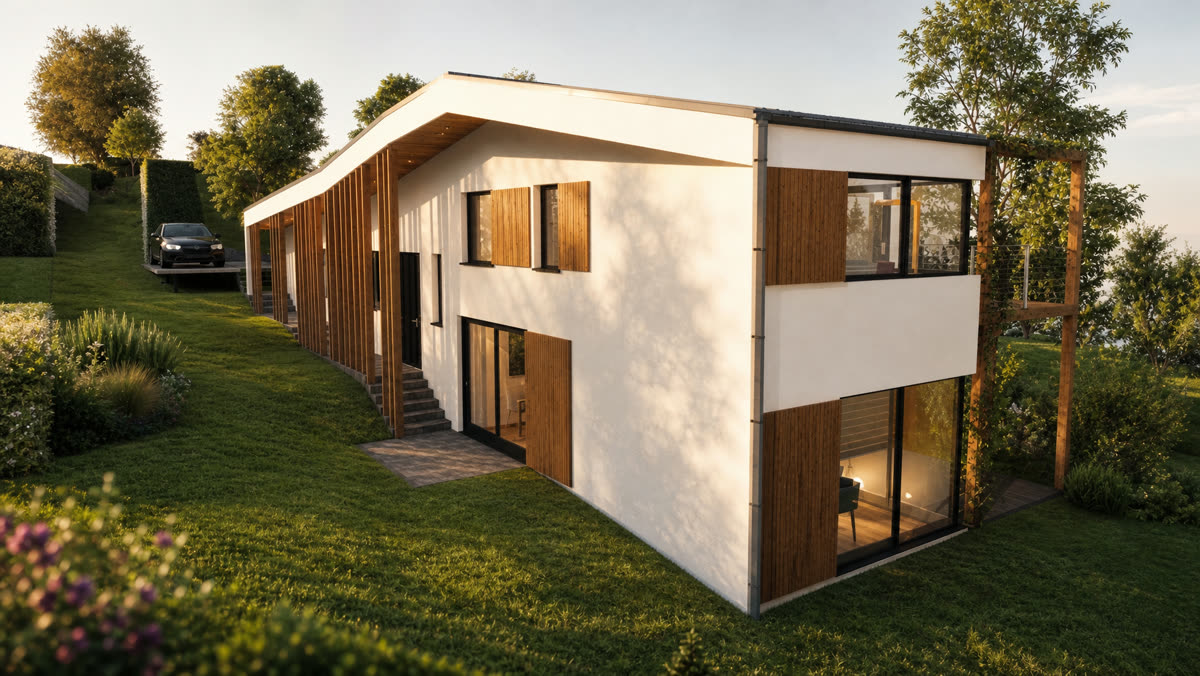
I ran the same house twice. The first attempt invented a different building halfway through. The second held for twenty seconds. Here is exactly what changed, with both prompts in full.
Drift is the reason you stopped trying.
You point an AI video model at your project, ask it to walk from the street into the living room, and somewhere around second eight it stops being your building. The stair moves. The window count changes. A neighbour appears that was never on the site.
That failure is not a prompt-wording problem, and you cannot fix it by adding more adjectives. I know because I tried that first.
Seedance 2.5 can now hold a building shot to shot. But it will only do it if you give it something to hold on to, and the thing it needs is not in the text.
Two things before we start
- Both prompts are below in full, free, no email wall. The one in section 05 is the reusable template.
- You need a 3D model. This workflow makes your model travel further. It does not replace having one.
What follows
01Attempt one, and what came back
My first instinct was the obvious one, and I suspect it is yours too.
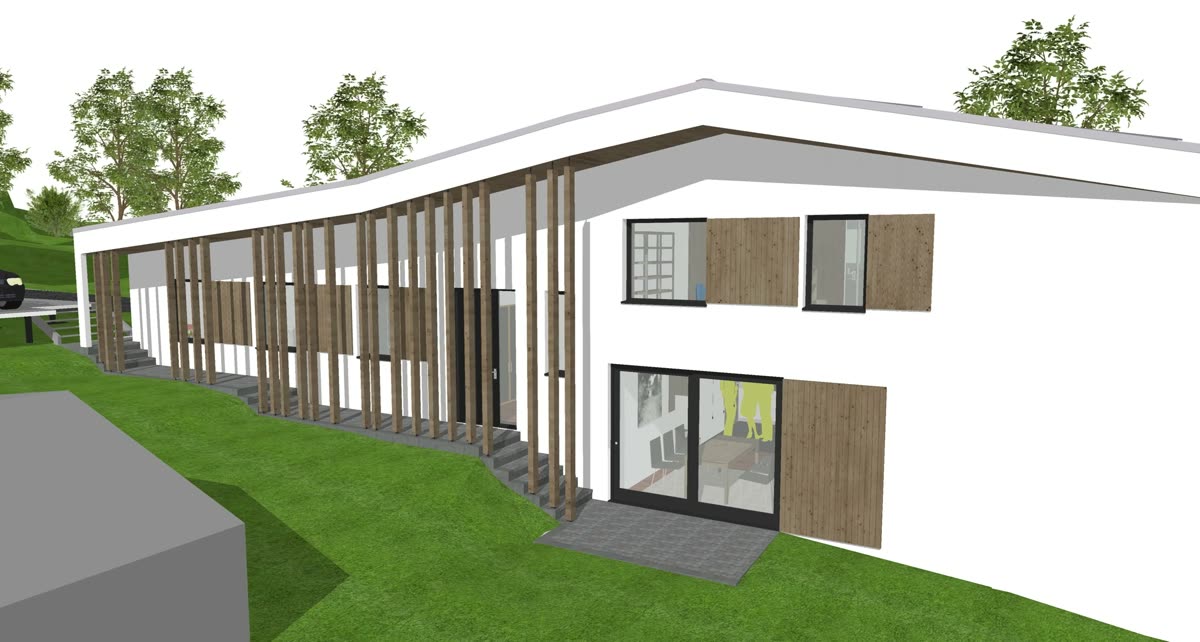
I already had a flythrough straight out of the ArchiCAD model. Correct geometry, correct camera path, correct room order, just flat and untextured the way viewport output always is. So I handed that clip to Seedance as the main driver, wrote one long paragraph describing every material and every room, and asked it to make the whole thing photoreal.
This is the prompt I used. It is a perfectly reasonable prompt. It is also the wrong shape, and I will come back to why.
Attempt one · the prompt that failed
photorealistic professional architectural real estate video flythrough
using @your-cad-clip as main driver. golden hour, peaceful suburban
neighbourhood. beautiful architectural home, white texture render
external wall. building is internally illuminated, vertical aluminium
fins with oak texture, beautiful landscaping with grass, vegetation.
family are enjoying outdoor space. oak colour external wall panels.
beautiful interior, nicely lit with downlights, pendant lights, stand
light. Interior is beautifully furnished with soft furnishing,
minimalist artworks, beautiful scandinavian furniture selection,
beautiful carpet, oak solid timber flooring, white skirting, people are
enjoying a conversation with a glass of wine near kitchen, beautiful
kitchen with high gloss laminate and black granite top. free standing
fridge. glass splashback, sink and kitchen mixer. black granite
flooring. shot ends with a still view of living room interior. interior
is professionally lit. 3000k warm light.
Note: @your-cad-clip stands in for the asset handle pointing at my ArchiCAD video. That video was the only reference in the whole run.
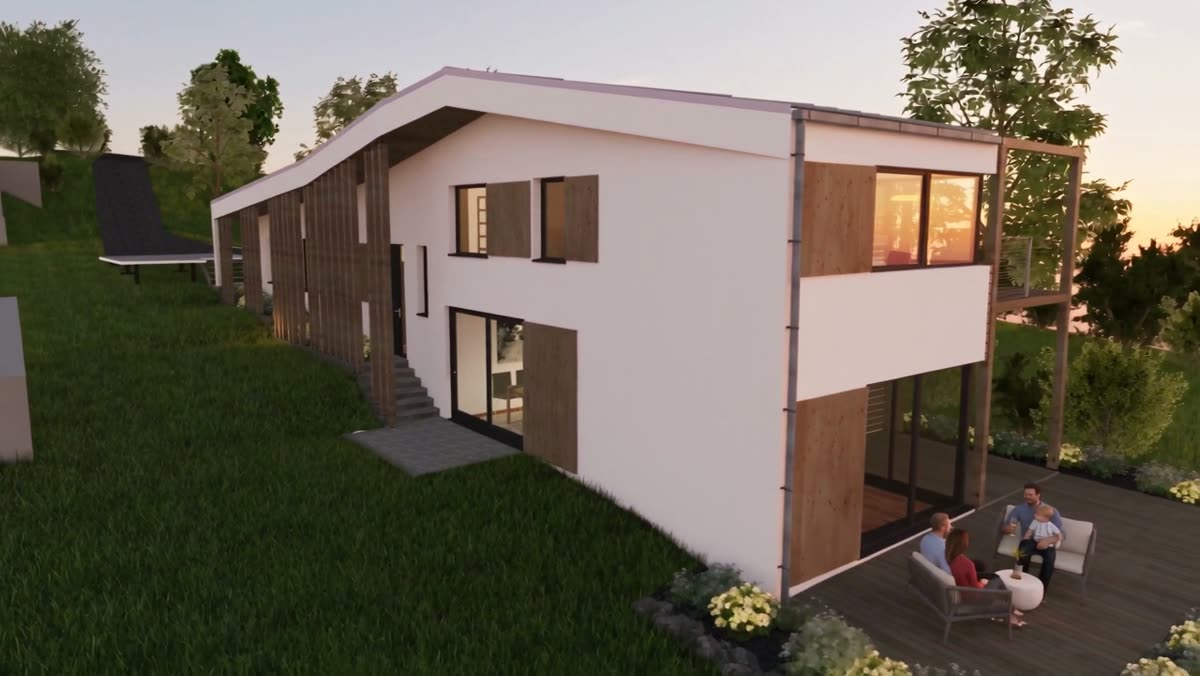
Here is what came back, at zero seconds, eight seconds and sixteen seconds.
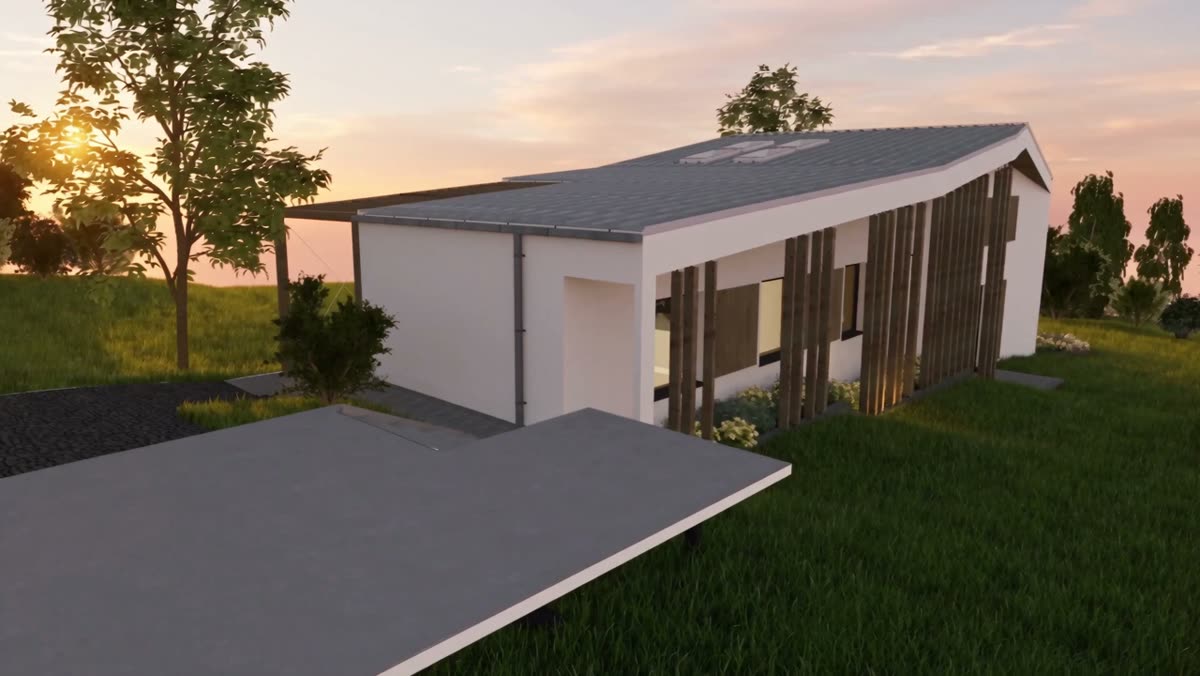
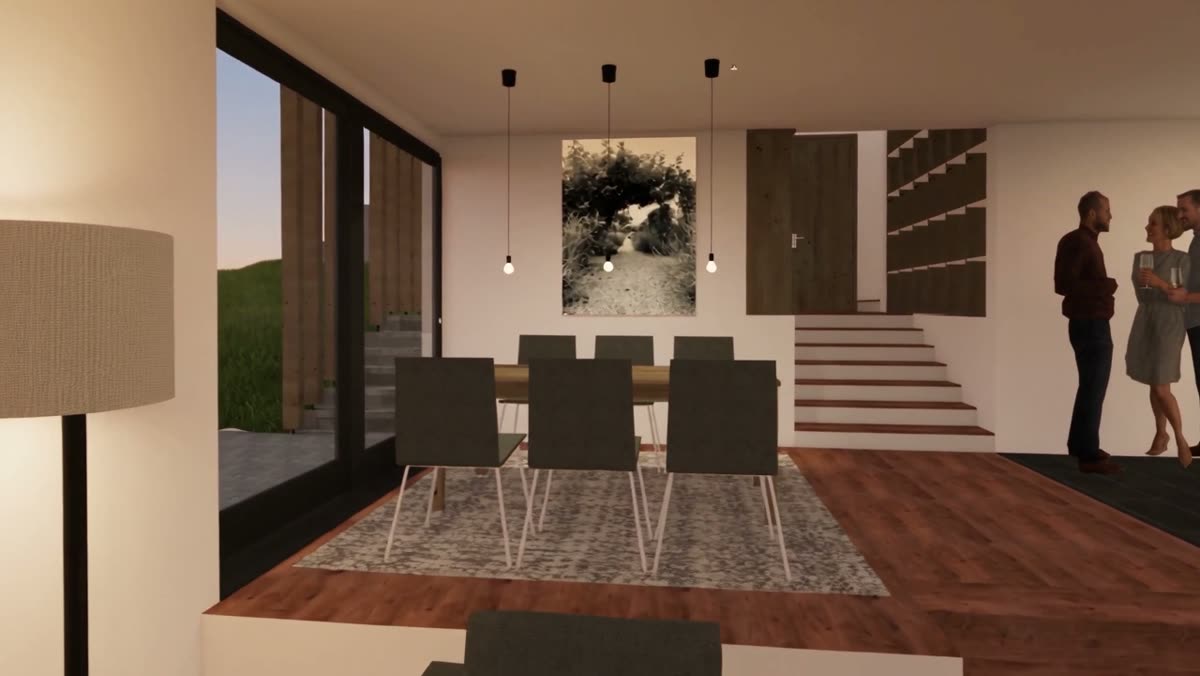
The opening frame is fine. Slightly plastic, but you could show it to someone.
By second eight it is not my house. The long single-storey form has become a two-storey box with a balcony, and a row of generic white blocks has appeared on the hill behind it that exists nowhere in the model or on the site. By second sixteen the interior is stock archviz with three waxy people in it, and none of the joinery I specified is there.
Generic, and honestly a bit ugly. The camera move was right. The building was gone.
02Why it fell apart
The mistake is easy to make because the input looked so complete. I gave it my actual model. Surely that is the strongest possible reference?
No. Here is the distinction that took me two runs to see.
A video driver
Supplies motion. Where the camera goes, how fast, in what order. It is read as a movement path, not as a description of a building.
A reference still
Supplies identity. What this thing looks like at this moment. Massing, proportion, material, window rhythm, the actual object.
An untextured viewport clip is very weak evidence of identity. It is flat white, the materials are placeholders, the lighting is nothing. So the model takes the camera path, notes that it needs to invent almost all of the appearance, reads your paragraph full of "beautiful" and "scandinavian" and "minimalist", and fills the gap from the average of everything it has ever seen.
That average is exactly what generic looks like.
The second problem is the shape of the prompt. One paragraph covering exterior, landscape, living room and kitchen gives the model no idea when any of it applies. So it tries to satisfy all of it at once, and drifts toward whichever description is loudest at that second.
The words barely changed between my two attempts. The anchoring did.
So the fix has two halves. Give it real evidence of identity at each moment, and tell it which moment each description belongs to.
03Step one: pick four beats, pull four frames
Before you touch anything AI, decide the film in your CAD viewport. Four beats is the number that worked for twenty seconds. Fewer and it drifts between anchors. More and each beat is too short to read.
Choosing the beats
- Approach. The establishing shot. Whole building, best three-quarter angle, the one you would put on the cover.
- Arrival. Closer. Entry, carport, the threshold you actually walk through.
- Inside, the main room. The living space, taken from where you enter it.
- The money room. Kitchen, or whatever the client cares most about.
That is a sequence a person could physically walk, in order, without teleporting. Keep it that way. If beat three is upstairs and beat four is back in the garden, the model has to invent the journey between them, and inventing is where drift lives.
Now orbit your model in the viewport to each of those four positions and screenshot the frame. Untextured is fine. What matters is that the geometry is correct and the composition is the one you want.
The check
Look at your four frames side by side. Could a stranger put them in the right order without being told? If not, your beats are not a walk yet, they are four separate renders.
04Step two: make each frame photoreal
This is the step I skipped the first time, and it is the whole difference.
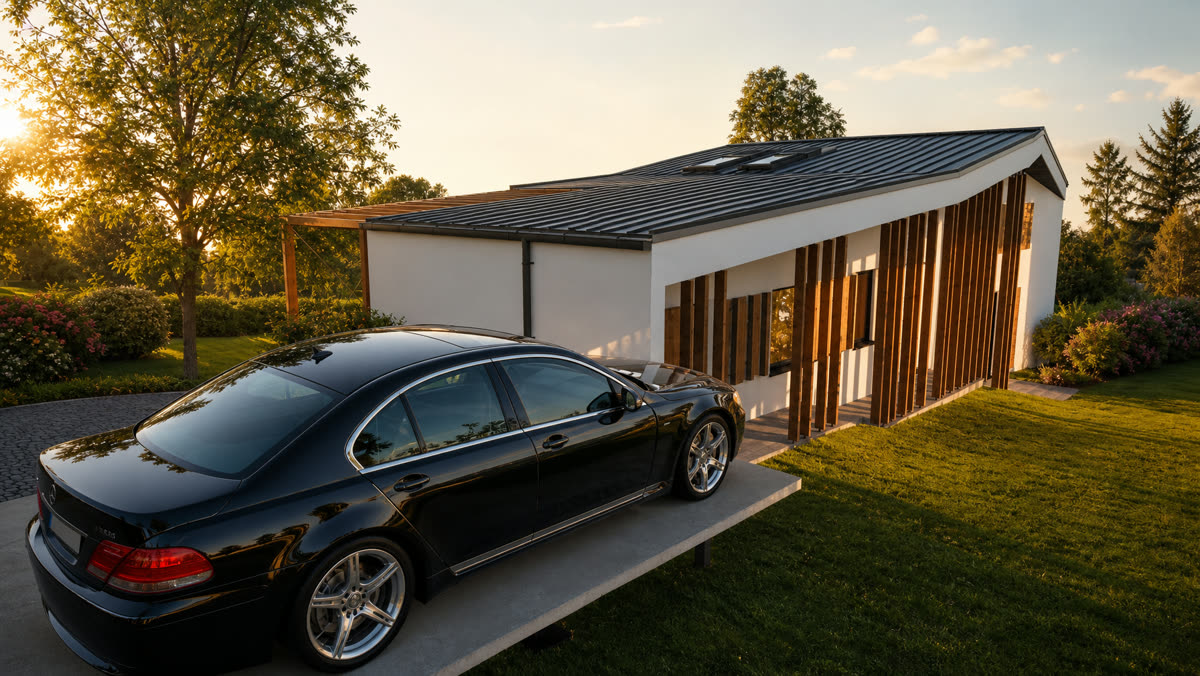
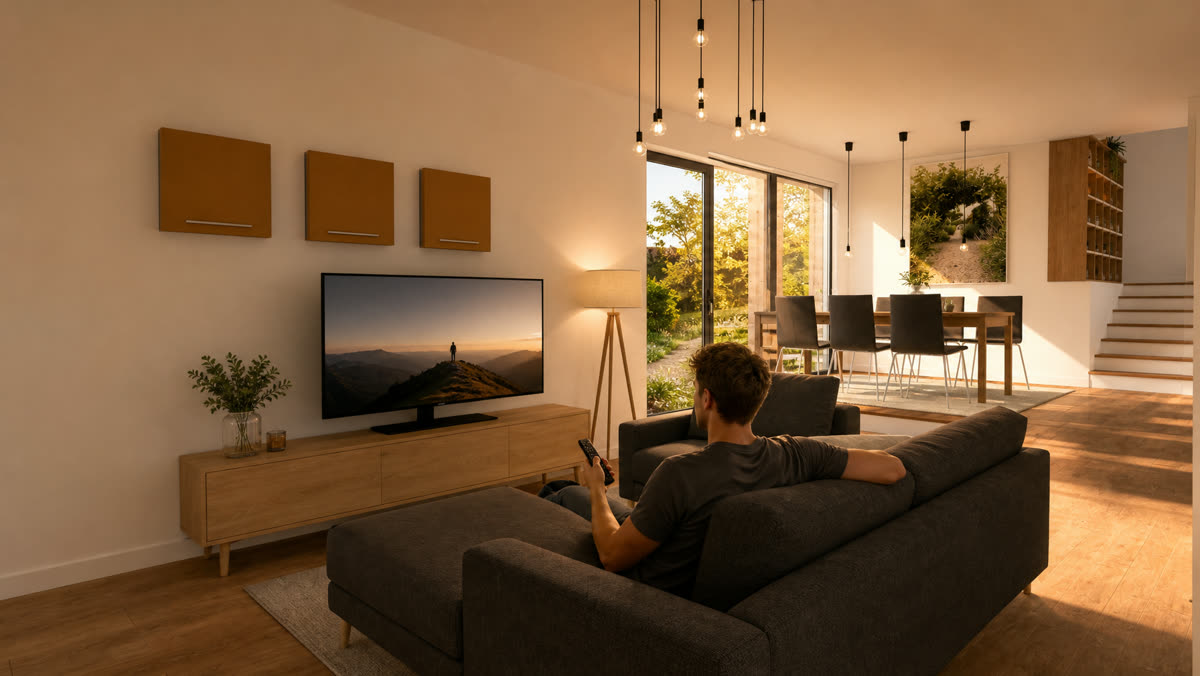
Take each ArchiCAD frame into GPT Image 2 and use edit, not generate. Edit keeps your geometry as the base and paints material, light and context on top of it. Generate starts from nothing and gives you a nice house that is not yours.
Four frames in, four photoreal stills out.
Ref 01 · approach
Ref 02 · arrival
Ref 03 · living room
Ref 04 · kitchen
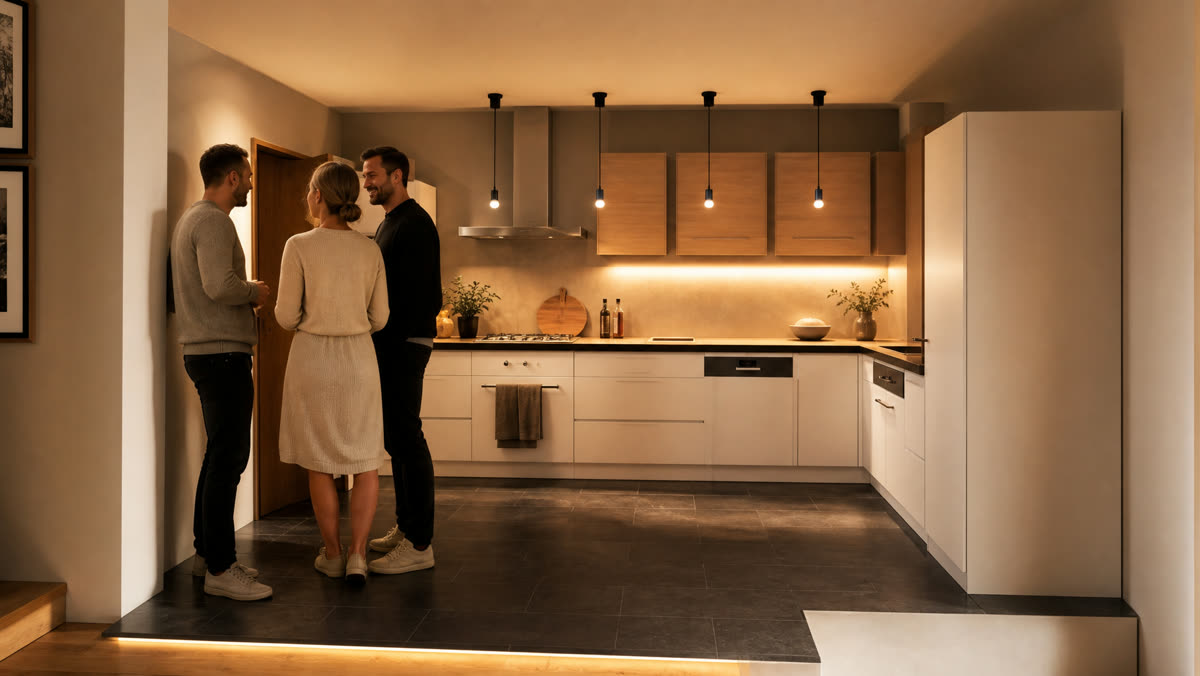
That comparison is the point. The roof pitch did not change. The window positions did not change. The building is still the building, and now it has material and light on it that Seedance can read.
Prompt · GPT Image 2 edit, one per frame
Edit this architectural viewport frame into a photorealistic
photograph. Keep the geometry exactly as it is: do not change the
massing, roof pitch, window positions, window count, or the camera
angle.

Apply these materials only:
[e.g. white textured render walls, vertical timber fins in oak,
dark powder-coated window frames, standing seam metal roof]

Lighting: [golden hour, low warm sun from the left / dusk with the
interior lit at 3000K]
Context: [sloping grassed site, established trees, suburban, quiet]

Photographic, not a render. Real depth of field, real sun. No
signage, no text, no watermark.
Where this goes wrong: if the output has a window your model does not have, throw it away and run it again. Do not proceed with a reference that is already slightly wrong, because every second of video after it will amplify the error.
05Step three: chain one prompt per beat
Now back to Seedance 2.5, with the four stills as your references.
The structure that works is one continuous prompt divided into beats, where each beat names its own reference image and states the camera move that gets you there. Not four separate clips stitched afterwards. One prompt, four anchors.
Prompt · the working structure, ready to fill in
Photorealistic professional architectural real estate video
flythrough using [reference 1] as main driver. [Time of day],
[neighbourhood character].

Start with [reference 1], [what the building is: wall material,
fins, glazing, landscaping]. Building is internally illuminated.

Camera arcs smoothly to [reference 2], [what is happening here:
people, activity]. [Materials visible in this beat.]

Camera enters the building smoothly to [reference 3]. Interior is
[furnishing, artworks, flooring, skirting, lighting temperature].

Camera moves to [reference 4], [activity]. [Joinery, benchtop,
splashback, appliances, flooring.]
Three rules make that structure hold.
The rules
- Every beat names its reference. No orphan descriptions. If a material is worth specifying, it belongs inside a beat that has an anchor image.
- Say the camera move, not the cut. "Camera arcs smoothly to", "camera enters the building smoothly to". Continuous verbs. The moment you write "cut to", you have given it permission to start a new scene, which means a new building.
- Describe only what is visible in that beat. Kitchen benchtops do not belong in the exterior sentence. That was half of what went wrong the first time.
For the record, here is the version that produced the film at the top of this page, with the fillers replaced by what I actually wrote.
Prompt · attempt two, in full
Photorealistic professional architectural real estate video
flythrough using [reference image] as main driver. Golden hour,
peaceful suburban neighbourhood.

Start with [reference image], beautiful architectural home, white
textured render external wall. Building is internally illuminated,
vertical aluminium fins with oak texture, beautiful landscaping with
grass, vegetation.

Camera arcs smoothly to [reference image], family enjoying the
outdoor space. Oak colour external wall panels. Beautiful interior,
nicely lit with downlights, pendant lights, standing lamp.

Camera enters the building smoothly to [reference image]. Interior
beautifully furnished with soft furnishing, minimalist artworks,
Scandinavian furniture, carpet, oak solid timber flooring, white
skirting.

Camera moves to [reference image], people enjoying a conversation
with a glass of wine near the kitchen. High gloss laminate, black
granite benchtop, freestanding fridge, glass splashback, sink and
kitchen mixer, black granite flooring.
What came back: twenty seconds at 1280 by 720, 24fps. Same wall panels, same stair, same joinery, front elevation through to the kitchen bench, no drift.
Read the two prompts against each other. The vocabulary is nearly identical. Golden hour, white textured render, oak fins, Scandinavian furniture, black granite. Almost every phrase survives from the failed version.
What changed is that the sentences are now attached to images, and each image is attached to a moment.
06What to check before you send it out
Photoreal is not the same as correct, and a client cannot tell the difference. Before this goes anywhere near a presentation, run these.
The check
- Count the windows. On each elevation that appears. This is the most common silent error and the easiest to catch.
- Watch the roofline across the whole clip. Scrub slowly. Pitch changes are where drift shows first, before anything else looks wrong.
- Check what appeared on the neighbouring sites. My failed run invented a row of buildings on the hill. If your site has a real context, an invented one is a problem you own.
- Check the materials you are contractually describing. If the film shows a benchtop you have not specified, either specify it or change the film.
- Say what it is. Label it a visualisation, the same way you would label an artist's impression. It is not a render of a documented design and should not be presented as one.
Worth being honest about: this is a mood and spatial-sequence tool at concept and early design stage. Do not use it to show a client a detail you have not resolved, because the film will resolve it for you, confidently, and wrongly.
07What it still will not do
It will not design the building.
Every material call, every camera beat, every reference frame in this workflow came from the CAD model and from me. The model supplied light and texture and twenty seconds of motion. It supplied no decisions.
It will not fix a weak sequence either. If your four beats are badly chosen, you get a well-lit, photoreal, badly sequenced film. The judgement about which four moments explain a building is the architectural part, and it is still entirely yours.
And it will not survive without anchors. Take the reference stills away and you are back at section 01, watching your house turn into somebody else's.
The part worth keeping
The old advice for AI video was to write a better prompt. That advice is now mostly wrong.
Prompt quality got you from unusable to generic. Anchoring is what gets you from generic to your actual project. The text says what things are made of. The reference frames say which building it is.
You still need the anchor. You just need fewer of them than you used to. Four stills carried twenty seconds, and four stills is one afternoon in a model you had already built.
The model builds the geometry. Seedance builds the light. Neither of them decides which four moments explain your building.
Four frames.
One chained prompt.
One chained prompt.
Every prompt in this piece is above in full. Take them, change the materials to your project, and run it on a model you have already finished.
If you try it, I would genuinely like to see the before and after. The failed version is the interesting one.
Copyright 2026 Chiang Ning. All Rights Reserved.