21 AI skills and MCPs for construction PMs. All verified.
Every name here opens a real repo. That sounds like a low bar. It is not: when I first assembled this list, a third of it did not exist.
Most AI tool lists are written by an AI that never checked whether the tools exist.
I found this out the hard way. I built this list the way everyone builds these lists: asked for research, got back twenty-one confident names with tidy one-line descriptions, and laid them out.
Then, before publishing, I checked every one against GitHub.
Seven of them were not real. Not obscure. Not renamed. Not real. bid-tabulator and subcontract-writer returned zero results across the whole of GitHub.
01The tell: they were all plausible
Here is the part worth your attention, because it will happen to you.
The fakes were not wild. Every one sat directly next to a real tool, wearing a slightly better name.
- bid-tabulator does not exist. bid-analysis-comparator does.
- budget-tracker does not exist. budget-variance-analyzer does.
- submittal-log-generator does not exist. submittal-tracker does.
- subcontract-writer does not exist. subcontractor-prequalification does.
A model asked to list construction tools produces the names such tools would have. It is pattern-matching a plausible shape, and a plausible shape is exactly what slips past a reviewer who is skimming.
A wrong answer that looks wrong is harmless. A wrong answer that looks right is the whole problem.
This is the same failure mode as a fabricated case citation or an invented Australian Standard clause number. It costs you nothing when you catch it and everything when a client does.
If an AI names a tool, a standard, a clause or a source, click it before you repeat it.
02Where the real ones actually live
The verified list comes from two places, and knowing which is which changes how you install them.
Fifteen are Claude Skills inside one open repository from DataDrivenConstruction. It holds 221 skills for construction, MIT licensed. Each one is a folder with a plain-text SKILL.md inside. You can read every line before you run it.
Six are standalone MCP servers, each its own project. An MCP server is different from a Skill: a Skill is saved instructions, an MCP server is a live connection to software. revit-mcp talks to an open Revit session. pyp6xer-mcp opens a P6 file. That is the difference between telling the assistant how to do something and giving it hands.
Read before you run. These are community projects, not vendor software. Nobody is supporting them and nobody is liable for them. Point them at a copy of your data first, not the live job.
03The 21
Every link goes straight to the source: the repo for an MCP server, the exact skill folder for a Skill. All twenty-one were checked the day this was published.
BIM data & documents
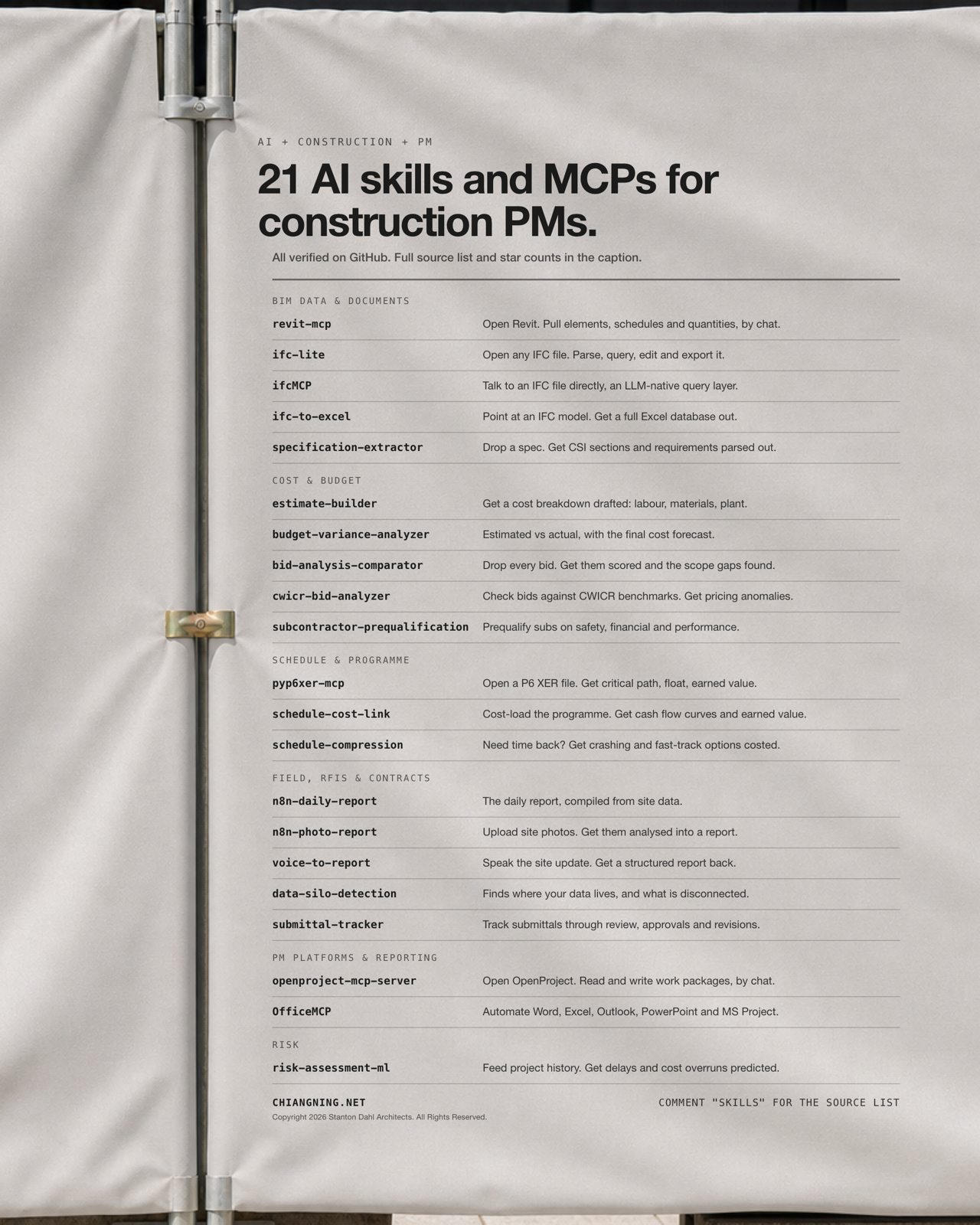
revit-mcp Connects Claude straight to an open Revit session. Pull elements, schedules and quantities, and push changes back, by chat. mcp-servers-for-revit/revit-mcp · 440★ on GitHub ifc-lite Parse, view, query, edit and export IFC, IDS and BCF. The most active open IFC toolkit on this list. LTplus-AG/ifc-lite · 276★ on GitHub ifcMCP An LLM-native query layer over IFC. Ask a model a question in plain English instead of writing IfcOpenShell. smartaec/ifcMCP · 33★ on GitHub ifc-to-excel Converts IFC 2x3, 4x1 and 4x3 into an Excel database via the IfcExporter CLI. Quantities out, no Revit licence needed. DDC skill · 1_DDC_Toolkit/CAD-Converters specification-extractor Parses construction specs into structured data: CSI sections, requirements, submittals. DDC skill · 2_DDC_Book/2.4-PDF-CAD-to-DataCost & budget
estimate-builder Builds a cost breakdown with labour, materials and plant, from your own historical data. DDC skill · 2_DDC_Book/3.1-Cost-Estimation budget-variance-analyzer Compares estimated against actual, spots the trend, and forecasts the final cost before it lands. DDC skill · 4_DDC_Curated/Financial-Management bid-analysis-comparator Scores every contractor bid, finds the scope gaps, and recommends a selection. DDC skill · 1_DDC_Toolkit/Procurement cwicr-bid-analyzer Checks bids against CWICR benchmarks and flags pricing anomalies component by component. DDC skill · 1_DDC_Toolkit/CWICR-Database subcontractor-prequalification Prequalifies subs on safety, financial and performance criteria before they get near a tender list. DDC skill · 1_DDC_Toolkit/ProcurementSchedule & programme
pyp6xer-mcp Opens a Primavera P6 XER file directly. Critical path, float and earned value without opening P6. paulieb89/pyp6xer-mcp · 12★ on GitHub schedule-cost-link Cost-loads the programme, then generates cash flow curves and tracks earned value. DDC skill · 1_DDC_Toolkit/Schedule-Integration schedule-compression Crashing and fast-tracking options, with the cost-time tradeoff priced. DDC skill · 3_DDC_Insights/Schedule-OptimizationField, RFIs & contracts
n8n-daily-report The daily site report, compiled automatically from field data by an n8n workflow. DDC skill · 3_DDC_Insights/Automation-Workflows n8n-photo-report Site photos in, AI image analysis out, formatted as a photo report. DDC skill · 3_DDC_Insights/Automation-Workflows voice-to-report Field staff speak the update. It transcribes and structures it into a real report. DDC skill · 3_DDC_Insights/Field-Automation data-silo-detection Maps where your project data actually lives and which sources are disconnected from each other. DDC skill · 2_DDC_Book/1.2-Data-Silos-Integration submittal-tracker Tracks submittals through review: approvals, revisions, compliance. DDC skill · 1_DDC_Toolkit/Document-ControlPM platforms & reporting
openproject-mcp-server Read and write OpenProject work packages by chat. Search, create, update. AndyEverything/openproject-mcp-server · 68★ on GitHub OfficeMCP Drives Word, Excel, Outlook, PowerPoint and MS Project from the assistant. OfficeMCP/OfficeMCP · 107★ on GitHubRisk
risk-assessment-ml Machine learning over your project history to predict schedule delays and cost overruns. DDC skill · 5_DDC_Innovative04How to actually install one
For the fifteen Skills, there is no installer. A Skill is a folder. You clone the repo, copy the folder you want into your project, and call it by name.
Start with one. Pick the document you file most often, find the skill closest to it, and read its SKILL.md before you run it. Most of them will need editing to match how your practice actually works, and that editing is the point. A skill you have adapted to your templates beats a generic one every time.
05What is missing, and it is glaring
Look at the list again and notice the shape of the hole in it.
Everything above works on open formats. IFC. XER. Excel. PDF. The moment a format is open, the tooling is strong: ifc-lite has 276 stars, revit-mcp has 440.
Now try to find the equivalent for the platform your project probably actually runs on. There is no official Procore MCP. The community ones sit at five, four and three stars, and the most complete of them is a personal side project that needs a 41MB spec file you have to supply yourself. Autodesk Construction Cloud is no better: the ACC servers I found have two stars, one star, and zero.
The open tooling is strong wherever the data is open, and absent wherever it is locked behind a vendor.
That is not a coincidence and it is not a gap that community developers can close. You cannot build a good open connector to a platform whose API you have to beg for. Procore has announced Agentic APIs and is signalling MCP support through its developer portal, which will change this the moment it lands. Until then, the honest answer for the biggest platform in construction is: not yet.
So the practical read is this. The work that is automatable today is the work sitting in open formats, which is more of your week than you would guess. The model file. The programme. The spec. The cost report. Start there, because that is where the tools are real.
One last thing
Twenty-one is not the interesting number in this article. Seven is.
Seven fabricated tools survived research, a first draft, and a layout, and would have gone out to several thousand people if nobody had clicked the links. They only died because someone opened GitHub and searched.
That check took an afternoon. Do it on anything you are about to put your name to.
The document you file most often.
Comment "Skills" and I will point you at the one on this list closest to your week, and how to adapt it to your templates.
If a colleague is about to publish an AI-researched list, send them this first.