You're not behind. Here's how to start with AI in FY2026–27.
Everyone has an opinion on it. Almost nobody has used it properly. Here is the plain-English starter for architects and PMs: what it actually is, when to reach for it instead of ChatGPT, and the seven codes that separate a generic answer from real work.
If you feel behind on AI, you are not.
You have heard the name a hundred times. Someone in the office swears by it. Someone else tried it once, got a bland answer, and decided the whole thing was overhyped. Both of them are right, and both of them are missing the point. The people getting value out of this did not start earlier than you; they started smaller, and they learned the shape of the tool.
Because Claude is not magic and it is not a search engine. It is a tool with a very particular shape, and once you understand that shape, it stops being a novelty and starts giving you your evenings back. The claims off six PDFs. The 90-page contract you have to read by Friday. The minutes, the reports, the fee letters you rewrite from scratch every time.
So this is the starter, in plain English. What it actually is, when to use it, the three things nobody tells you until you have already been burned, and the seven codes that make it useful. No theory, no hype. The parts you can use this week.
01What it actually is
Like the sharpest graduate you ever hired. Has read everything. Has been to nothing.
Underneath, Claude does one deceptively simple thing: it predicts the next word, over and over, faster than you can read. That sounds too plain to be useful, until you realise the scale. It has read more codes, contracts, specifications and reports than anyone in your office ever will, and it can draw on all of it in a sentence.
But it has never stood on a site in the rain. It has no stake in your project, no memory of the client who burned you last year, and no judgement of its own. It is astonishingly well-read and completely green. Treat it exactly like that: a brilliant grad you would never let sign a certificate unread, but would happily hand the first draft.
Why it matters: the moment you expect judgement from it, you get let down. Expect a fast, well-read first pass that you steer and sign off, and it rarely disappoints.
02Claude or ChatGPT?
Two good tools, different jobs. Most people who are serious keep both open.
This is the question everyone asks, so here is the honest version, with no tribal loyalty attached.
Reach for Claude when the work is long or written: a lengthy contract or specification to decode, a QS assessment to cross-check, a claim buried in a stack of PDFs, a fee letter or set of minutes where the wording has to be right. It holds a very long document in front of it without losing the thread, and it writes in a calmer, less breathless voice.
Reach for ChatGPT when you want to talk out loud on the drive home, generate a quick concept image, or search the live web for something that happened this morning. Those are its strengths, and Claude will not pretend otherwise.
The one mistake: forcing one tool to do the other's job, then blaming the tool. Match the job to the strength and both look far smarter.
03Three things nobody tells you first
Each one feels like a bug the first time. None of them is. They are just how the tool works.
1 · It has a memory budget
Every conversation has a limit — think of it as the length of the meeting before people stop remembering the start. Pile a whole project into one endless thread and it quietly loses the top of it. So keep one thread for one piece of work, and start a fresh one when you move to the next. Starting over costs nothing.
2 · It wants to agree with you
Claude is trained to be agreeable, which means it will rarely volunteer that your fee is too low, your program is optimistic, or your logic has a hole. Left alone, it nods. You have to ask it to push back — and when you do, it is genuinely useful at it.
3 · It can be confidently wrong
It will produce a clause number, a date, or a dollar figure with total conviction, and occasionally that figure is invented. This is the one that bites. Never let a number or a reference leave the building on its trust alone. Check it against the source — the actual clause, the actual claim, the actual contract.
You are a sceptical senior colleague reviewing my thinking, not a
cheerleader. Be direct.

Here is what I'm proposing:
[PASTE your fee basis / program logic / design decision]

Do this:
1. Give me the three strongest reasons this could be wrong, risky,
   or under-priced.
2. Name anything I've assumed without evidence.
3. Tell me what a tough client or contractor would attack first.
Australian English. Don't soften it to be nice.
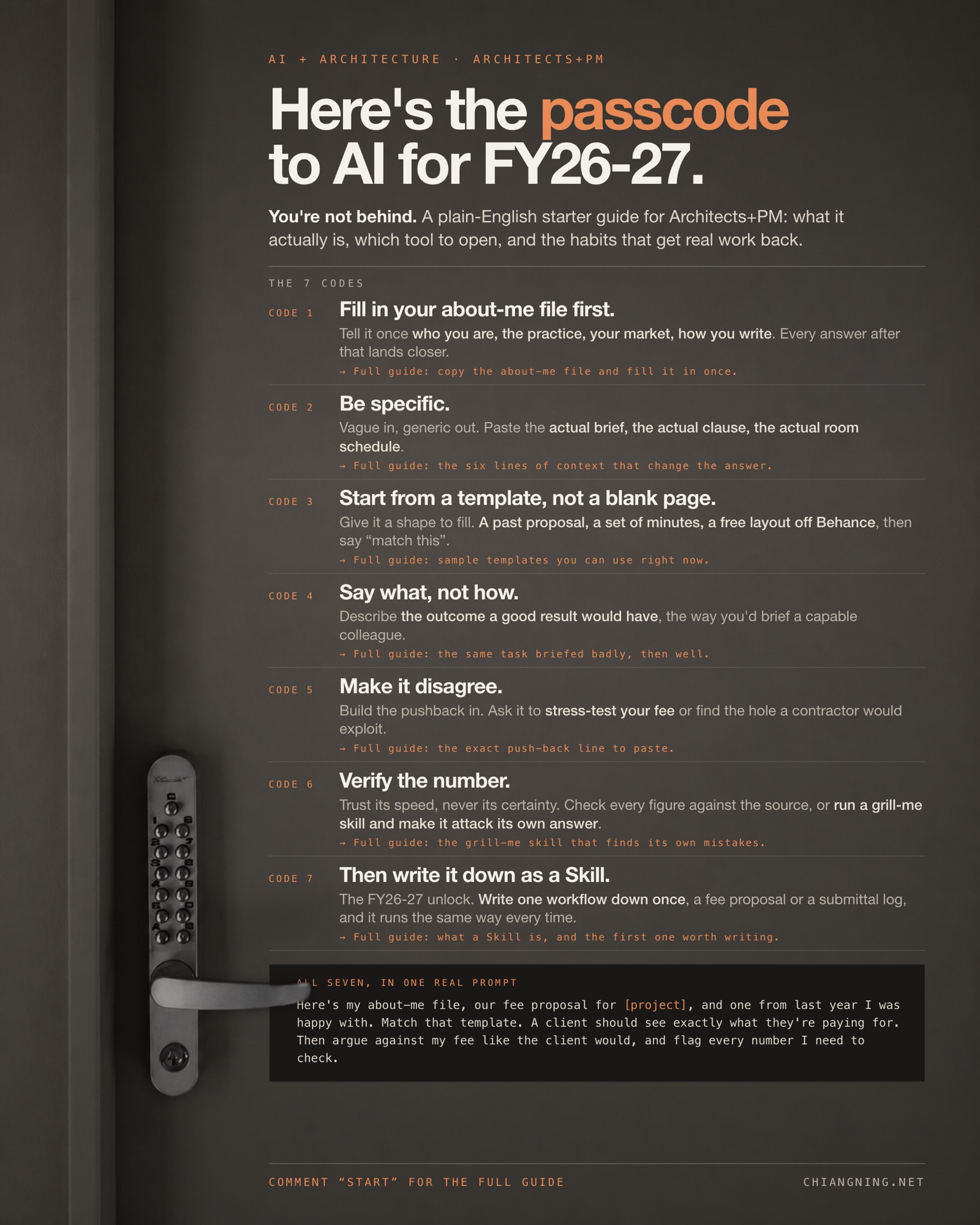
04The seven codes that get real work back
Nothing here is technical. It is all just how you brief a capable person, written down.
Code 1 · Fill in your about-me file first
Most people start every conversation from zero, then wonder why the answer reads like it was written for someone else. Tell it once who you are, the practice, your market, the way you write, and keep that file where you can paste it at the top of any thread (or save it as project instructions so you never paste it again). It is fifteen minutes, once, and every answer afterwards lands closer to something you would actually send.
ABOUT ME (paste at the top of a new thread, or save as project instructions)

Who I am: [name, role, registration, years in practice]
The practice: [size, where, sectors, typical project value]
My market: [clients, procurement route, the authorities I deal with]
The codes and standards I work to: [NCC, state planning, client standards]
How I write: [Australian English, plain, no fluff, no em dashes]
What good looks like to me: [short, specific, assumptions flagged]
What I never want: [invented figures, invented clause numbers, filler]

Use this as background for everything I ask in this thread.
If something here contradicts what I ask for later, ask me which one wins.
Code 2 · Be specific
Vague in, generic out. "Write a fee proposal" gets you a template anyone could have written. Paste the actual brief, the actual clause, the actual room schedule, and you get something that fits your job. Context is not a nicety; it is the whole game.
Code 3 · Start from a template, not a blank page
One example beats a page of instructions. Give it a shape to fill and it fills it far more faithfully than it follows abstract rules. The shape can be a past proposal or set of minutes you were proud of, or, when you have nothing good to hand, a free layout off Behance, Notion's template gallery, or your own office standard. Hand it over and say "match this".
Why this one pays off fastest: the template carries all the structure you would otherwise have to describe in a paragraph. You stop writing instructions and start pointing.
Code 4 · Say what, not how
Describe the outcome a good result would have, the way you would brief a capable colleague, and let Claude find the method. The moment you start dictating steps, you have swapped your expertise (what good looks like) for a job that was never yours (how to get there).
Code 5 · Make it disagree
Because it defaults to agreeing, build the pushback into the brief. Ask it to argue against your program, stress-test your fee, or find the hole a contractor would exploit. You will catch things at your desk that you would otherwise catch in a PCG.
You are helping an architect draft a fee proposal, in our house voice.

Match the tone and structure of this example we're proud of:
[PASTE a past fee proposal you'd happily send again]

Now draft the new one for:
[project, client, scope, stages, and anything unusual]

Rules:
- Match the example's structure and tone, not a generic template.
- Flag every assumption. Never invent a fee or a scope item.
- End with the three things you'd want me to confirm before it's sent.
Australian English.
Code 6 · Verify the number
Trust its speed, never its certainty. Every figure and every clause reference gets checked against the source before it goes out the door. Used this way it is a tireless first-pass assistant. Used blind, it is a liability with excellent grammar.
The trick that saves the most time is to make it do the first pass of that checking itself. Save the block below as a grill-me skill and run it on anything before it leaves the building: it stops writing and starts attacking its own output, which is the one job it is unreasonably good at.
GRILL ME

Stop drafting. You are now the person who has to defend this document
in a meeting, and you did not write it.

Take the output above and do this, in order:
1. List every number, date, area, rate and clause reference in it.
   For each one: is it from a source I gave you, or did you produce it?
   Mark them SOURCED or UNVERIFIED. Do not guess. Do not fill gaps.
2. List every claim that would fall over if one assumption were wrong,
   and name the assumption.
3. Tell me the first three things a tough client, contractor or
   certifier would attack, in the order they'd attack them.
4. Give me the shortest possible list of what I must check myself
   before this goes out.

No compliments. No summary of how good the draft is. Australian English.
Code 7 · Then write it down as a Skill
This is the code that turns the other six from good habits into a system, and it is the one worth picking up this year. Once a brief works, stop retyping it: save it as a Skill and call it by name. The next section is how.
Ready for the tools themselves? Read Claude has 5 surfaces for what each one does on a live job, then browse the 25 Claude Skills for architects and PMs. Everything links straight to its real home, no email wall.
05Write it down as a Skill
A Skill is just your instructions, saved with a name, so you never type them again.
By your third fee proposal you will notice you are typing the same brief with the project name swapped. That repeated brief is the skill. Write it once into a file, give it a name, and from then on you call it instead of rewriting it: same structure, same rules, same house voice, every time, whether you run it or someone else in the office does.
Start with the workflow you do most and hate most. A fee proposal. A submittal log. Minutes into actions. Anything where the shape never changes and only the content does. One skill, written once, is worth more than a hundred clever one-off prompts, because it survives you forgetting how you did it last time.
The one mistake: writing a skill for a job you do twice a year. Write them for the weekly grind, where the same twenty minutes disappear over and over.
New to the idea? What is a Skill explains it in one page, then The AI + Architecture Playbook is 25 ready-made ones you can install today and read as worked examples.
06The part it can't do
Everything above is the easy half. The fast, well-read, tireless half.
It still cannot read the room in a client meeting.
It cannot feel which option is the one to fight for.
It cannot carry the risk of the number you certify.
You would never let a good grad sign the certificate. You would let them draft it. Use Claude exactly the same way.
That judgement is still yours, and it is the part clients actually pay for. Everything underneath it just got faster — and that is where the hours come back.