Claude explained for architects and project managers. (one sheet, 6 sections)
Which model, how to brief it, where it pays back in hours, and the panel I put first: everything it gets wrong.
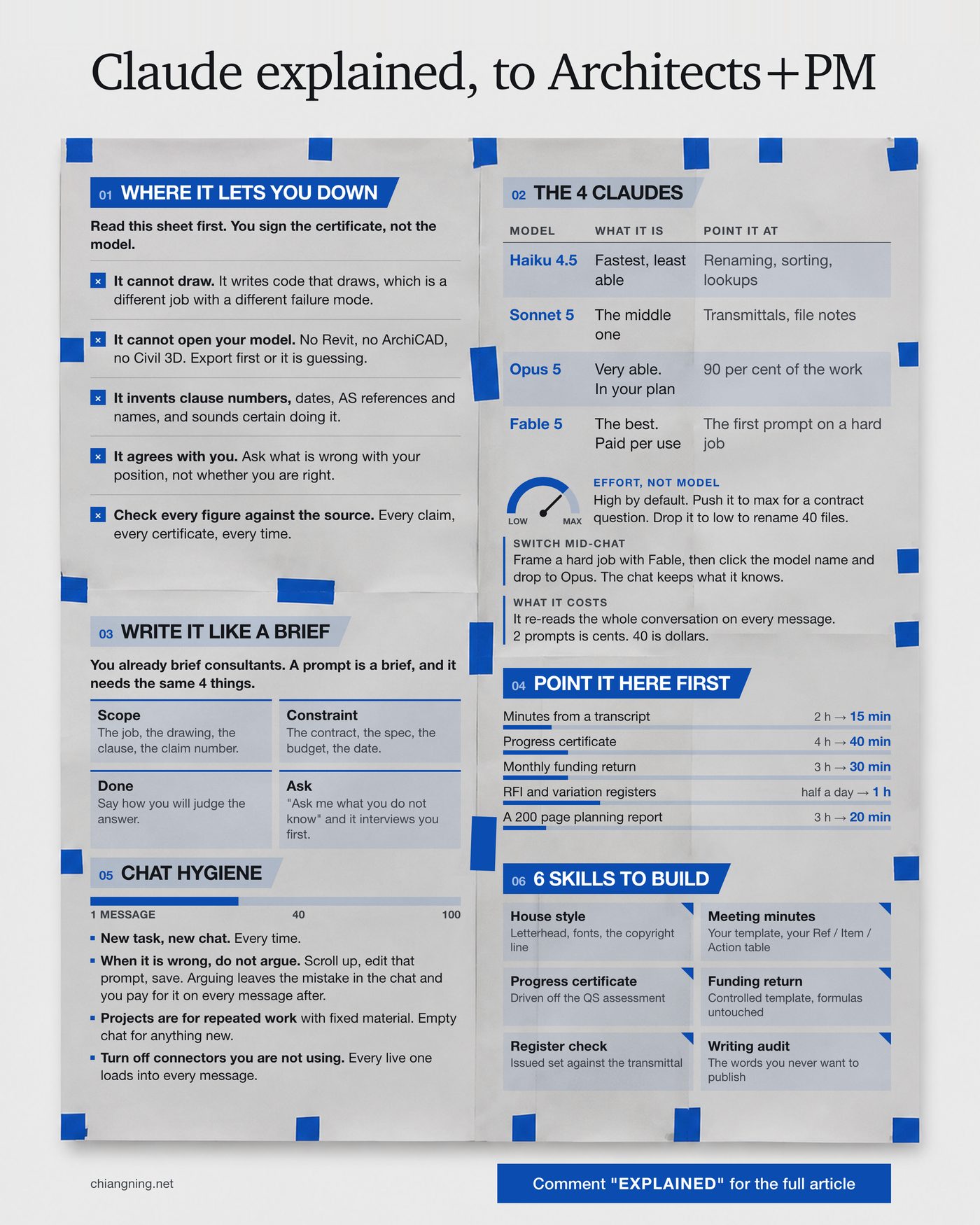
Most explainers about Claude are written for people who do not have a job like ours.
They tell you it can write, summarise and code. True, and useless. Nobody in a practice wakes up needing to summarise something in the abstract. You wake up needing minutes out of a 90 minute Teams transcript before the 4pm deadline, a progress certificate that reconciles to the QS assessment, and a variation register that matches the one the builder is quoting from.
So this is the version for the job. 6 sections, in the order I would hand them to someone in my own office. The failures come first, because the fastest way to lose a year with this thing is to trust it on something it cannot do and then never trust it again.
2 things before we start
- Have a real job open while you read. Not a test question. The difference between this being interesting and being useful is whether you point it at an actual claim, transcript or register today.
- Send it to 1 project manager who still types into it like a search box. That is most people, and it is the single biggest gap between the people getting hours back and the people who are not.
Section 01Where it lets you down
Read this one first · you sign the certificate, not the model
Every other section is about what it can do. This one exists because the failures are not random. They are specific, repeatable, and each one has already cost somebody in this profession an embarrassing afternoon.
It cannot draw
It can write code that draws, which is a different job with a different failure mode. Ask for a wall type detail and you will get either a description of one or a script that produces something detail-shaped. Neither is a detail. The gap matters because the output can look convincing at thumbnail size and fall apart the moment somebody tries to build from it.
It cannot open your model
No Revit, no ArchiCAD, no Civil 3D. If you have not exported something it can actually read, a schedule, a PDF, an IFC, a CSV, then it is working from your description of the model rather than the model. It will still answer. That is the problem.
It will invent a clause number
Also dates, AS references, names and page numbers, delivered in exactly the same confident register as the things it has right. This is the failure that ends careers-worth of goodwill in one email, because a wrong clause number in correspondence to a builder is not a typo; it is a position you have taken on the contract.
The habit that fixes it: never let a reference reach an outgoing document without opening the source. Not "check the important ones". All of them.
It will agree with you
This is the expensive one, and the one almost nobody guards against. Ask "is my position on this EOT claim reasonable?" and you will get support for your position. Ask "what is the strongest argument against my position on this EOT claim?" and you will get the thing the builder's contract administrator is about to write to you.
Same model, same job, 2 completely different values delivered. The second question is worth more than the first every single time.
It is a well-briefed graduate with an enormous library and no professional indemnity cover.
Section 02The 4 Claudes
Choosing the model is the easy part · the dial nobody touches is effort
4 models, and most people use whichever one loaded. Here is what each is actually for on a project.
| Model | What it is | Point it at |
|---|---|---|
| Haiku 4.5 | Fastest, least able | Renaming, sorting, lookups, tidying a file list |
| Sonnet 5 | The middle one | Transmittals, file notes, routine email |
| Opus 5 | Very able, and already included in a paid plan | 90 per cent of the work: minutes, reports, certificates, register reconciliation |
| Fable 5 | The best there is, paid per use on top | The first prompt on a hard job, and nothing else |
The practical rule is that Opus 5 is your default and you should stop deliberating. It is in the plan you already pay for and it handles the overwhelming majority of contract administration work without complaint.
Effort, not model
There is a second control that changes the answer more than the model choice does, and almost nobody moves it. Effort sits high by default. Push it to max when the question is a contract interpretation, a compliance pre-check or a fee build-up, where a wrong answer costs real money and you would rather wait 40 seconds. Drop it to low to rename 40 files, where thinking harder produces the same filenames slower.
Most people meet the model on its quickest setting, conclude it is shallow, and stop. That is close to judging a practice on its first sketch.
Switch mid-chat
Frame a hard job with Fable 5, then click the model name and drop to Opus 5 in the same conversation. The chat keeps everything it already knows, so you buy the expensive thinking once, on the framing, where it does the most good, and run the rest of the work on the model you have already paid for.
What a chat costs
It re-reads the whole conversation on every message. Not the last thing you typed. All of it. That means a chat gets more expensive as it goes, and the 40th message in a long thread costs many times what the 2nd one did. 2 prompts is cents. 40 is dollars. This is also why section 05 exists.
Section 03Write it like a brief
You already know how to do this · a prompt is a brief
The single biggest difference between people getting hours back and people concluding it is overhyped is the shape of what they type. Architects and PMs are already professionally trained in exactly the skill required, and almost nobody connects the two. You brief consultants. A prompt is a brief, and it needs the same 4 things.
- Scope. The job, the drawing, the clause, the claim number. What this is about, specifically.
- Constraint. The contract, the spec, the budget, the date. What binds the answer.
- What done looks like. Say how you will judge it. "2 paragraphs I can paste into a letter" produces something different from "a table".
- Permission to ask. Finish with "ask me what you do not know". This one line changes the behaviour completely: instead of guessing at the 4 things you left out, it interviews you first.
Here is the difference on a real task.
"Write a response to this RFI."
Job: [job number and name]
Document: RFI [number], attached. It asks whether
[the substitution or clarification sought] is acceptable.
Constraint: the contract is [AS4000 / AS2124 / other] and
spec section [number] calls for [the specified item].
Done looks like: 2 short paragraphs I can paste into a formal
response, holding the specification without stopping the work,
and flagging anything a consultant has to verify before I sign it.

Ask me what you do not know before you write.
The second one is longer to type and shorter to fix. That trade is the whole game.
Why the last line matters: without it, the model fills gaps with plausible assumptions and you cannot see which ones. With it, the gaps come back to you as questions, which is exactly how a good graduate behaves.
Section 04Point it here first
My own jobs · checking time is inside these numbers
These are the tasks where it has paid back most reliably on live projects, with my before and after. They are the honest ones: repetitive, document-heavy, and structurally identical every month, which is precisely where it is strongest.
| Task | Before | After | |
|---|---|---|---|
| Minutes from a Teams transcript | 2 h | → | 15 min |
| Progress certificate and cover letter | 4 h | → | 40 min |
| The monthly funding return | 3 h | → | 30 min |
| RFI and variation register tidy-up | half a day | → | 1 h |
| Reading a 200 page planning report | 3 h | → | 20 min |
2 things about that table, so it is not read as a brochure.
First, the "after" figures include the checking. The 40 minutes on a progress certificate is 15 minutes of drafting and 25 minutes of reading every figure back against the QS assessment, which is work I did before and still do. The saving is real, and it is smaller than the drafting saving on its own.
Second, none of these are design. There is no line in that table about massing options or planning strategy, because that is not where the reliable hours are for a contract administrator. The reliable hours are in the documents that arrive on a cycle and have to reconcile to each other.
Notice what those 5 have in common. Each one takes information that already exists in a fixed structure and moves it into another fixed structure. That is the shape to look for when you are deciding what to try next in your own week.
Section 05Chat hygiene
Boring, and it is where most of the waste is
- New task, new chat. Every time. Context from the last job does not help the next one; it competes with it.
- When it is wrong, do not argue. Scroll up, edit the prompt that produced the bad answer, and save. Arguing leaves the mistake sitting in the conversation, and since it re-reads everything on every message, you pay for that mistake again on each message after.
- Projects are for repeated work with fixed material. A project container with the brief, the drawings and the consultant reports in it is excellent for the monthly cycle on one job. It is the wrong place to ask for a new idea, because it will answer from the files.
- Turn off connectors you are not using. Every live one loads into every message you send, whether it is relevant or not.
- Past 40 messages, start again. The answers get worse and the bill gets bigger at the same time, which is an unusual combination and a good signal to stop.
The second point is the one worth rereading. Editing the prompt above a bad answer instead of replying to it is the highest-value habit on this page, and it is invisible until somebody tells you.
Section 066 skills worth building
A skill is the prompt you only write once
Everything above is per-conversation. The step that compounds is writing the instruction down once, properly, so the next 12 months of that task run the same way without you rebuilding the brief each time. In Claude these are skills. In practice they are the office standard, in a file.
- House style. Letterhead, the fonts, Australian English, the copyright line, the things that make a document look like it came from your practice rather than from nowhere.
- Meeting minutes. Your template, your Ref / Item / Action table, your numbering, your conventions about what gets an action and what does not.
- Progress certificate. Driven off the QS assessment, cross-checked against the builder's claim and the project control document.
- The monthly funding return. A controlled template where the formulas and the accountant's figures must not be touched, which is exactly the kind of constraint worth writing down once.
- Drawing register check. The issued set against the transmittal, every month, looking for the one drawing that went out at the wrong revision.
- Writing audit. The words and sentence shapes I never want to publish, so anything client-facing gets checked against that list before it leaves.
A skill is a short document. Here is the whole shape of one.
---
name: progress-certificate
description: Prepare the monthly architect's progress
  certificate for a head contract, driven off the QS assessment.
  Use when asked to prepare or cross-check a progress claim.
---

## Inputs
- The QS assessment for this claim
- The builder's claim for the same period
- The project control document
- Last month's certificate

## Steps
1. Read the QS assessment. It sets the figures.
2. Cross-check the builder's claim against it and list every
   difference with a dollar value.
3. Reconcile the variations against the control document
   register. Flag anything approved but not yet certified.
4. Draft the certificate and the cover letter.
5. List every figure you could not verify from a source
   document, and stop.

## Rules
- Never invent a figure. If a number is not in a source, say so.
- [your house style, your rounding, your sign-off]
That is it. The description line is the part that matters most, because it decides whether the skill loads when you need it, and the "stop" in step 5 is the part that keeps you in the loop.
The first hour
If you want to test all of this on a real job this week, the order that works: take last month's meeting transcript, write the brief for it using the 4 things in section 03, run it on Opus 5 at high effort, then read the output against the transcript and note every place it was wrong. That last step is the one people skip and it is where the learning is.
Do the same task again next month. The second time is faster, and by the third you will have enough of a pattern to write it down as a skill.
What none of this does
It does not read your site. It does not know your planning scheme, your council, or the officer who will assess the application. It does not size a beam or resolve a junction. It will not sit in front of a client who has changed their mind about the brief for the third time.
And on the documents where it genuinely saves you hours, the certificates and the returns and the registers, it is still your name on the front. The hours come back. The obligation does not move.
On the model names: these change fast, and the specific version numbers above will date. The reasoning does not: use the capable model that is already in your plan for almost everything, spend the expensive one on framing hard problems, and move the effort dial more often than you move the model.
Start with the one about the failures.
Send this to 1 project manager who is still typing into it like a search box.
I run sessions for practices adopting this internally, and I write the skills. That is the business. This guide is free regardless.