Land that Architecture Job with AI
The full playbook for architects and graduates. Eight moves, every prompt, and how to use each one well. Free.
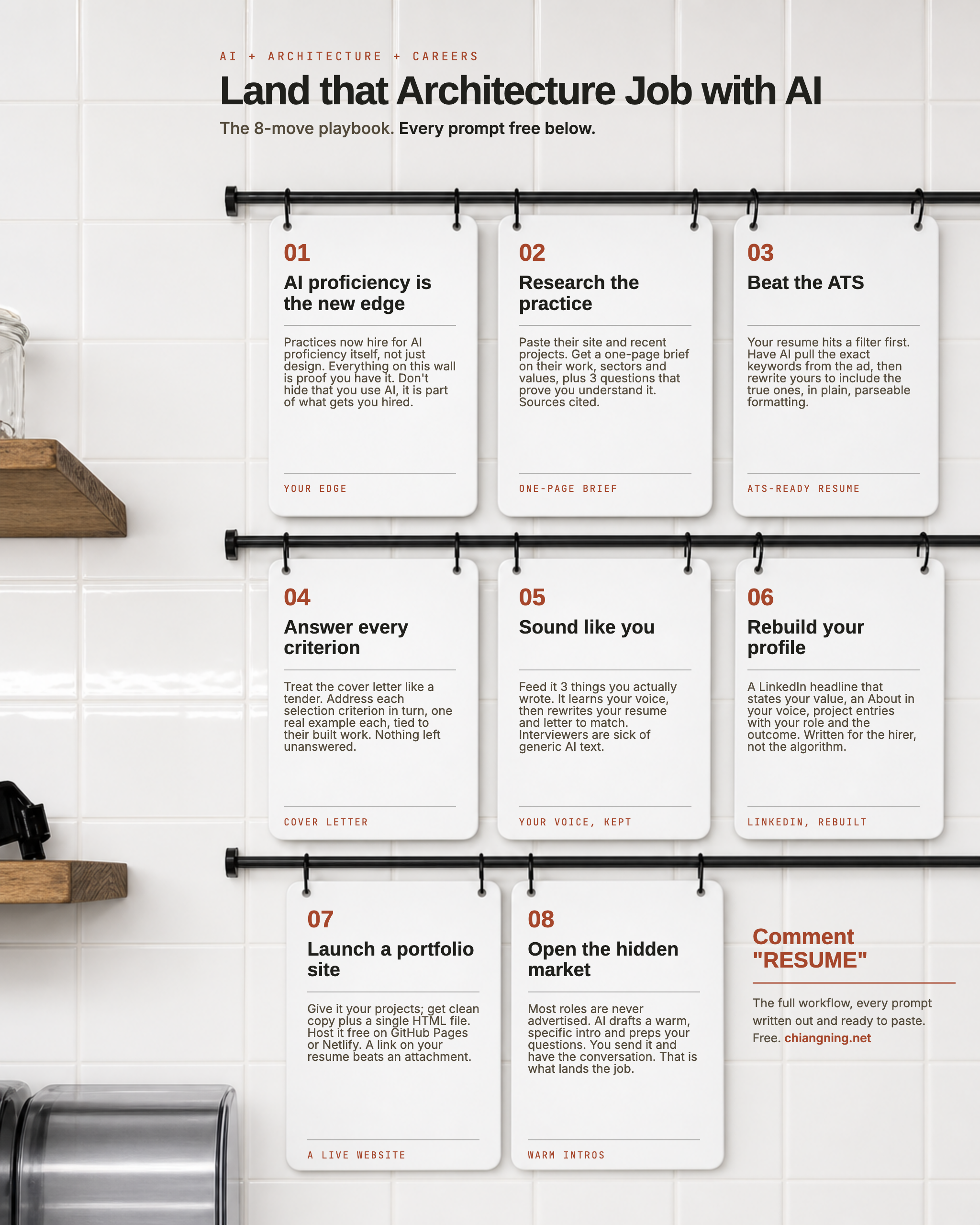
Here is the uncomfortable part. The practice you want to work for is already screening applicants with AI.
Your resume hits a filter before a human reads it. The shortlist is half-sorted before the interview. If you are an architect or graduate job-hunting right now, that is the game. This article is how you play it well, and how you stay a real person while you do.
There is a second shift most people miss: using AI well is now something practices hire for. A candidate who can research, draft and iterate fast, and who knows where the tool stops and judgement starts, is more useful on day one. Everything below is not just how you apply. It is proof you already work this way.
I have kept it honest. Every prompt names its limits, nothing here fakes experience, and the last move is the one that actually lands jobs and no prompt can do it for you.
- Do move 05 first. It builds a "voice guide" from your own writing that every later prompt reuses, so nothing you send sounds generic.
- Work one real job ad. Don't do this in the abstract. Pick a role you actually want open now and run the moves against it.
One rule throughout: AI does the heavy lifting, you make the calls. Never claim experience you do not have, an interviewer will find the gap in ten minutes. The portfolio, the conversation and the judgement stay yours.
AI proficiency is the new edge
Your edgeBefore the tactics, the mindset. Practices are starting to hire for AI proficiency itself, not just design skill, because it compounds across every task in the week. You do not need to be an engineer. You need to show you can use these tools with judgement. So don't hide that you use AI. Used openly and honestly, it reads as fluency, and fluency is the edge.
- Name one real workflow you run, then say exactly where you keep the human decision. "AI generates massing options; I choose which one respects the site." Specific beats buzzwords.
- Put a true "AI tools" line in your skills: the models and tools you actually use (Claude, Midjourney, a Rhino or Revit MCP, GPT Image). Only what you can demo.
- Have a two-minute story ready for interview: a task AI sped up, and how you checked its work like you'd check a junior's drawing.
- Know the limits out loud. Saying "it can't read a planning scheme, so I do" is what separates fluent from hype.
Research the practice
One-page briefWalk in knowing their work better than they expect. Before you write a word of the application, build a tight brief on who they are and what they value, so every later move can be aimed at them, not a generic firm.
Research [practice name], an architecture firm in [city]. Give me a
one-page brief to prepare for a job application and interview:
- Their 5 best-known or most recent projects, and the sectors they focus on.
- Awards, competition wins, and any recent news.
- The directors, and who I would likely report to in the [role] role.
- What their website and project write-ups suggest they value
  (design, delivery, sustainability, community, heritage).
- 3 smart questions I could ask that show I understand their work.
Cite your sources so I can verify them.
- Use a model with live web access or Deep Research (Claude, ChatGPT, Perplexity). Without it, the model guesses.
- Open every source it cites. AI can attach the wrong architect to a project. Cross-check against the practice's own site and their Australian Institute of Architects award listings.
- Pick one project you genuinely admire and understand why. That single specific reference, used in your letter and interview, does more than any amount of flattery.
Check it: if you can't verify a claim, cut it. Walking in accurate beats walking in confident and wrong.
Beat the ATS
ATS-ready resumeLarger practices and recruiters run resumes through an applicant tracking system that scans for keywords before a human ever looks. A brilliant resume that the filter can't parse never gets read. Fix that, honestly.
Here is a job ad:
[paste the full ad]

Here is my current resume:
[paste your resume]

Do this:
1. Extract every selection criterion, required skill, software, and
   keyword an ATS would scan for. List them as a checklist.
2. Rewrite my resume to be ATS-friendly for this role: use the exact
   keywords where they are genuinely true of me, in plain formatting
   (no tables, columns, text boxes or graphics that break parsing),
   [1 to 2] pages.
3. Flag any criterion I do not yet clearly evidence, so I can decide
   how to address it. Do not invent anything.
- Match software names exactly: write "Revit", "ArchiCAD", "Rhino", "AutoCAD" as the ad does, not "BIM software". The filter matches literal strings.
- Keep the format plain: one column, standard headings (Experience, Education, Skills), submitted as .docx or PDF-from-text. No tables, icons, or text in headers/footers, they get dropped.
- Never keyword-stuff. Once you pass the filter a human reads it. Stuffing reads as desperate. Every keyword must sit in a true sentence.
- Keep your beautiful designed resume too, for the portfolio and the human stage. The plain one is only to get through the machine.
Answer every criterion
Cover letterTreat the cover letter like a tender response. If a practice or a government or institutional client lists selection criteria, answer each one, in order, with a real example, tied to their work. Most applicants answer the ones they like. Answering all of them, well, is often what shortlists you.
Write a cover letter for my application to [practice] for [role].

Treat it like a tender response: address EVERY selection criterion
below, one at a time, each backed by a specific, real example from
my experience.

Selection criteria:
[paste the criteria, or the "about you" list from the ad]

My experience and projects:
[paste a short career summary and 3 to 5 projects, with your role]

Tie it to their built work:
[paste 2 or 3 of their projects or values from move 02]

One page. Confident, specific, no filler, no "I am passionate about".
Australian English.
- Give it evidence, not adjectives. For each criterion, hand it a situation, what you did, and the outcome. The model can only be as specific as your input.
- Read for the unspoken criterion. A practice burned by a cost blow-out is really hiring for reliability. Ask the model: "what is this client likely worried about that they didn't write down?" then reassure it quietly.
- One page. They read a stack. Long doesn't read as thorough, it reads as unedited.
Sound like you
Your voice, keptThe one nobody does, and the one that matters most. Reviewers now read dozens of applications that all sound like the same polite robot, and it is a fast "no". Train the model on your own writing so everything it drafts sounds like a person. Do this first and reuse it everywhere.
Here are 3 things I have written in my own words:
[paste 3 samples: an email you sent, a project description, any
paragraph that sounds like you]

Do this:
1. Describe my writing voice: sentence length, tone, rhythm, the words
   and phrases I favour, the ones I avoid.
2. Save that as a short style guide I can reuse.
3. Now rewrite my resume summary and the cover letter in THAT voice.
   Keep every fact the same. Change only the voice, so it reads like
   me, not like AI.
- Feed it real, unpolished samples, not things you already ran through AI. It needs your actual voice to copy.
- Save the style guide it produces and paste it into moves 04, 06 and 07 so your whole application sounds like one person.
- Read every output aloud. If a sentence isn't something you'd actually say, rewrite that line. This is your anti-generic insurance.
Rebuild your profile
LinkedIn, rebuiltYour LinkedIn is often checked before anyone replies to you, and it is where recruiters go looking in the first place. Rewrite it to sell your experience to a hiring architect, in your voice, not for the algorithm.
Here is my CV and a few project summaries:
[paste]

My writing voice (style guide):
[paste from move 05]

Rewrite my LinkedIn profile to appeal to architecture hiring managers:
1. A headline under 220 characters that says what I do and the value
   I bring, not just my job title.
2. An About section in first person, in my voice, telling a short
   career story and what I am looking for next.
3. For each of my [3 to 5] strongest projects: a 2-line entry with my
   specific role, the skills it shows, and the outcome.
4. A skills list that mirrors what architecture employers search for.
No buzzwords ("passionate", "results-driven"). Specific and human.
- Headline = specialism + value, not "Architect at ___". Recruiters search by specialism (aged care, education, heritage, multi-res).
- Turn on "Open to work" (visible to recruiters only, if you're employed) so you appear in their searches.
- Add your registration status if relevant, registered architect, or Part 1/2/3 toward AACA/state board. It's a real filter for employers.
Launch a portfolio site
A live websiteA link beats a 40MB attachment that bounces from an inbox. A simple one-page site says "I'm current, I ship things, click here." Claude can write you the copy and the code; you host it free.
I want a simple one-page portfolio website to showcase my architecture
work.

My projects:
[paste 4 to 6 projects: name, type, your role, one line each]

My writing voice (style guide):
[paste from move 05]

Do this:
1. Propose a clean structure: hero (name + what I do), about, selected
   projects (image + one short paragraph each), skills, contact.
2. Write the copy for each section in my voice.
3. Generate the whole thing as a single HTML file with inline CSS:
   minimal, fast, mobile-friendly, image placeholders I can swap, my
   name and contact in the header and footer. No frameworks.
- Host it free on GitHub Pages, Netlify or Cloudflare Pages. Ask Claude to walk you through the steps if it's new to you.
- Compress your images (TinyPNG or similar) so the page loads fast on a phone, that's where it'll be opened.
- Put the link everywhere: resume header, LinkedIn, email signature, and the outreach message in move 08.
- Keep it lean. 5 or 6 strong projects beat 20. Reviewers spend seconds, not minutes.
Open the hidden market
Warm introsThis is the one that actually lands jobs. Most architecture roles are never advertised, they're filled through a conversation or a referral. AI can lower the friction of reaching out. It cannot build the relationship for you, and it shouldn't try.
I want to reach out to [name / role] at [practice], because
[genuine reason: their project, a mutual contact, their work on X].

My background: [paste short summary].
My writing voice: [paste style guide from move 05].

Draft a short, warm, specific message (LinkedIn or email, under 120
words):
- Open with a genuine, specific reason I am reaching out, not flattery.
- One line on who I am and why it is relevant to them.
- A low-pressure ask: a 15-minute chat or advice, not "do you have a job".
- Sound like a real person, in my voice. No "I hope this finds you well".

Then give me 5 good questions to ask if they say yes to a coffee or call.
- Ask for advice, not a job. "Could I ask you 15 minutes about how you got into aged-care work?" opens doors that "are you hiring?" slams.
- Reference something real they made or said. Generic outreach is obvious and ignored.
- Follow up once, politely, after a week. Then leave it. Persistence, not pestering.
- The AI writes the first draft. You send it, and you show up as yourself. That part is the whole point.
Your first hour with this
- 10 min · Run move 05 on 3 things you've written. Save your voice guide.
- 15 min · Pick one real open role. Run move 02 to research the practice.
- 20 min · Run moves 03 and 04, resume and cover letter, for that exact ad. Edit in your voice.
- 15 min · Send one genuine outreach message (move 08) to someone at a practice you admire.
That's one real application and one real conversation started, in an hour, sounding like you. Do that a few times a week and the odds shift.
The part AI can't do
Everything above is the easy half. The fast, clean, step-by-step half. AI clears the busywork that used to eat your evenings and lets you apply to more roles, better, in your own voice.
But it will not read the room, choose which project to show, hear the worry a client didn't say out loud, or decide the number you'll stand behind. And it will not build the relationship that most jobs actually come from. Human connection still wins the offer. Use the hours these prompts hand back, and spend them on people.
AI opens the door. You still walk through it.
send it to one person who needs it.
A graduate who's been ghosted. A friend stuck rewriting the same cover letter. That's how it reaches the people it's for.