If I started with AI again, these 9 settings come first. (before a single prompt)
9 switches, 10 minutes. The configuration almost nobody does.
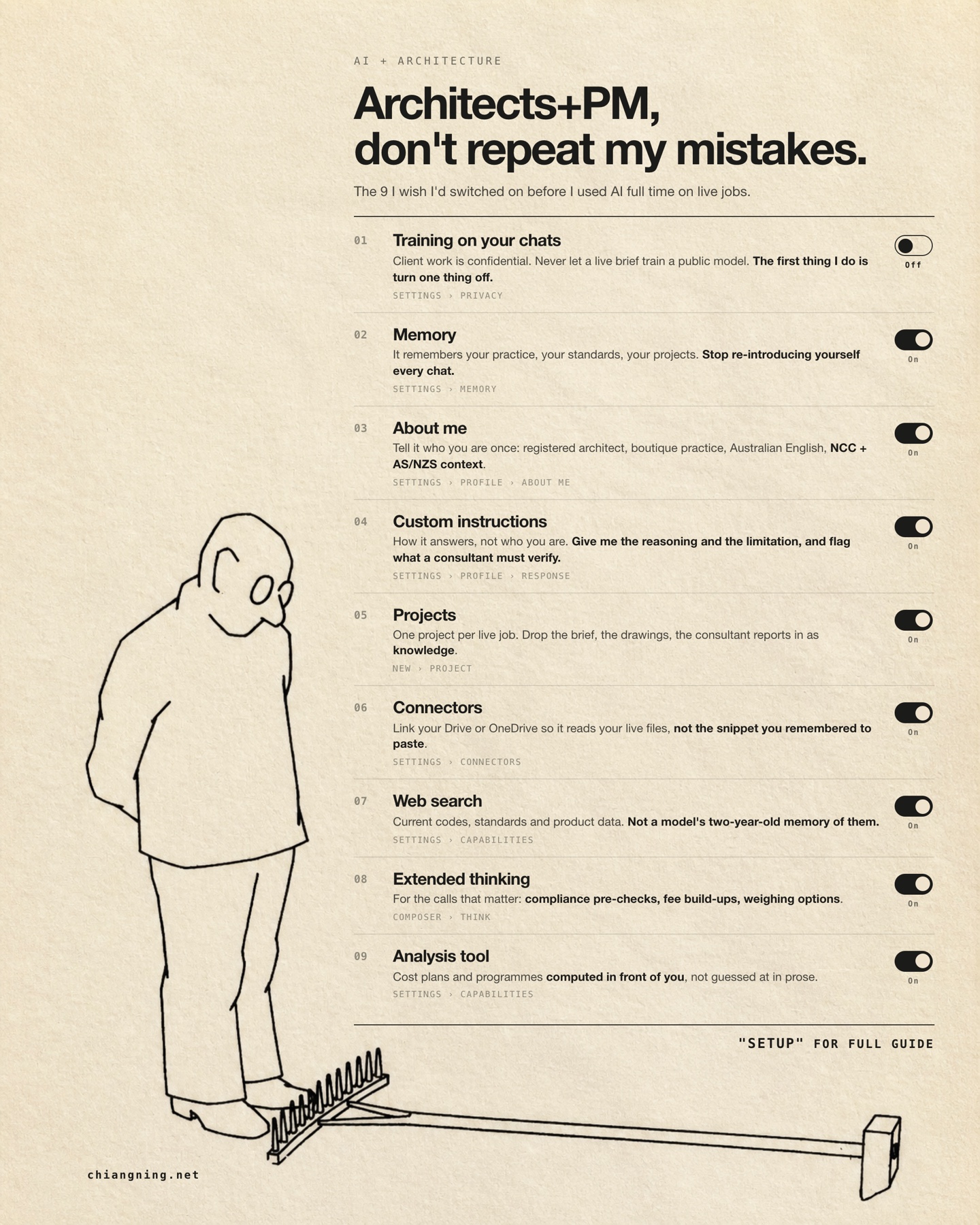
For months I ran live jobs through a completely default AI account.
I typed into it like it was a search box. I re-introduced my own practice every morning, because it had no idea who I was. I pasted in the paragraph of the brief I half-remembered instead of pointing it at the actual file sitting in the project folder. I let it do arithmetic inside a sentence and then quoted the result. And I left one switch on that has no business being on when the work is confidential.
Then I told people the model felt shallow.
It was not the model. It was the setup. The account had never been configured to know anything about the work, so it answered like a stranger, and I judged it on that answer.
The defaults are built for a general audience, not for a practice handling confidential client work to Australian standards. These 9 settings close that gap. They are what I would change in the first 10 minutes of a new account tomorrow, before any real prompt.
8 go on. 1 comes off. Start with the one that comes off.
Two things before we start
- Open your account settings in the next tab and change each one as you read. Reading this without touching the switches achieves nothing.
- Send it to someone in your practice who has configured none of these. That is most people.
Switch 01Training on your chats
The one you turn OFF · everything else goes on
On personal plans you are asked whether your conversations can be used to improve the model. Turn it off, and turn it off first, before you paste anything real into the account.
Look at what actually passes through a chat on a live job. The client's budget before it is public. A fee build-up with your rates in it. A planning strategy you have not lodged yet. A marked-up drawing. A consultant's report that arrived under a confidentiality clause. Occasionally a name and an address. None of that is yours to donate.
There is a professional angle as well as a privacy one. Your client agreement and your PI cover both assume you know where project information goes and that you control it. "I never checked the setting" is a poor sentence to say out loud in that conversation.
The mistake: assuming it is already off. On personal plans you are asked to choose, and the choice does not always default the way you would like. Team and Enterprise plans exclude your content from training by default, but confirm the setting once rather than trusting a summary of the policy.
Worth knowing: this is separate from chat history and from memory. Turning training off does not delete your conversations, and it does not stop the next 8 settings from working. You are opting out of one thing only.
Where: Settings › Privacy
Switch 02Memory
Turn it ON
Memory carries context between conversations: your practice, the standards you document to, the jobs you are running. Without it, every chat begins from nothing and you spend the first 3 messages re-establishing that you are an architect in Australia, that you work to the NCC, and that P312 is a job number rather than a typo.
That is not the model being slow. That is you working as an unpaid intern to your own account, every morning, forever.
Seed it on day one
Remember how I work, for every future chat:
- I'm an architect running small-to-mid projects in [state].
- We document to the NCC and the relevant AS/NZS standards.
- Our fee proposals run in stages: concept, planning, tender, CA.
- When I name a project code (like [P312]), it's a live job folder.
Ask "draft a variation notice for P312" on a configured account and it already knows the jurisdiction, the standards, the stage, and the fact that a variation here has a clause and a notice period attached.
Ask the same thing on a default account and you get a competent American subcontract letter that you then have to rewrite.
The mistake: pasting your whole professional history on day one. Add the essentials, then correct it when it records something wrong. Memory writes down what you said in a hurry as readily as it writes down your standards, so read it occasionally and delete what is stale.
Where: Settings › Memory
Switch 03About me
Turn it ON
The profile field that states who you are on every conversation, without you repeating it. Memory learns over time and gets it slightly wrong sometimes. This one you set once, deliberately, with the 4 facts that never change and that actually alter how the model should answer you.
Registered architect, boutique practice in [Melbourne].
Australian English. NCC and AS/NZS context.
Small-to-mid projects: residential, mixed-use, education.
I make the design and contract calls. You do the drafting.
The last line does more work than the other 3 combined. Without it, the model volunteers decisions and presents them as conclusions. With it, it drafts, sets out the options, and hands the call back to you. That single sentence changes the tone of every answer you get for the rest of the year.
The mistake: writing a CV. 4 facts, not a biography: role, language, standards, and who makes the decisions. Nobody is impressed, and a longer profile does not produce a better answer.
Where: Settings › Profile › About me
Switch 04Custom instructions
Turn it ON
How the model answers, as distinct from who you are. These are the standing house rules applied to every reply: give the reasoning and the limitation, flag what a consultant must verify, never invent a number. Of the 9, this is the setting that most improves the quality of what comes back.
Give me the reasoning and the limitation, not just the answer.
Flag anything an authority, engineer or consultant must verify.
Never invent a number, a code clause, or a product spec. If you're
not certain, say so and tell me where to check.
Australian English. Metric. Plain and direct, no filler.
Default: "The minimum ceiling height for a habitable room is 2.4 m."
Configured: "Habitable rooms are generally 2.4 m, but that sits in the NCC and carries state variations and exemptions. Confirm the current clause for your jurisdiction before you rely on it, and here is where to look."
The second answer is not cleverer. It is honest about its own edge, which is the only version you can safely put near a drawing.
The mistake: conflating this with About me. About me is facts; custom instructions is behaviour. Keeping them separate makes each one sharper.
The second mistake: writing 20 rules. 5 or 6 that you would genuinely enforce beat a long list that gets diluted. If you would not correct the model for breaking a rule, do not write it down.
Where: Settings › Profile › Response
Switch 05Projects
Turn it ON
A Project is a workspace with its own files and its own instructions. Create 1 per live job and add the brief, the drawings, the consultant reports and the planning documents as knowledge. Every conversation inside that project can then reference all of them without you attaching anything.
A project named "P312 Glenroy" holding the brief, the survey, the town planning report and the fee proposal. Ask whether the shadow diagrams satisfy the overshadowing clause in the planning report and it already has both documents open in front of it.
Give the project its own instructions
This project is [P312 Glenroy], a [2-storey addition] currently at
[town planning] stage.
Use only the documents in this project. If something isn't in them,
say so rather than filling the gap.
Refer to drawings by sheet number and quote the planning report by clause.
The mistake: running 1 general chat for every job, so context from 1 project bleeds into another and you end up with the neighbour's setback applied to your site. A separate project per job keeps each one's context clean.
The second mistake: loading files in and never pruning. A superseded drawing set left in a project is worse than no drawing set, because the answers stay confident while quietly coming from the wrong revision. Date the files, and take out what is dead.
Where: New › Project
Switch 06Connectors
Turn it ON
Connectors let the model read your live files directly: Drive, OneDrive, mail, depending on your plan. The point is the gap between the brief as you remember it and the brief. Every paste is a summary, and every summary drops the clause you would have most wanted.
Connected, you can ask a question that is simply unaskable on a default account: read the latest structural report in the P312 folder and list every item that changes an architectural drawing. That is 40 minutes of your Tuesday.
The mistake: connecting everything on day one. Start with the 2 sources that actually carry your work, your file store and your mail, and add others when a task needs them.
Worth checking: a connector reads whatever the connected account can read. Connect the work account rather than the one that also reaches the practice's HR folder, and look at the scope you granted rather than clicking through it.
Where: Settings › Connectors
Switch 07Web search
Turn it ON
Retrieves current information instead of answering from a training cut-off. Use it for everything that moves: code amendments, standards, current product data, supplier lead times, a council's planning scheme as it reads today rather than as it read 2 years ago.
A model's memory of a standard is a guess with good grammar. It will hand you a clause number, correctly formatted, delivered with total confidence, and it may be a clause that was renumbered 2 amendments ago. Search does not make the answer right. It makes the answer checkable, which is the part you need.
The mistake: accepting a confident answer about a code clause with search switched off. Ask for the source, then open the source. The habit matters more than the setting.
Where: Settings › Capabilities
Switch 08Extended thinking
Turn it ON
Directs the model to reason for longer before it answers, and to check its own working on the way. Use the newest model at high effort for the work that carries weight: compliance pre-checks, fee build-ups, comparing a scheme against a brief, reading a contract clause you do not like the look of.
Do not use it to write an email. It is slower, and an email does not need it.
Most people meet the model on its fastest setting, decide it is shallow, and stop. That is close to judging a practice on its first sketch. Model choice and effort level are a far bigger lever than prompt wording, and almost nobody touches either.
The mistake: leaving the account on whatever model it shipped with. Check which model you are actually using once a month. They change more often than the settings do.
Where: the model and effort controls in the composer, often labelled Think
Switch 09Analysis tool
Turn it ON
Runs real calculations and reads spreadsheets, rather than performing arithmetic inside a paragraph. Use it for cost plans, programmes, schedules of areas, and for checking a tender return line by line against the schedule of quantities.
Prose is where numbers go to lie. A sentence can carry a wrong total at full confidence and nothing about the sentence looks wrong. Code that runs cannot do that, and it leaves working you can read.
The mistake: trusting a total that was asserted rather than computed. Have it calculate, then read the working, which is now sitting there for you to check.
Where: Settings › Capabilities
The 10 minutes, in order
If you want to do this now rather than later, here is the sequence. It takes about as long as making a coffee and waiting for someone to answer the phone.
- Privacy. Turn training off. 1 minute.
- Memory on, and paste the seed above. 2 minutes.
- About me. The 4 facts. 2 minutes.
- Custom instructions. Paste the response rules. 2 minutes.
- Capabilities. Web search on, analysis tool on, extended thinking available. 1 minute.
- Connect your file store. 1 minute.
- Create a project for the job that is on your desk right now, and drop the brief into it. 1 minute.
The last step is the one people skip, and it is the one that makes the other 8 visible. Configuration you cannot feel does not stick.
How to tell it worked
Ask a question you asked last week and watch the first 3 lines of the answer.
The test is not whether the answer is smarter in some general sense. It is whether you had to explain yourself first. On a configured account you open with the question, not with the preamble about who you are, where you practise, which code applies, and what stage the job is at. That preamble is the tax you have been paying, and you stop paying it in the first 10 minutes.
The default account is built for everyone. 10 minutes makes it built for your practice.
What the settings cannot do
Configured, the account knows who you are, works to your standards, reads your real files, looks things up rather than recalling them, and computes rather than asserts. That removes the friction. It does not do the work.
None of these 9 read your site. None of them know your planning scheme. None of them size a beam, resolve a junction, or sit in front of a client who has just changed their mind about the kitchen. A configured account is a well-briefed graduate, not a consultant, and the obligation to check is exactly where it was before you touched the settings.
You still read the site. You still make the call the code cannot make for you. You still decide which number and which drawing carry your name.
On the paths: menu labels differ between apps and change over time. If a path here does not match your screen, the setting is close by, usually under the same word.
Configure it before the first prompt.
Send this to someone in your practice still starting every conversation from zero.
I run AI setup sessions for practices adopting this internally. That's the business. The guide is free regardless.