26 AI skills for LinkedIn growth.
Every one is real, open source, and already on GitHub. Pinned in the order the work actually runs, from finding the idea to reading what happened.
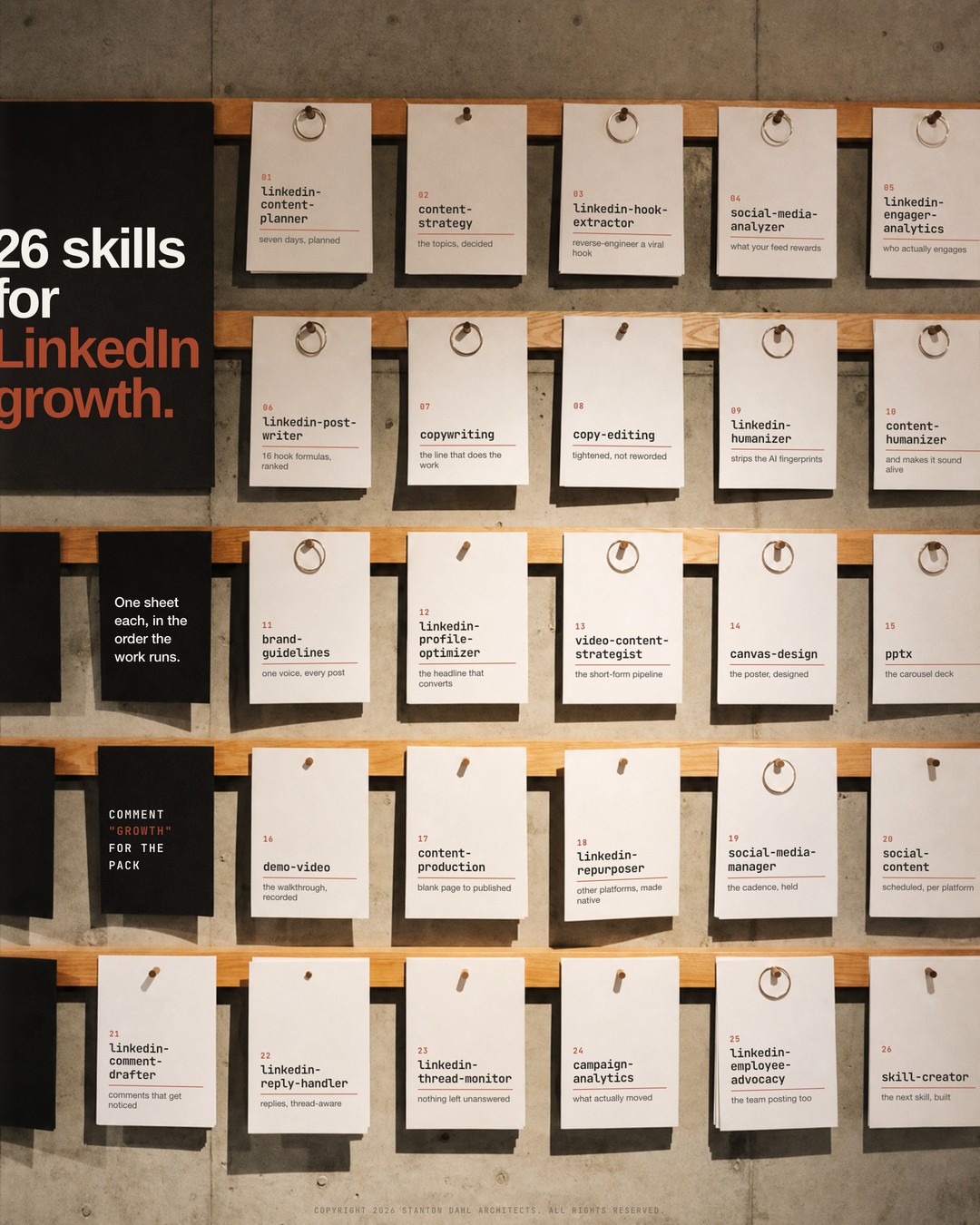
I built this poster twice. The first version had twenty six good-sounding skill names on it, nineteen of which did not exist. It looked authoritative and it was fiction.
That is worth saying out loud, because it is the standard failure of every "20 AI tools for X" post you have scrolled past this month. The list is the content. Whether the things on the list exist is somebody else's problem.
So the rule for this one: every name is a real skill folder in a public GitHub repository. I checked by cloning all three repos and reading the frontmatter of each SKILL.md, not by asking a model what it remembered and not from a search-result summary. Nineteen names got replaced. Nothing on the wall is aspirational.
Where the 26 come from. Eleven from sergebulaev/linkedin-skills (MIT), eleven from the marketing set in alirezarezvani/claude-skills (MIT), four from Anthropic's own anthropics/skills. Nothing is re-hosted here behind an email wall. Each name below is the actual folder name.
A skill is just your process, written down once. If that phrase means nothing yet, start with what is a skill, then come back. Four minutes.
One note on framing before the list. This is written for architects and project managers, which means your problem on LinkedIn is almost never volume. You are not short of things to say. You are short of a way to get the thing you already know out of a Tuesday site visit and onto a page, in your own voice, without it eating the evening. That is what the order below is for.
Stage 01 · Skills 01 to 05Find the idea, before you write anything
Like scoping a job properly instead of starting to draw on the Monday.
Most bad posts are not badly written. They are badly chosen. Someone sat down at 8pm with an empty box and a general feeling that they should be posting, and the general feeling is what came out.
A seven-day plan from a theme, an audience and your pillars: per-day pillar, format, hook type, CTA, posting time and a daily comment target. The comment target is the part people skip and it is half the growth.
Decides what to cover at all, when the honest answer to "what should I write about" is that you do not know yet. Sits upstream of the week, not inside it.
Point it at a post that did well and it tells you which of sixteen 2026 hook formulas it used, structurally. Far more useful than admiring the post: you get the shape you can reuse on your own material.
Engagement rates and benchmarks across platforms, so you find out what your feed is actually rewarding rather than what you assume it rewards.
Pulls the people who liked or commented on a post and segments them by fit: peer, aspirational, prospect, other. This is the one that tells you whether a post that "did numbers" reached anyone who could ever hire you.
Stage 02 · Skills 06 to 12Write it, then take the AI back out
Like a spec: written once properly, then edited by someone who will have to build it.
Drafts from one of sixteen hook formulas picked by engagement goal: anaphora, R.I.P. obituary, year-over-year pivot, time anchor, curiosity gap, contrarian, emotional cold-open, named gratitude and more. The formula is chosen for the outcome, not for novelty.
Written for marketing pages, and the reason it belongs here is that a LinkedIn post and a landing page have the same job in the first line. Use it when the idea is right and the sentence is not.
Reviews and tightens a draft you already wrote. Different job from rewriting it: this one keeps your sentences and removes the ones doing no work.
Strips the AI tells at four tiers, and has an audit mode that returns a pass or fail against a 2026 detection checklist without touching the text. Run the audit on something you wrote yourself, once, as a calibration. It is educational.
The other half of the same problem. Where the one above removes the fingerprints, this one is aimed at content that is technically clean and still reads dead.
Documents and enforces a voice, colours and type so twelve posts read as one practice. Worth it the moment more than one person is posting.
Audits the profile end to end: headline, the About section as seven steps, Featured, banner, Experience metrics, custom URL. The unglamorous one that decides what happens after a good post, when four hundred people click your name.
Here is a LinkedIn post I wrote myself, with no AI involved:

[PASTE YOUR OWN POST]

Two things, in this order:

1. Audit it against the AI-detection checklist only. Do not rewrite it.
   Tell me pass or fail per item and which specific phrases trigger it.
2. Then tell me which of my own habits are the ones that read as
   generic, and which are the ones I should keep because they sound
   like a person who has actually done the work.

Be specific and quote my lines back at me. Do not be encouraging.
Stage 03 · Skills 13 to 18Make the thing people actually stop for
Like the difference between a plan set and a render: same information, different amount of attention paid.
Architects have an unfair advantage here and mostly waste it. You can already make things look considered. The reason your posts do not is that the visual is an afterthought bolted on at the end, usually a screenshot.
Plans a short-form pipeline: scripts, Reels and Shorts, and repurposing long-form into cuts. The pipeline is the point. One good reel is luck; a pipeline is a habit.
Real design output as PNG or PDF, working from a design philosophy rather than a template. The poster at the top of this article was built this way, in HTML, with the type mapped onto each sheet by a planar homography so it sits in the plane of the paper.
Decks in and out. On LinkedIn a deck is a carousel, and a carousel is still the format with the highest dwell time per minute of effort you will spend.
Turns screenshots or scene descriptions into a walkthrough or a GIF. This is the one for showing a workflow, which is the single most saved kind of post in this niche.
Blank page to publish-ready in one pipeline, for the long piece the post points at. A post that leads somewhere outperforms a post that ends.
Rebuilds a tweet, thread, YouTube video, blog or newsletter as a native post: re-hooked before the fold, expanded to the 900 to 1300 character band, whitespace added. Not cross-posting. Rebuilding.
Stage 04 · Skills 19 to 23Publish, then do the half nobody does
Like handing over a set of drawings and then never answering an RFI.
This is where the actual growth is, and it is the least glamorous stage on the wall. Four of these five skills are about other people's posts and your own comment threads. If you only take one stage from this article, take this one.
Calendars, cadence and community management across platforms. The value is the cadence being held when the week goes sideways, which it will.
Creating, scheduling and optimising per platform, so the same idea is not posted identically in four places.
Drafts a comment on someone else's post from its URL, or reshares it with commentary. A real comment on a bigger account reaches more of your ideal audience than your own post did that week. Consistently.
Drafts a reply to a specific comment, handling LinkedIn's two-level thread flattening properly so the reply lands where you meant it to.
Tracks which of your comments earned author replies and flags the six-to-twenty-four-hour window where a thread still has momentum. Answering at hour forty is answering into an empty room.
I have 30 minutes for LinkedIn today and I am an architect / project
manager writing for [WHO YOU ARE ACTUALLY WRITING FOR].

Plan the 30 minutes as a list of specific actions, not advice:

1. Check my open comment threads and tell me which ones are still
   inside the warm window and worth replying to now.
2. Give me the 5 posts from other accounts where a comment from me
   would reach the right people, and say why for each.
3. Draft one comment per post that adds something only someone who
   has run a project would know. No compliments, no agreement, no
   "great post".

If a thread is already dead, say so and skip it.
Stage 05 · Skills 24 to 26Read what happened, honestly
Like a post-completion review, which every practice believes in and almost none actually books.
Attribution and funnel analysis. Overkill for one post, exactly right for the question of whether three months of posting produced anything you can point at.
A fourteen-day launch playbook for getting a team posting, with governance, a per-post time budget and cadence benchmarks. The time budget is the honest bit: this is the number that decides whether it survives past week three.
Builds the twenty-seventh skill, the one that only makes sense for your practice. Every list like this ends here if it is honest, because the useful skill is the one shaped like your own job.
The setupWhat this actually costs to run
Two practical things the tool lists never tell you.
Four of the eleven LinkedIn skills read live data — comment drafter, reply handler, hook extractor and the engager analytics — and to do that they need an Apify token. The free tier ships with about five dollars of monthly credit, which goes a long way at a dollar or so per thousand results. Without a token they still work; they just ask you to paste the post or the thread in yourself. The other seven, and all fifteen non-LinkedIn skills, are text in and text out with nothing to configure.
The install is a folder, not a product. A skill is a directory with a SKILL.md inside it. You clone the repo, or install it as a plugin, and the skill activates when what you ask matches its description. That is the whole mechanism, and it is why these are worth learning once: the format is now an open standard, so the same folder works in Claude Code, Codex, Cursor and the rest.
git clone https://github.com/sergebulaev/linkedin-skills.git
git clone https://github.com/alirezarezvani/claude-skills.git
git clone https://github.com/anthropics/skills.git

# then, in Claude Code, point it at what you just cloned:
# "read the SKILL.md files in ./linkedin-skills/skills and tell me
#  which one fits what I am trying to do right now"
Take them from the source, not from me.
All three are public and free. Two are MIT licensed; the Anthropic set is their own published skills repository. Nothing on this page is re-hosted, because a copy behind my email form would be worse than the original in every way.
linkedin-skills claude-skills anthropics/skillsThe limitThe part none of this touches
Twenty six skills will not give you anything to say. That is not a caveat, it is the whole thing.
What you have that a content pipeline does not is a job. You sat in the meeting where the budget moved. You saw the detail that failed on site. You know which part of the process everybody pretends works. None of the twenty six can produce that, and all of them get sharper the moment you feed one in.
The second limit is the one worth being blunt about. Every skill here makes it cheaper to post, and cheaper to post is only good if what you are posting is true. The humanizer will make a hollow post read like a person. It cannot make it worth reading. That check stays with you, and it is the same check as putting your name on a drawing.
Or take the three repos above directly. Same skills, no sign-up either way.