24 MCP for Architects+PM, at your fingertip.
What each one does, and the line that installs it. 8 of them run on my machine every day. The other 16 are one command away.
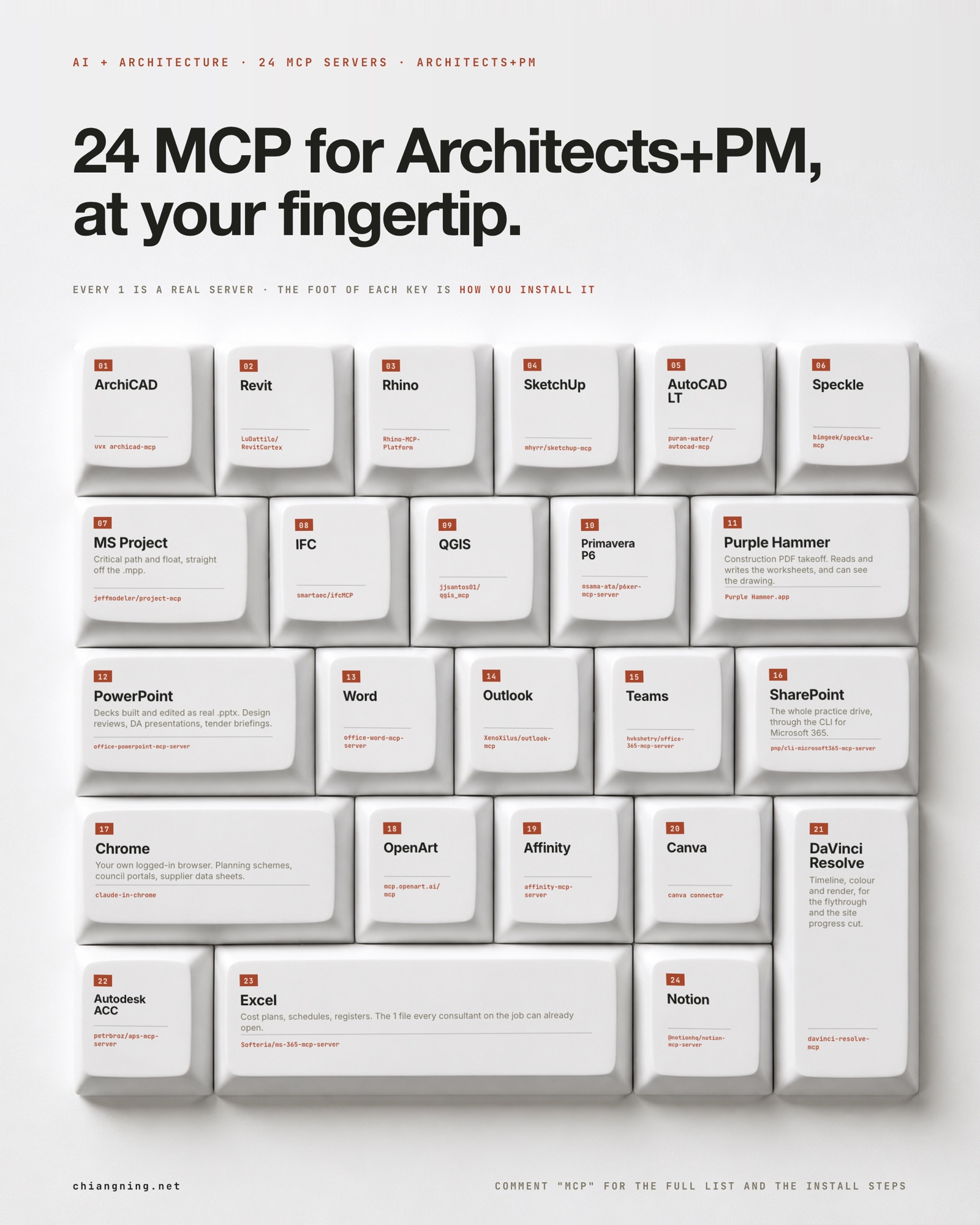
For 2 years the answer to "can AI touch my model?" was no.
Not really. You could describe the model to it. You could paste a schedule at it. You could ask it to write something about the model. But the model itself sat there, in ArchiCAD or Revit, untouched, because the software had no way to let anything in.
That changed, quietly, and most architects have not noticed.
MCP stands for Model Context Protocol. Ignore the name. What it actually is: a small program that sits between Claude and a piece of software, and lets Claude use that software the way you would.
Not a file export. Not a plug-in that does 1 fixed thing. The running application, with its real API, driven by description.
ArchiCAD has 173 commands available this way. Rhino will build and solve a Grasshopper graph. Microsoft Project will hand back the critical path off the .mpp the contractor emailed you. QGIS will run the site analysis.
This page is 24 of them, what each one does, and how to install it.
Two things before we start
- Save the page. You will want the install lines when you are actually at your desk, not now.
- Start with 1. Pick the software you already open every morning and connect that one first. Connecting 6 in an afternoon teaches you nothing.
It is not a subscription, and it is not an AI feature inside the software. Most of these are free and open source, written by 1 or 2 people, and they run on your own machine.
It is also not magic. An MCP gives Claude hands. What it does with them is still your problem, and checking the result is still your job.
00How you install one
Every one of these is added the same way, with 1 line in your terminal. This is the real command for ArchiCAD, verbatim out of my own config:
claude mcp add archicad -- uvx --python 3.12 --from archicad-mcp --with "mcp<2" archicad-mcp
That is it. claude mcp add, a name you choose, then the command that starts the server. Restart Claude and ArchiCAD is in the conversation.
The honest caveat, up front. The ones on GitHub below vary in polish. Some are a clean package, some are a clone-and-configure. Every one has a README, and the README wins over the line I printed here if the two disagree. I have marked the 8 I actually run every day, and I have not personally tested the other 16, which is why I am telling you rather than implying otherwise.
01The model itself
The 9 that talk to the software your drawings actually come out of. These are the ones people assume are impossible, and they are the ones that were already sitting there.
ArchiCAD
I run thisClaude talks to the running copy of ArchiCAD on localhost, through the free Tapir add-on. 173 commands: read every wall on a storey with its composite, swap composites in bulk, place doors from favourites, create labels, check zone areas, publish a set to PDF. It edits the model that issues the drawings, not an export of it.
claude mcp add archicad -- uvx --python 3.12 --from archicad-mcp --with "mcp<2" archicad-mcp
Needs the free Tapir add-on installed in ArchiCAD first. This is the one I use most.
Revit
One command awayA C# add-in exposing the Revit API, for Revit 2023 to 2027. Parameters across a whole category, sheets and views, schedules, room tags, warnings. It runs against the open session, the same way the ArchiCAD one does.
git clone https://github.com/LuDattilo/RevitCortex
Source: LuDattilo/RevitCortex. Alternatives worth knowing: mcp-servers-for-revit and oakplank/RevitMCP (pyRevit).
Rhino
I run thisGeometry in the open Rhino document, plus Grasshopper. It will place components, wire them together and solve the graph, which means the parametric study you never learned to build by hand gets built by description instead.
Rhino > Tools > Package Manager > install "Rhino-MCP-Platform"
Installs like any other Rhino plug-in. The Grasshopper side is the part that surprised me.
SketchUp
One command awayA SketchUp extension opens a local port, and the MCP server talks to it. Model creation, component placement, scene control, all against the file you have open.
git clone https://github.com/mhyrr/sketchup-mcp
Source: mhyrr/sketchup-mcp. Install the .rbz through Window > Extension Manager, then start the server.
AutoCAD LT
One command awayAutoLISP executed from a prompt, with an ezdxf fallback so it can work on the DXF directly when AutoCAD is not open. For the practices still issuing 2D, this is the one that removes the most repetitive work.
git clone https://github.com/puran-water/autocad-mcp
Source: puran-water/autocad-mcp.
Speckle
One command awaySpeckle is the pipe between the apps: Revit, Rhino, Archicad, Blender, SketchUp, AutoCAD, Civil 3D and QGIS all have connectors. The MCP server lets Claude push and pull models and versions through it, so moving geometry between two consultants stops being a file transfer.
git clone https://github.com/bimgeek/speckle-mcp
Source: bimgeek/speckle-mcp.
IFC
One command awayReads and queries IFC files directly, built on IfcOpenShell. Useful precisely because IFC is what you get handed when the consultant will not send you their native file.
git clone https://github.com/smartaec/ifcMCP
Source: smartaec/ifcMCP. If you work in Blender, Bonsai_mcp does the same job through Bonsai BIM.
02The programme
Two, and they are the ones I get asked about most. A construction programme is a database that happens to be drawn as bars, and both of these read the database.
MS Project
One command awayReads .mpp and MSPDI XML without opening Project. Tasks, resources, dependencies, critical path, float, baseline variance. Ask it which tasks moved since the last baseline and it answers off the file the contractor sent you.
git clone https://github.com/jeffmodeler/project-mcp
Source: jeffmodeler/project-mcp. Read-only, which for programme review is the correct posture.
Primavera P6
One command awayThe same idea for P6 .xer files, built on PyP6XER. Parse, query and analyse a schedule without a P6 licence, which matters when you are the architect being handed a contractor programme rather than the one writing it.
git clone https://github.com/osama-ata/p6xer-mcp-server
Source: osama-ata/p6xer-mcp-server.
03The site, and the job record
Where the project lives when it is not a model.
QGIS
One command awayDrives QGIS: load layers, run processing, style, build a print layout, query across layers. Site analysis, overlays, contours and catchment work stop being a half day of clicking.
git clone https://github.com/jjsantos01/qgis_mcp
Source: jjsantos01/qgis_mcp. nkarasiak/qgis-mcp is a larger alternative.
Autodesk ACC
One command awayAutodesk Construction Cloud and BIM 360 through the Autodesk Platform Services API: accounts, projects, folders, document versions, issues and their comments. If your job lives in ACC, this is how Claude sees it.
git clone https://github.com/petrbroz/aps-mcp-server
Source: petrbroz/aps-mcp-server. Needs your own APS app credentials.
Chrome
I run thisYour actual browser, already logged in. Planning schemes, council portals, the supplier data sheet behind a form. It reads the page you are on rather than a scrape of it, which is the difference between useful and wrong.
Install the Claude in Chrome extension, then enable it in Claude Code
Not a package. Worth setting up before you next open a planning scheme.
04The documents
This is where most of a project manager's week goes, and it is the block that changed my own habits most.
Purple Hammer
I run thisConstruction PDF takeoff, with a real MCP surface: read and write the worksheet cells, read markups, manage drawings and versions and page scales, and render a region of a drawing so Claude can actually look at it. Raw cells are truth, formulas compute on top, which is exactly how a takeoff should work.
It ships inside the app. Point Claude at "/Applications/Purple Hammer.app/Contents/MacOS/ph_mcp"
The only paid app on this list, and the one that most changed how I do quantities.
Excel
One command awayCost plans, schedules of values, drawing registers, defect lists. The one file every consultant on the job can already open, which is why it is the biggest key on the poster.
git clone https://github.com/Softeria/ms-365-mcp-server
Source: Softeria/ms-365-mcp-server, which exposes Excel through the Graph API alongside mail, files and calendar.
Word
One command awayCreates and edits real .docx: headings, tables, styles, comments, tracked content. Specifications, reports, minutes and letters, produced in the format the practice already issues rather than pasted out of a chat window.
claude mcp add word -- uvx --from office-word-mcp-server word_mcp_server
Source: GongRzhe/Office-Word-MCP-Server. Built on python-pptx's sibling, python-docx.
PowerPoint
One command awayBuilds and edits real .pptx with python-pptx: slides, placeholders, images, tables, charts. Design review packs, DA presentations, tender briefings.
pip install office-powerpoint-mcp-server
Source: GongRzhe/Office-PowerPoint-MCP-Server. Check the repo for the exact server entry point in your config.
Outlook
One command awayMail and calendar through the Microsoft Graph API. Find the email chain that decided a variation, draft the RFI response, put the site meeting in the diary.
git clone https://github.com/XenoXilus/outlook-mcp
Source: XenoXilus/outlook-mcp. Needs an Azure app registration, which is the fiddly part. Read the Microsoft note at the end of this page before you pick one of these.
Teams
One command awayChats, channels, messages, planner tasks and notifications, again through Graph. For the practices whose entire project conversation is in Teams rather than email.
git clone https://github.com/hvkshetry/office-365-mcp-server
Source: hvkshetry/office-365-mcp-server, 24 consolidated tools across mail, calendar, Teams and planner.
SharePoint
One command awayThe practice drive, through the CLI for Microsoft 365. Files, sites, lists and permissions. This is the one that lets Claude work on the job folder instead of on whatever you remembered to attach.
npm i -g @pnp/cli-microsoft365
Source: pnp/cli-microsoft365-mcp-server, which wraps that CLI.
Notion
One command awayThe official Notion server. If your practice wiki, project register or standards live in Notion, this puts them in reach of everything else on this list.
claude mcp add notion -- npx -y @notionhq/notion-mcp-server
Source: makenotion/notion-mcp-server, maintained by Notion.
05The visual work
Four I run constantly, and the reason I stopped moving files between applications by hand.
OpenArt
I run thisImage and video generation, driven from the same conversation as everything else. Remote server, so there is nothing to install locally. I use it for render passes, storyboards and the moving pieces of a submission.
claude mcp add --transport http openart https://mcp.openart.ai/mcp
The one server on this list that is a URL rather than a package.
Affinity
I run thisDesigner and Photo, scripted. Boards, diagrams, sheet layouts and the fiddly image work that sits between a render and a submission.
git clone https://github.com/sekharmalla/affinity-mcp-server
There are two routes: the SDK server, and a UI-automation server that drives the application directly. The second needs macOS Accessibility permission.
Canva
I run thisBrand templates, exports and folders. Where the practice's marketing material lives, and where a proposal cover gets made in 3 minutes rather than 30.
Add the Canva connector in your Claude connector settings
A hosted connector rather than a local install. Sign in once.
DaVinci Resolve
I run thisTimeline, colour and render. Flythroughs, site progress cuts, and the short video that goes with a submission. It drives the free edition too, through an in-app bridge.
git clone https://github.com/samuelgursky/davinci-resolve-mcp
External scripting is a Studio feature, but the free edition is reachable through the bridge script. Worth knowing before you buy anything.
06The Microsoft problem, said plainly
Every Office server above is written by somebody who is not Microsoft. That is worth knowing before you install one, so here is the position as of today.
Microsoft does ship official MCP servers for Outlook Mail, Outlook Calendar, Word, Teams and SharePoint. They live in the Microsoft Agent 365 catalogue, for enterprise agents built in Copilot Studio.
Which means there is no public install line to give you. You cannot add them to Claude Code the way you add the ones above.
There is 1 official Microsoft server you can point a client at, the Microsoft MCP Server for Enterprise. It is in preview, it is read-only, and its scope is Entra identity data: users, groups, devices. It does not open a Word file.
And there is no official Microsoft Excel or PowerPoint server at all.
So pick knowingly. The community servers work and they install today. They also want access to your mail and your practice drive, which is a real decision, not a formality. Read what permissions each one asks for, and if the answer makes you uncomfortable, that is your answer.
07The part that transfers
Forget the 24. The useful shift is smaller.
For most of my career, the software I use has been a place I go to do work by hand. The file was the thing, and everything in it was there because I put it there, click by click.
An MCP turns the application into something you can talk to while it is open. The file stops being a destination and becomes a live thing you can ask questions of.
That is why the first one you connect should be the software you already open every morning. Not the most impressive one on this list. The one where you already know what a wrong answer looks like.
The model was never the hard part. Getting anything to reach into it was. That is the part that just quietly got solved.
What this still cannot do. None of these have judgement. ArchiCAD will happily let Claude swap every composite in the building, including the ones that were right. Project will report a critical path off a programme that was optimistic to begin with. The API says it succeeded, and only reading the model back tells you the truth.
I have written about that failure mode at length, because it cost me a session: 4 bugs that lie politely.
The one you already open every morning.
Copy its install line above, run it, and ask it something you already know the answer to. That is the whole on-ramp, and the checking habit is the actual skill.
If your practice wants these running internally, message me. That is the business.