I wrote down how I do my job. 24 times.
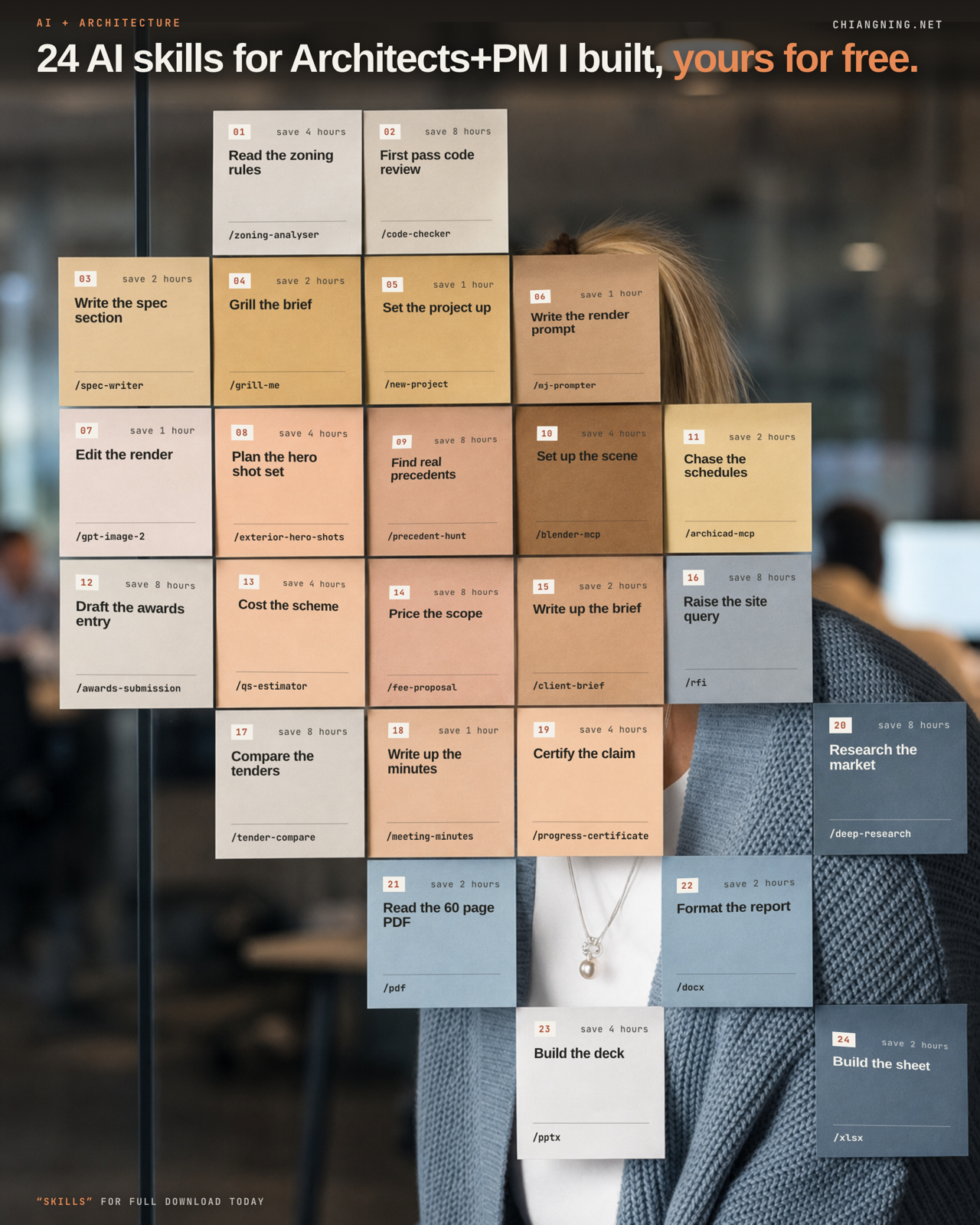
6 months of building. 24 files. Every one free to copy, including the 2 printed here in full.
I have not opened a blank fee proposal in months.
Not because AI writes them for me. Because I finally wrote down how I write them, once.
That is the whole trick, and it is duller than it sounds. For the past 6 months I have been building the same small object over and over: a plain text file that describes one job I do, in the order I do it.
There are 24 now. This page has all of them, 2 printed in full so you can see exactly how little is in one, and the 10 minute method for writing your own.
Two things before we start
- Save this page. You will want the templates when you are actually at your desk.
- Send it to 1 architect who still starts every fee proposal by opening the last one they can find. You know who.
01What a skill actually is
The word makes it sound technical. It is not.
A skill is a text file with instructions in it. No code. No install. No API key. You write it the way you would brief a graduate in their first week, and the model reads it before it starts work.
That is it. The rest of this page is just consequences of that.
Most people using AI at work are re-explaining themselves every time they open a chat. Same context, same standards, same output format, retyped from memory, slightly differently, forever. A skill is you refusing to do that a sixth time.
Does this job deserve one?
- Have you done it at least 5 times?
- Do you do it roughly the same way each time?
- Would you be annoyed if a graduate did it differently?
Three yeses, write the file. Any no, just use a normal chat.
A skill is not intelligence. It is your method, written down where a model can read it.
02All 24, in the order a project runs
Grouped by when you would reach for them, not by job title.
Before you draw. The brief and the money.
grill-me · interrogates a brief until nothing is vague. Run it before you price anything.
client-brief · turns a messy first meeting into something the client can sign off.
fee-proposal · turns an agreed scope into a staged fee, phase by phase.
qs-estimator · costs the scheme.
new-project · sets the project up so everything after it has somewhere to go.
deep-research · digs across sources and names them, so you can check it.
While you draw.
zoning-analyser · reads the planning controls and gives you the envelope, with a clause cited per figure.
code-checker · first pass code review.
spec-writer · turns a product cut sheet into a proper specification clause.
precedent-hunt · finds real built precedents, not mood images.
mj-prompter · writes the render prompt so it holds architectural fidelity.
gpt-image-2 · edits the render.
exterior-hero-shots · plans the shot set before you render anything.
blender-mcp · sets up the scene in Blender.
archicad-mcp · reaches into the live model and chases the schedules.
awards-submission · drafts the awards entry.
Once it is on site.
rfi · turns a rough site query into something a contractor can actually answer.
meeting-minutes · turns a recording or scrawled notes into minutes with a clean action list.
progress-certificate · drives the monthly claim off the QS assessment and cross-checks it against the builder.
tender-compare · lines up submissions like for like and writes the recommendation.
The document jobs.
pdf · docx · pptx · xlsx
These 4 are Anthropic's. They ship with the product and they are already free to everyone. I am listing them because they do more of my week than several of the ones I wrote.
03A real one, printed in full
People assume these files are long. Here is grill-me, complete, nothing removed. It is the one I run most, and it is 200 words.
---
name: grill-me
description: Interrogate a brief, scope or idea until nothing is vague. Use before you build or price anything, to surface the unstated decisions, hidden risks and missing information that would otherwise derail the work.
---

# Grill Me

## What it does
Acts as a demanding senior reviewer. Before Claude builds anything, it asks 10 to 15 pointed questions, one theme at a time, confirms a short spec, then proceeds. No more vague results.

## When to use
- Before any brief, fee, drawing or prompt where a wrong assumption is expensive.
- Whenever a request "feels" incomplete but you cannot say why.

## Instructions
1. Read the request. Identify every place a reasonable architect or PM would need more certainty.
2. Ask questions grouped by theme: outcome, audience, scope, constraints, inputs available, success test.
3. Ask only what materially changes the result. Do not pad.
4. Restate the answers as a short, numbered spec and get a yes before building.

## Output format
- Numbered questions grouped under theme headings.
- A short confirmed spec at the end (3 to 6 bullets).
- One line: "Highest unresolved risk right now: ...".

## The one mistake to avoid
Do not accept a vague answer as closed. If the reply is "we'll sort that later", record it as a live risk, not a resolved item.
Read the last section again. "The one mistake to avoid" is the part that took me 6 months to learn to write. It is where you put the thing you keep having to correct.
Here is a second, so you can see the shape repeat on a completely different job.
---
name: rfi
description: Turn a rough site query into a clear, contractor-ready RFI. Use when something on site or in the documents needs a formal question raised and answered.
---

# RFI

## What it does
Takes a rough query, "the slab edge doesn't match the drawing", and writes a clear Request for Information: what is unclear, the reference, the impact, and the specific answer required.

## When to use
- Contract administration, when a query needs formal recording.
- Any time a loose question would otherwise get lost in an email thread.

## Instructions
1. State the question in one unambiguous sentence.
2. Reference the exact drawing, detail or clause in question.
3. State the impact: what is held up, and by when an answer is needed.
4. Ask a specific, answerable question. Offer a proposed resolution if you have one, clearly marked as a suggestion.

## Output format
A numbered RFI with fields: reference, question, background, impact, response required by, and optional proposed resolution.

## The one mistake to avoid
Raising a vague question with no reference or date. An RFI that cannot be answered cleanly just adds a round trip.
Same 6 headings both times. That is not a coincidence, it is the template.
04Build your own in 10 minutes
Copy this, fill in the [bracketed bits], save it as SKILL.md in a folder named after the skill.
---
name: [skill-name-in-lowercase-with-hyphens]
description: [One sentence: what it does. Then: when to use it.
  This line is how the model decides to reach for it, so write the
  trigger words a real person would type.]
---

# [Skill Name]

## What it does
[Two sentences, plain English. What goes in, what comes out.]

## When to use
- [The obvious case.]
- [The case people miss.]

## Instructions
1. [Your first step. The real one, in your order.]
2. [Your second step.]
3. [Keep going. 4 to 8 steps is normal.]
4. Before finishing, list every assumption made and every figure
   that could not be verified from the inputs provided.

## Output format
[Be specific. A table with these columns. Australian English.
Never invent a number. Flag anything a consultant must confirm.]

## The one mistake to avoid
[The thing you keep having to correct. Write it here so you only
have to correct it once.]
Then do this, in this order
- Pick the job you most resent doing. Resentment is a reliable signal that a job is repetitive, and repetitive is what this is for.
- Fill the template in. 10 minutes, not an afternoon. It will be wrong and that is fine.
- Run it on a real job, not a test one. Test jobs hide the gaps.
- Fix the file wherever it got it wrong. Run it again.
- Repeat step 4 about 3 times. Then it is yours.
Steps 4 and 5 are the actual work. Everything before them is typing.
One gotcha that cost me an afternoon. A skill you write in Claude Code does not automatically appear in Cowork, which is the surface most of your team will use. It is one checkbox under Customize. I was convinced a file was broken when it was simply switched off.
Keep them somewhere shared. The moment a second person in the practice runs one, the file stops being a personal shortcut and becomes a standard. Standards belong where everyone can see them and argue with them.
05Where mine went wrong
The first version of every one of these was wrong. Not broken, which would have been easy to spot.
Worse than that. Plausible.
The failure mode is always the same. You leave a gap in the file, and the model fills it with something reasonable instead of stopping to ask.
A fee proposal that reads beautifully and prices a scope nobody agreed to. A programme that quietly assumes a soil classification you never gave it. It does not flag the assumption, because you never told it that flagging assumptions was part of the job.
So the highest value line in any of my skills is some version of the same instruction, and it is now in the template above:
List every assumption you made, and every figure you could not verify.
The second mistake was writing them too clever. My early files tried to handle every variation of a job. They were long, and the output got worse, because I had buried my actual method under a pile of edge cases.
The ones I use daily are short and opinionated. They do one job the way I do it, and they say so. Both files above are under 250 words and that is deliberate.
06Where it falls short
A skill makes you faster at your own method. It does not give you a better one.
If your spec writing is sloppy, you have just built a machine that produces sloppy specs at speed and at volume. A lot of practices are going to discover that this year.
It has no memory of your project between runs, and no accountability for the outcome. Those are the 2 things a graduate has that this does not, and neither is small. You sign the document, so you read the document.
Two of these are not really files. blender-mcp and archicad-mcp need a live connection to the software before they do anything at all. Download the text on its own and it will sit there doing nothing.
And the commercial part, plainly. I run workshops teaching this. So take the files, use them, and ignore me entirely if that is all you want. They work without me.
07The part that transfers
Forget the 24. The transferable thing is smaller and duller than a list of tools.
You already have a method. It is in your head, and it walks out of the practice every time someone resigns.
Writing it into a text file is worth doing even if you never point a model at it, because the writing forces you to admit what your method actually is.
Half the value I got from these 6 months was discovering that 3 of my own processes made no sense once I had to type them out in order.
The model is not the asset. The written-down method is the asset. The model just reads it faster than a graduate.
The job you most resent.
Copy the blank template above, fill it in for that one job, and run it on your next real project. That is the entire on-ramp.
If your practice has 20 or more people and you want these running internally, message me. That is the business.