A construction PM's month, as 23 files.
Every job that comes round whether you are ready or not, written down. 18 of them you can download and run tomorrow morning.
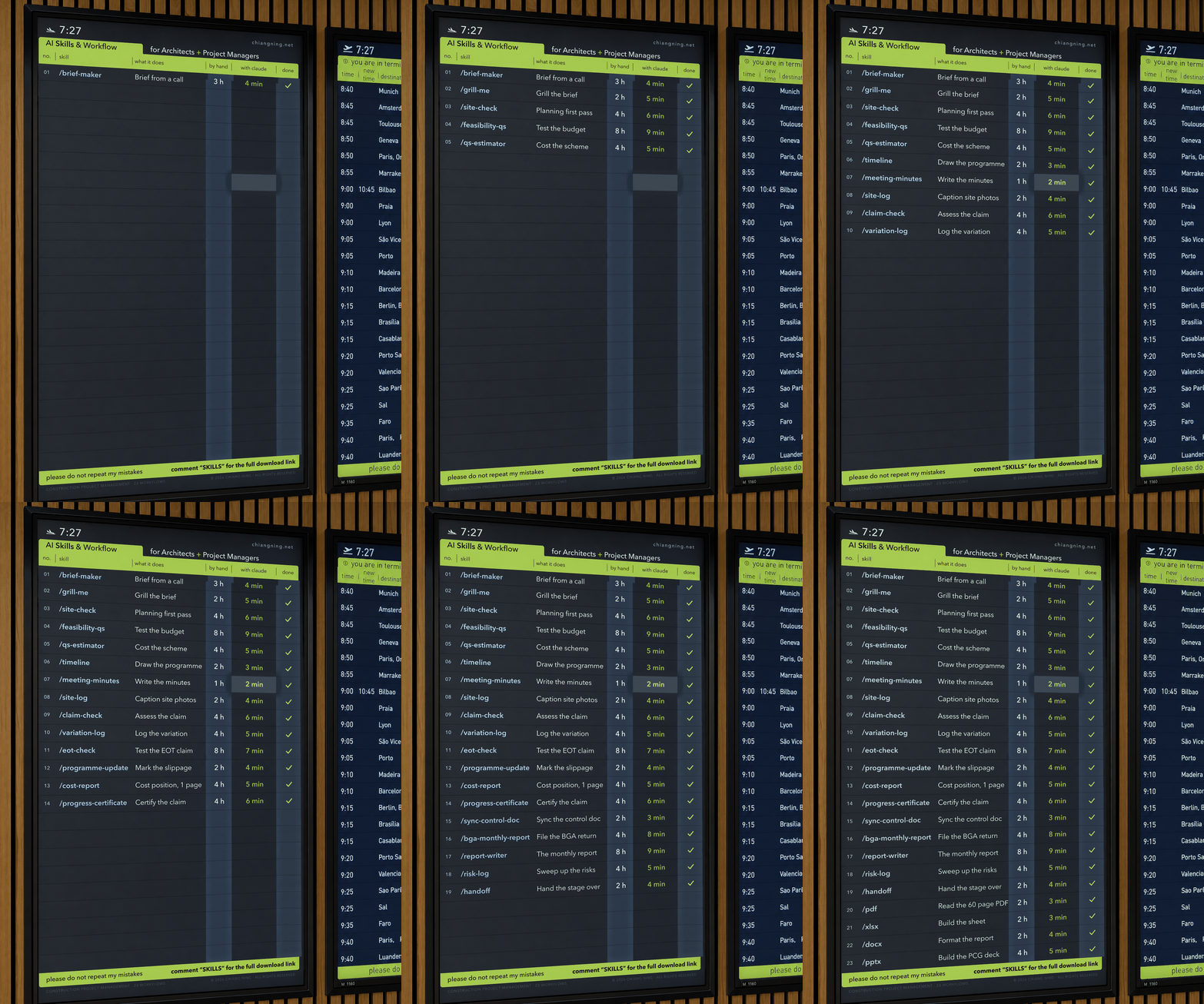
A construction PM's month reads like a departures board.
Everything queued, everything timed, half of it already delayed, and almost none of it the job you were actually hired to do. The claim lands on the 25th. The minutes are owed by Friday. The programme has to be marked up before the control group meets. The report has to be assembled out of 6 other documents that do not agree with each other.
None of that is hard. It is just relentless, and it always arrives in the same order.
So I wrote the board down. 23 rows, and each row is a file.
Two things before we start
- Save this page. You will want it open the week the claim lands.
- Send it to the one PM on your team who still writes minutes on a Sunday.
01What is actually in one of these files
A skill is a page of plain text. No code, no install, no API key. It describes one job you do, in the order you do it, and the model reads it before it starts work.
That is the whole idea. Most people using AI at work are re-explaining themselves every time they open a chat: same context, same standards, same output format retyped from memory, slightly differently, forever. A skill is refusing to do that a sixth time.
Here is a complete one, unedited, so you can see how little is in it. This is the file behind /claim-check.
---
name: claim-check
description: Assess a contractor's progress claim line by line against the
  schedule of values and the contract, showing claimed against assessed and
  flagging every over-claim with the evidence needed to refuse it. Use each
  month when a payment claim lands, before anything is certified.
---

# Claim Check

## What it does
Tests every claimed percentage against the agreed schedule of values and
reports the delta, so the monthly certification starts from a position you
can defend rather than from the contractor's number.

## When to use
- A progress claim has arrived and the assessment is due.
- Before a payment certificate, payment schedule or progress certificate
  is issued.

## Instructions
1. Ask for the claim, the schedule of values (or contract sum breakdown),
   the previous month's assessment, and the contract's payment provisions.
2. Work line by line. For each item show: value, previously certified,
   claimed this period, cumulative claimed percentage, and your assessed
   percentage.
3. Where the claim exceeds what the evidence supports, say so plainly and
   name the evidence that would be needed to accept it (site photograph,
   delivery docket, off-site materials protection, survey).
4. Separate work in place from materials on site and off site, and apply
   the contract's rules for each.
5. Apply retention, previously paid amounts and any set-off exactly as the
   contract provides, and show the arithmetic.
6. Do not certify. Produce an assessment for a named person to review,
   adjust and sign.

## Output format
- Assessment table: item | value | prev % | claimed % | assessed % | $
- Total claimed, total assessed, and the difference
- Over-claims listed separately, each with the evidence required
- Retention, set-off and net payable
- Statutory note: the payment schedule deadline under the applicable
  security of payment legislation

## The one mistake to avoid
Do not let the claim's own structure set the assessment. Assess against the
schedule of values and what is actually built, not against the percentages
the claim proposes.
Read the last 2 headings again. Output format and the one mistake to avoid are doing most of the work. The first one stops you negotiating the shape of the document every month. The second is the thing you would say out loud to a graduate on their first claim, which is exactly the sort of knowledge that never gets written down and walks out the door when someone resigns.
The test for whether a job deserves a file: have you done it 5 times, do you do it roughly the same way each time, and would you be annoyed if a graduate did it differently. 3 yeses and it is worth 20 minutes.
The 2 columns on the board are how long the job takes me by hand against how long the first draft takes with the file loaded. They are my own numbers, off my own jobs, rounded. Not a study, and not a promise. The second number is a draft arriving, not a job finishing, because you still have to read it.
02Starting up, 6 files
The front of a job is where the whole thing is decided and where there is never any time. These 6 run from a recorded first call to a programme you can put in front of a client.
/grill-me is the one people underrate. It does not write anything. It reads the brief you just produced and asks the questions a good client would ask, which is a very different job from generating a brief and a much more useful one. Most of what goes wrong on a job is a decision nobody made at the start.
03Every week, 4 files
The admin that never stops. This is the group that pays for itself fastest, because you do it 40 times a year.
Here is the second complete file, because it shows the part that matters most in a delivery-stage skill: it works from the approved programme, not from a fresh one.
---
name: programme-update
description: Update an approved construction programme with the month's
  actual progress, mark the slippage, recalculate the critical path and
  forecast a completion date with the reasons it moved. Use monthly during
  construction.
---

# Programme Update

## What it does
Works from the approved programme rather than drawing a fresh one, so the
movement between what was promised and what happened stays visible.

## When to use
- Monthly, for the project report or the site meeting.
- Whenever a forecast completion date has to be defended in front of a
  client.

## Instructions
1. Ask for the approved contract programme, the current progress
   (percentage complete by activity), the site records for the period, and
   any assessed extensions of time.
2. Mark actual against planned for every activity. Show start, finish, and
   float consumed.
3. Recalculate the critical path on the updated position and say whether it
   has changed since last month.
4. Report slippage by activity and separate what is recoverable from what
   is not.
5. Forecast practical completion, and state whether it is measured against
   the original date or a date revised by an assessed EOT.
6. List the reasons the date moved. A forecast date with no cause attached
   is not usable in a report.

## Output format
- Progress table: activity | planned | actual | variance | float
- Critical path, and whether it changed
- Slippage summary, recoverable and not
- Forecast practical completion, against original and revised dates
- The reasons for the movement
- Recovery actions available, and who owns each

## The one mistake to avoid
Do not accept the reported percentage complete without testing it against
the claim assessment and the site record. The programme and the claim must
tell the same story, or the report contradicts itself.
Note the last line. That is not an AI instruction. That is a project management instruction that happens to be written where the model can read it.
04The money, 5 files
The 5 that arrive together, once a month, usually on the day something else has gone wrong on site.
/eot-check saves the most time and is the one to be most careful with. An extension of time claim is a contractual argument, not a calculation, and the file is only ever producing the first pass. It sorts 40 pages of claimed delay into what touched the critical path and what did not. You make the call.
05Month end, 4 files
Assembly. By this point every input already exists somewhere. The job is putting it in one place without contradicting yourself.
/handoff is the odd one out and the one I would keep if I could only keep 1. Every practice loses the same thing at every stage change: not the drawings, the reasons. Why the slab stepped. Why that window went. Six months later nobody can remember, and it gets undone.
06The document jobs, 4 files
These 4 are not mine. They are Anthropic's, they are free to everyone, and they do more of my week than several of the ones I wrote myself.
If you do nothing else on this page, turn these 4 on. They cost nothing and they are the reason a monthly report can leave the building as a formatted document instead of a wall of chat text you then spend an hour pasting into Word.
One folder per skill, each holding a SKILL.md. Drop the folder into your Claude skills directory and call it with a slash. Also in the zip: a blank template, and a README with the honest note.
Download the skill pack07The 5 I cannot hand you
The board shows 23. The pack holds 18. That gap is deliberate and it is worth explaining, because it is the most useful thing on this page.
These 5 reach into documents that only exist in my office: /feasibility-qs, /meeting-minutes, /progress-certificate, /sync-control-doc and /bga-monthly-report. They open a specific branded template, write into named cells on a controlled spreadsheet, follow a house minute format, and file the result in a folder structure you do not have. Downloaded into your machine they would fail on line 1, or worse, produce something confident and wrong.
So here is the template instead. Every file in the pack has these 6 headings and nothing else. Fill it in badly, in 20 minutes, then fix it after it gets something wrong on a real job.
---
name: your-skill-name
description: One sentence saying what the skill produces and one saying when
  to reach for it. This is the only part the model reads when it decides
  whether to use the skill, so write it for that job.
---

# Your Skill Name

## What it does
One or two sentences. The outcome, not the method.

## When to use
- The moment in the job that triggers it.
- The document or meeting it feeds.

## Instructions
1. Ask for the inputs you would ask a graduate for. Name them.
2. The first step of your method, in the order you actually do it.
3. Keep going. 6 to 8 steps is usually the whole job.
4. Say plainly what the skill must not do (do not certify, do not price,
   do not advise on the contract).

## Output format
- The headings, tables and columns you want back, named exactly.
- Anything that must appear every time (a statutory note, a disclaimer,
  a reference number).
- List every assumption made and every figure that could not be verified.

## The one mistake to avoid
The thing that goes wrong when you do this job in a hurry. Write the one you
have actually made.
How to build one
- Pick the job you most resent. Resentment is a reliable signal of repetition.
- Fill the template in badly. 20 minutes, first draft, do not polish it.
- Run it on a real job, not a test one. Test jobs hide the gaps.
- Fix the file where it got it wrong, rather than fixing the output.
- Repeat step 3 and step 4 about 3 times. Then it is done.
The mistake I made first: writing them too clever. Long files trying to handle every variation, which made the output worse, because the method got buried under edge cases. Every file above is under 400 words. That is not a constraint, it is the finding.
08What none of this will do
These files draft. They do not assess, and they do not decide.
The failure mode is not a crash, which would be easy to spot. It is plausibility. Leave a gap in a claim assessment and the model fills it with something reasonable instead of stopping to ask you, so you get a document that reads beautifully and prices a scope nobody agreed to, or a programme that quietly assumes an EOT that was never granted.
That is why every file ends the same way: list every assumption you made and every figure you could not verify. Read that list first, before the document. It is the only reason I trust the output enough to send it on.
The rest of the honest list is short. A file makes you faster at your own method, it does not give you a better one, so a sloppy method now produces sloppy work at speed. There is no memory between runs and no accountability for the outcome, which are the 2 things a graduate has that this does not. And nothing here reads a contract you have not given it.
The board fills itself in. Somebody registered still signs the bottom of it.
Write the 5 that are yours.
Download the pack. If your practice has 20 or more people and wants this set up internally, message me. That is the business, and I would rather say so than pretend otherwise.
And if you know a PM who is still doing all 23 by hand, send this to them.